



In brief: Digital onboarding is a process for acquiring, verifying, screening, and approving customers remotely. A typical workflow includes application start, identity document verification, biometric verification, risk and compliance screening, and final decisioning.
Digital onboarding is the process of opening and verifying a customer relationship online, without an in-person branch visit. It allows businesses to approve legitimate customers faster while enforcing the checks needed to manage compliance and fraud risk.
This article explains how banks, fintechs, insurers, and other regulated businesses onboard customers remotely.
What is digital onboarding?
Digital onboarding is the broader process of opening and activating a customer relationship through digital channels. It covers the journey from initial sign-up to account activation.
In regulated industries, however, opening a customer relationship is only one side of the equation. Banks, fintechs, insurers, and other regulated businesses also need to verify who the customer is, assess risk, and apply the required compliance controls before granting access to the service.
That broader journey usually includes KYC, AML screening, and other fraud or compliance checks. Depending on the product and risk level, businesses may combine document and biometric verification with additional signals such as device intelligence, IP and geolocation checks, watchlist screening, or other digital-footprint-based analysis before allowing full access to the service.
How does digital onboarding work?
The exact sequence of digital onboarding steps can vary by industry and jurisdiction:
-
Lower-risk use cases, such as prepaid card programs with tight limits or domestic e-money wallets for low-value transactions, may use a more basic KYC workflow.
-
Higher-risk use cases, such as banking, lending, crypto, or cross-border payments, often require more layered verification and screening before activation. That may mean different onboarding workflows for different customers, with extra checks triggered based on risk signals, product rules, jurisdiction, or suspicious behavior.
.svg)
A typical digital onboarding workflow in regulated industries, from sign-up to activation.
1. Application start
The process starts when a customer begins an application through a website or mobile app. At this stage, the business typically collects only the minimum information needed to create the application, such as contact details, consent to terms, or other basic inputs required to proceed.
The goal is to get the user into the onboarding flow with as little friction as possible before moving to identity and compliance checks.
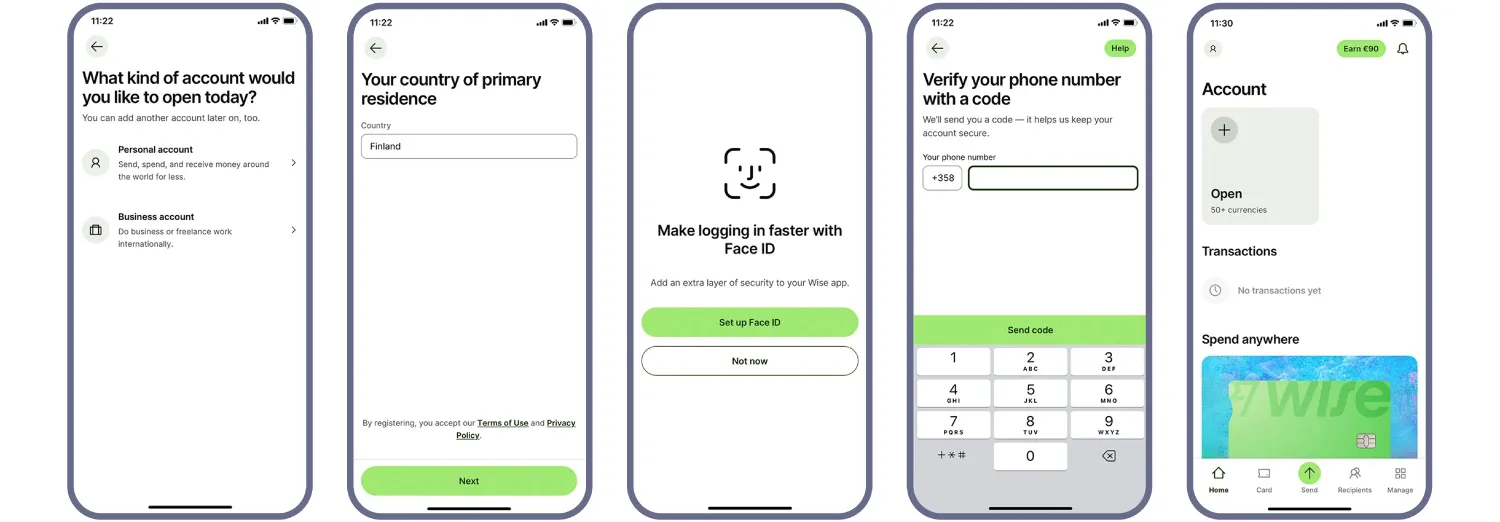
The onboarding journey usually begins with a lightweight application step before identity verification starts. Source: Wise
2. Identity document verification
Once the application is underway, the business collects the customer’s identity evidence. In remote onboarding, this usually means capturing an identity document and extracting the data needed for verification.
The system may detect the document type and issuing country, extract data from the visual zone, read machine-readable zones, barcodes, or RFID chip data where available. It can then structure and validate that data, cross-check fields across sources, and compare it with any information the customer provided earlier or will provide later, such as biometrics.
| What the user does | What the system may do |
|---|---|
| Captures an ID document |
|
| Waits for the result | Processes the captured document and returns the verification outcome |

Advanced ID document verification solutions like Regula allows you to shorten the flow eliminating the “Choose your ID type” or “Choose your country” steps by automatically recognizing this information. Image source: Coinbase
3. Biometric verification
Biometric verification is used in digital onboarding for regulated industries to confirm that the applicant is a real person and, where required, that the person matches the portrait on the submitted identity document.
This step is key for remote scenarios, as the business needs stronger protection against impersonation, presentation attacks, including growing deepfake threats, and other forms of identity fraud.
| What the user does | What the system may do |
|---|---|
|
|
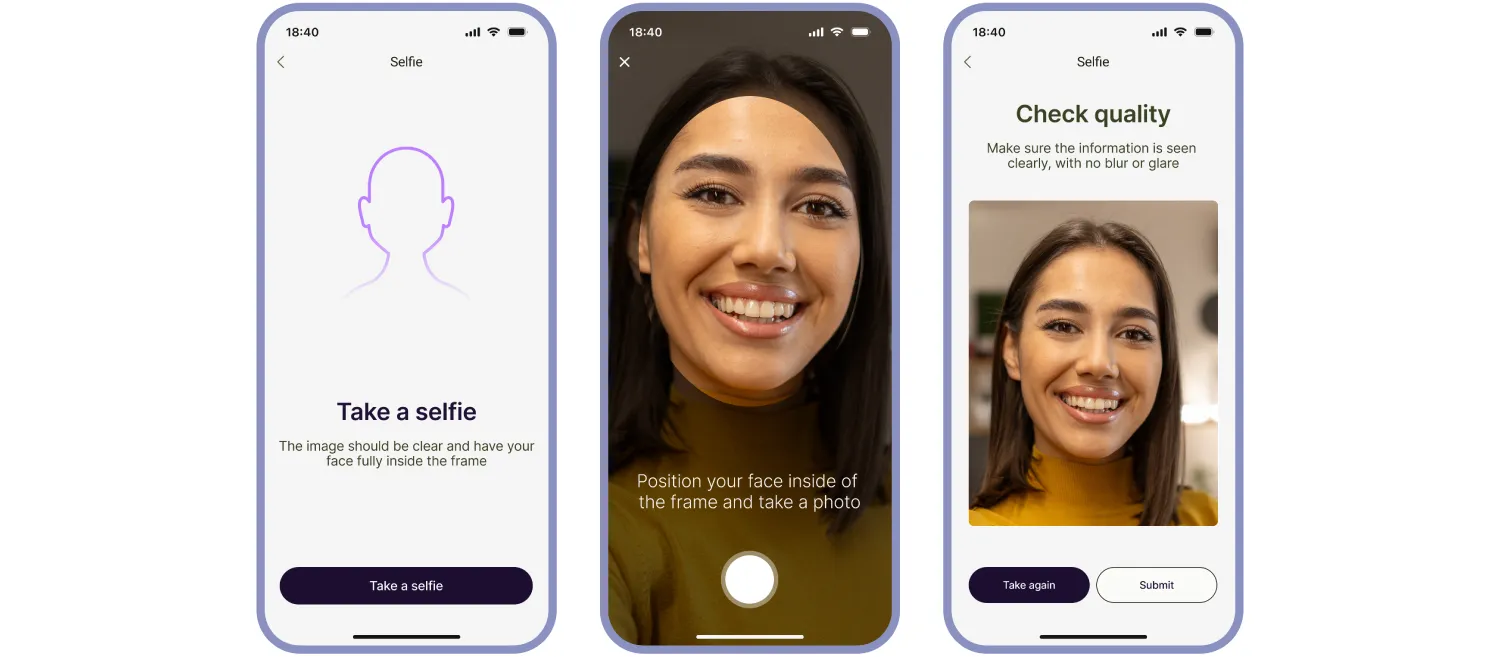
Biometric verification helps confirm that the applicant is present and matches the claimed identity.
4. Additional fraud and risk checks
Depending on the business, the workflow may also include additional fraud and risk signals that help detect suspicious behavior earlier or route the customer into a different verification path.
These checks can include device intelligence, IP address analysis, geolocation checks, digital footprint signals, internal blocklists, and external watchlists. The goal is to add context around the application: whether it is coming from an expected device and location, whether the behavior looks normal, and whether the case should move forward, be stepped up, or be escalated.
| What the user does | What the system may do |
|---|---|
| No actions required. |
|
5. Risk and compliance screening
Once the business has enough confidence in the customer’s identity, it may run additional screening to assess regulatory, financial-crime, and reputational risk. The exact set of checks depends on the service, jurisdiction, customer type, and risk profile.
This stage can include sanctions, PEP, adverse media, and other compliance-related screening, as well as additional due diligence measures for higher-risk cases, such as proof-of-address or source-of-funds checks. In some workflows, decisions at this stage are also informed by earlier fraud signals, such as device anomalies, location mismatches, or watchlist hits.
| What the user does | What the system may do |
|---|---|
|
|
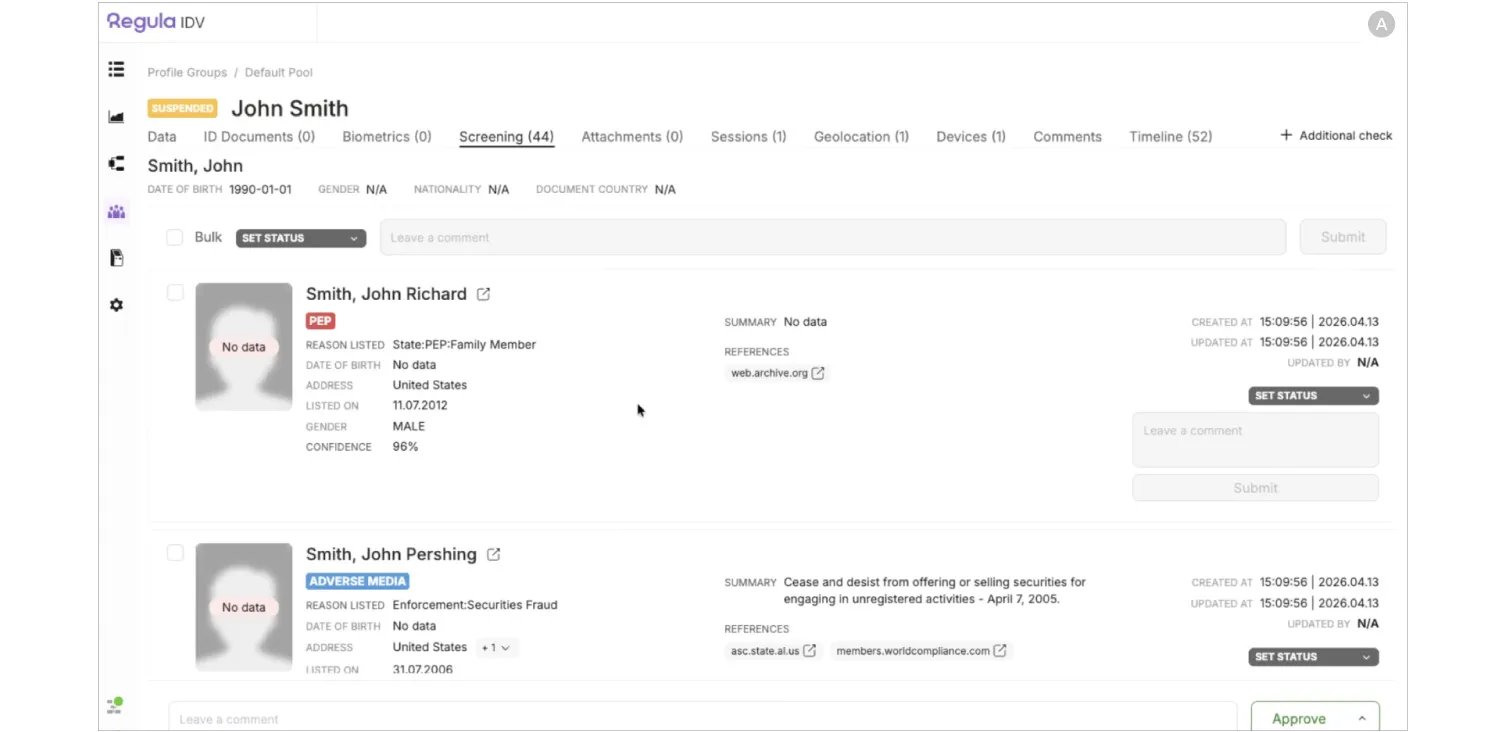
Risk and compliance screening assesses whether a verified customer presents sanctions, AML, fraud, or other regulatory risk.
5. Decision and account activation
After the required identity, biometric, and risk checks are completed, the business makes an onboarding decision. Straightforward applications may be approved automatically, while cases with mismatches, missing evidence, weak confidence scores, or elevated risk signals may be routed to manual review.
If the outcome is positive, the account or service can be activated and the customer can start using it. If the business cannot establish identity with enough confidence or the risk is too high, the application may be rejected. In more complex cases, the final decision may depend on additional evidence, analyst review, or enhanced due diligence.
CASE STUDY
REACT, a provider of digital and biometric identification platforms, wanted to replace manual document checks with a faster and more scalable digital onboarding flow. The company needed users to complete identity verification remotely while still meeting security and regulatory requirements.
To do that, REACT embedded Regula Document Reader SDK into its ID Wallet platform. Users start the onboarding journey in a mobile app or web portal, scan their ID document, complete biometric verification, and then go through backend cross-validation. If inconsistencies appear, the case is routed to manual review.
The result was a much faster and more automated onboarding process. REACT reduced average onboarding time to under 30 seconds, achieved over 90% automation in identity verification, and exceeded 99.5% accuracy in document verification.
What businesses need to get right in digital onboarding
Digital onboarding works when the flow is both usable and defensible. It has to be simple enough for legitimate customers to complete, while reliable enough to verify identity, assess risk, and support an approval decision.
That usually depends on how well the steps work together.
A fast sign-up flow means little if document capture is weak, biometric checks are easy to spoof, or risk screening creates too many false positives or misses obvious red flags. Each of those weak points can affect both conversion and control. For a closer look at what commonly goes wrong, see our other article where we cover five identity verification-related failure points during customer onboarding.
For more than 30 years, Regula has worked in identity and document verification. We have helped organizations, including UBS and Pearson VUE, strengthen and streamline digital onboarding. If you are planning to build or improve your onboarding flow, we are here to help.


