



In brief: ID scanners capture data from passports, ID cards, driver’s licenses, and other identity documents. Basic scanners automate data entry; professional document readers also help verify whether a document is valid and authentic.
Think of the last time you opened a bank account. If it was fairly recently, the teller probably scanned your ID, and within seconds, your information was in their system. That’s where ID scanners come in. They use optical character recognition software to quickly capture data from IDs, automating the entry process.
However, the term "ID scanner" covers a wide range of tools, from mobile apps to specialized forensic ID scanners.
In this guide, we’ll explain how ID scanners work, which types of ID scanning solutions exist, what professional document readers can detect, and how to choose the right option for your workflow.
What is an ID scanner?
An ID scanner is a device or software solution that captures data from an identity document and converts it into structured digital information. ID scanners can take different forms. Some are desktop or embedded hardware readers used at counters. Others are portable readers used in field operations. Software-based ID scanning SDKs can also be integrated into mobile apps and websites.
Unlike ordinary scanners used for general-purpose image capture, ID scanners are built to work with passports, ID cards, driver’s licenses, residence permits, and other identity documents. Depending on the scanner type, they can read ID-specific data zones and features, such as machine-readable zones (MRZs) and RFID chips.
The main purpose of an ID scanner is to remove manual data entry and make identity checks faster and less error-prone. In higher-risk workflows, ID scanners also support document verification by checking whether the document is valid and authentic.
Get posts like this in your inbox with the bi-weekly Regula Blog Digest!
ID scanner vs. document reader: what’s the difference?
ID scanners are often called document readers or passport readers. In some contexts, the terms can be synonymous, but as a rule, document readers have more powerful capabilities.
Both scanners and readers use an OCR engine to capture symbols and feed them into the system. But, unlike ID scanners, passport readers also allow you to authenticate the data: identify the document type; make sure it’s valid; check the data encoded in machine-readable zones, barcodes, and chips; and even examine the security features of IDs under different light sources.
| Capability | Basic ID scanners | Professional document readers |
|---|---|---|
| Detects document type | Sometimes | Yes |
| Captures textual and numeric fields | Yes | Yes |
| Reads MRZs | Sometimes | Yes |
| Reads barcodes and QR codes | Sometimes | Yes |
| Reads RFID chips in biometric documents | Rarely | Yes |
| Checks data consistency across document zones | Limited | Yes |
| Inspects security features under white, infrared, ultraviolet, or coaxial light | No | Yes |
| Supports document authenticity checks | Limited | Yes |
| Best suited for | Data entry and low-risk checks | Everything basic ID scanners do, plus: identity verification, fraud detection, and regulated workflows |
Dedicated document reader or software-only ID scanning?
The main difference between hardware and software ID scanners is the environment in which they capture data.
Software ID scanners use the camera on the user’s device. However, image quality depends on the device camera, lighting, glare, document position, and how accurately the user follows the instructions.
Hardware document readers create controlled capture conditions. Desktop and embedded readers keep the document flat, reduce glare, block ambient light, and capture images under specific light sources, such as white, infrared, ultraviolet, and coaxial light. This gives hardware readers an advantage when the organization needs stronger document authentication.
In practice, the choice isn’t about which option is universally better. Software scanning is better for remote and high-scale digital flows. Hardware readers are better when capture quality, physical document inspection, and advanced authenticity checks matter most.
How do ID scanners work?
From a bird’s-eye view, using an ID scanner involves the following steps:

1. Capture
A low-quality image, a photo taken at an angle, or poor lighting can make it difficult to read the information on the document. It can also make it harder to spot any signs of forgery, such as text alterations. In many cases, it’s also important to save the images for further audit.
While hardware document readers excel at scanning and capturing images by default, software solutions often rely on advanced algorithms to get the best shot on the first try. At this stage, RFID chips in biometric documents are also read.
2. Recognition
The solution recognizes text symbols in images (for example, passport scans), converts them into data, and sends that data to one or more systems for further use.
This function is used, for example, in hotels. With a passport reader, a receptionist doesn’t have to manually enter guests’ personal data, which accelerates the check-in process and improves the customer experience.
3. Verification
Verification ensures that the ID is authentic and valid. Depending on the device or software, checks can include comparing the document’s expiration date or even using biometric verification.
For example, Regula Document Reader SDK matches the data in the visual inspection zone with machine-readable zones and barcodes. Paired with Regula Face SDK, it can also verify the document holder’s portrait against the images stored on the chip.
It’s also important to keep in mind that, to reliably verify a document, a vendor needs an extensive library of document templates to compare the provided documents against references. Otherwise, the ID scanner is only suitable for very basic document verification.
What types of ID scanners are available?
ID scanners differ by where they are used, how documents are presented, and how deeply the document needs to be checked. The most common types include desktop document readers, embedded readers, mobile readers, portable workstations, and software-based ID scanning SDKs.
| ID scanner type | Best for | Typical use cases |
|---|---|---|
| Desktop document readers | Fixed counters and staffed service points | Border control, visa centers, immigration counters, government offices, bank branches, hotel desks, visitor registration |
| Standalone document readers | All-in-one setups where fast deployment and independent operation matter (no need for an external PC) | Small border checkpoints, secondary inspection rooms, immigration offices, consulates, and remote government service points |
| Embedded document readers | Self-service and automated terminals | E-gates, kiosks, check-in counters, and access control systems |
| Mobile document readers | On-the-spot checks outside fixed locations | Road police, border patrol, field inspections, surveillance teams |
| Portable workstations | Field teams that need advanced checks without a full office infrastructure | Remote checkpoints, mobile law enforcement units, and decentralized government services |
| Software-based ID scanning SDKs | Remote and digital identity verification flows | Mobile banking, online onboarding, crypto platforms, marketplaces, travel apps, etc. |
Desktop document readers
Desktop document readers are used at fixed service points where an employee checks a document in person. They are common in both commercial and government workflows, from hotel desks and bank branches to immigration checkpoints and municipal offices.
In business environments, desktop readers may be used for faster data entry and basic ID checks. They capture personal data from passports, ID cards, driver’s licenses, residence permits, and other documents, then send it to internal systems without manual typing.

Regula 70X7 is widely used to automatically and accurately fill in identity document data within seconds.
For workflows where customers present card-format documents more often than passports, organizations may use desktop readers designed for ID-1 document authentication. For example, Regula 72X3 supports dual-sided scanning and additional modules for reading RFID chips, smart cards, and magnetic stripes.
In border control, immigration, and government workflows, desktop document readers are often used for fast, accurate passport processing. Compact yet powerful, these devices can perform sophisticated authenticity checks, such as reading embedded chips and inspecting security features like optical variable inks and holograms.
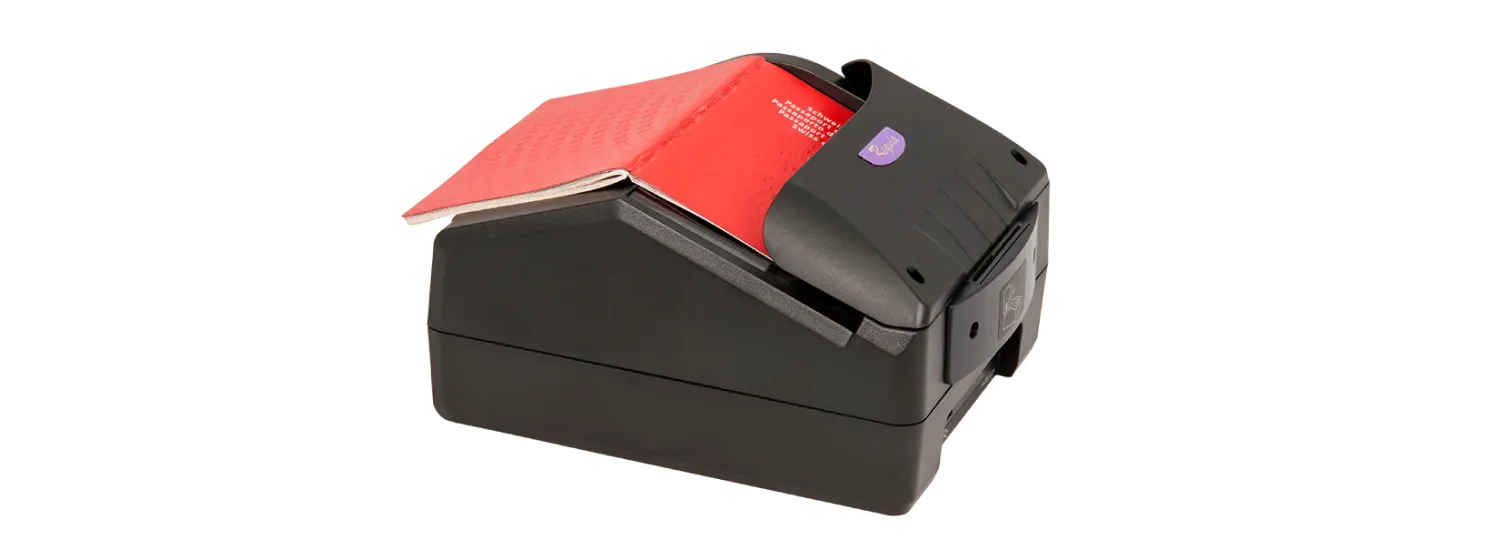
Regula 70X4M. Modifications of this device are used, for example, in Austria by the municipal registration offices and by the Aruban Immigration Authority.
Standalone workstations
Standalone workstations have a built-in computer, eliminating the need for an external PC to manage the data. These all-in-one devices are particularly useful in space-constrained environments like border control counters, police stations, and immigration offices.
In addition to reading and verifying documents, standalone workstations can store and analyze data independently, making them an efficient solution for remote or decentralized locations where additional IT infrastructure is unavailable.

Regula 70X9, a standalone workstation example.
Embedded document readers
Embedded document readers are built into automated border control kiosks, e-gates, and check-in counters. These readers are designed for self-service scenarios where travelers scan their own documents.

Regula 70X8M, an example of an embedded document reader.
Embedded readers can also differ by the document formats they support. In addition to passports, ID-1 format documents, such as identity cards and driver’s licenses, may also need to be read and verified.
For these cases, organizations may use dedicated embedded readers for card-format documents. In some e-gates and kiosks, passport readers and ID-1 document readers can be installed together to support different document types within the same self-service flow.
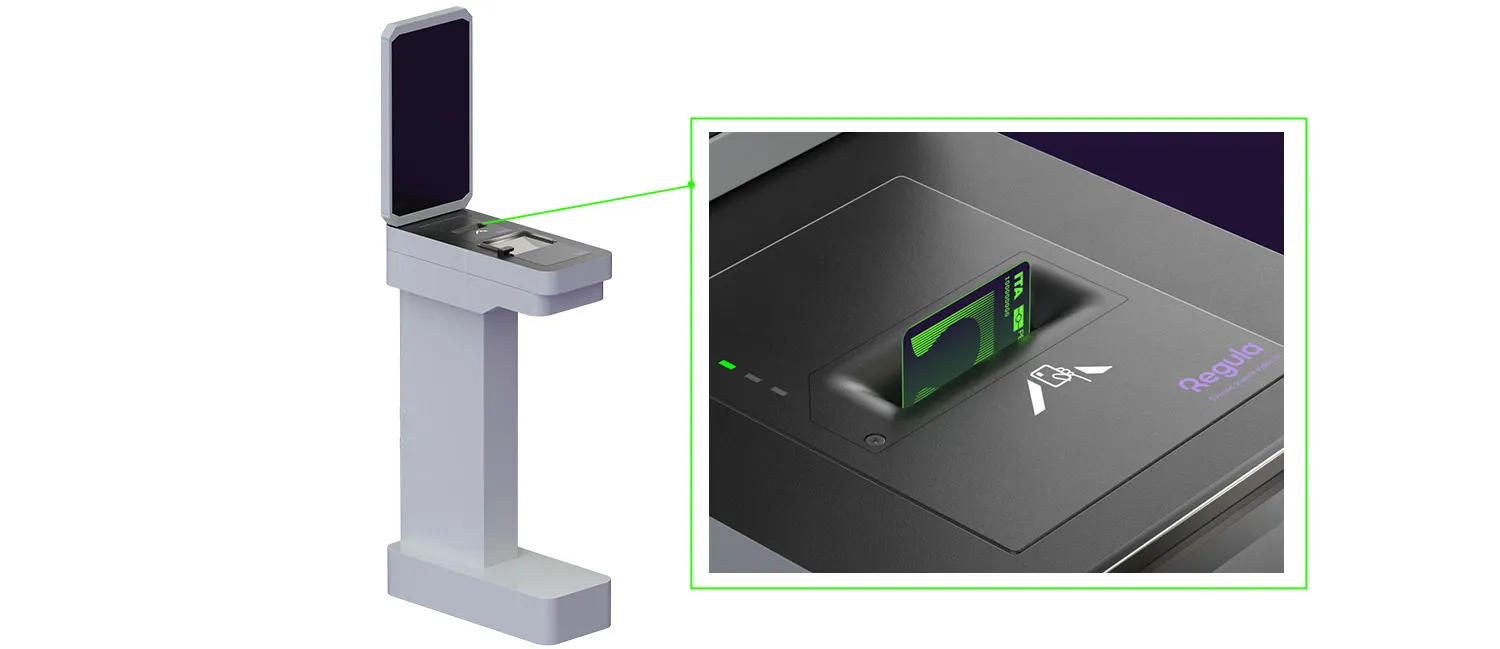
Regula 7223E supports dual-side scanning, card insertion in any orientation, and automatic card ejection after scanning.
Portable workstations
Portable workstations resemble desktop workstations but are built for fieldwork.
Equipped with a rechargeable battery and multiple fastening options (shoulder or waist straps), they offer maximum mobility while still enabling advanced document verification. Officers can wear them securely, leaving their hands free to handle other tasks or equipment.

Regula 7308 features a wide, adjustable shoulder strap for comfortable carrying.
Mobile document readers
Mobile document readers are handheld devices used by road police, border patrols, and surveillance agencies.
Some of these readers have a built-in computer that processes and analyzes data on the spot, allowing them to work independently. This can be especially important in remote areas where internet connectivity is unreliable or unavailable. Others connect to a centralized system and can be used as a part of a larger ecosystem.
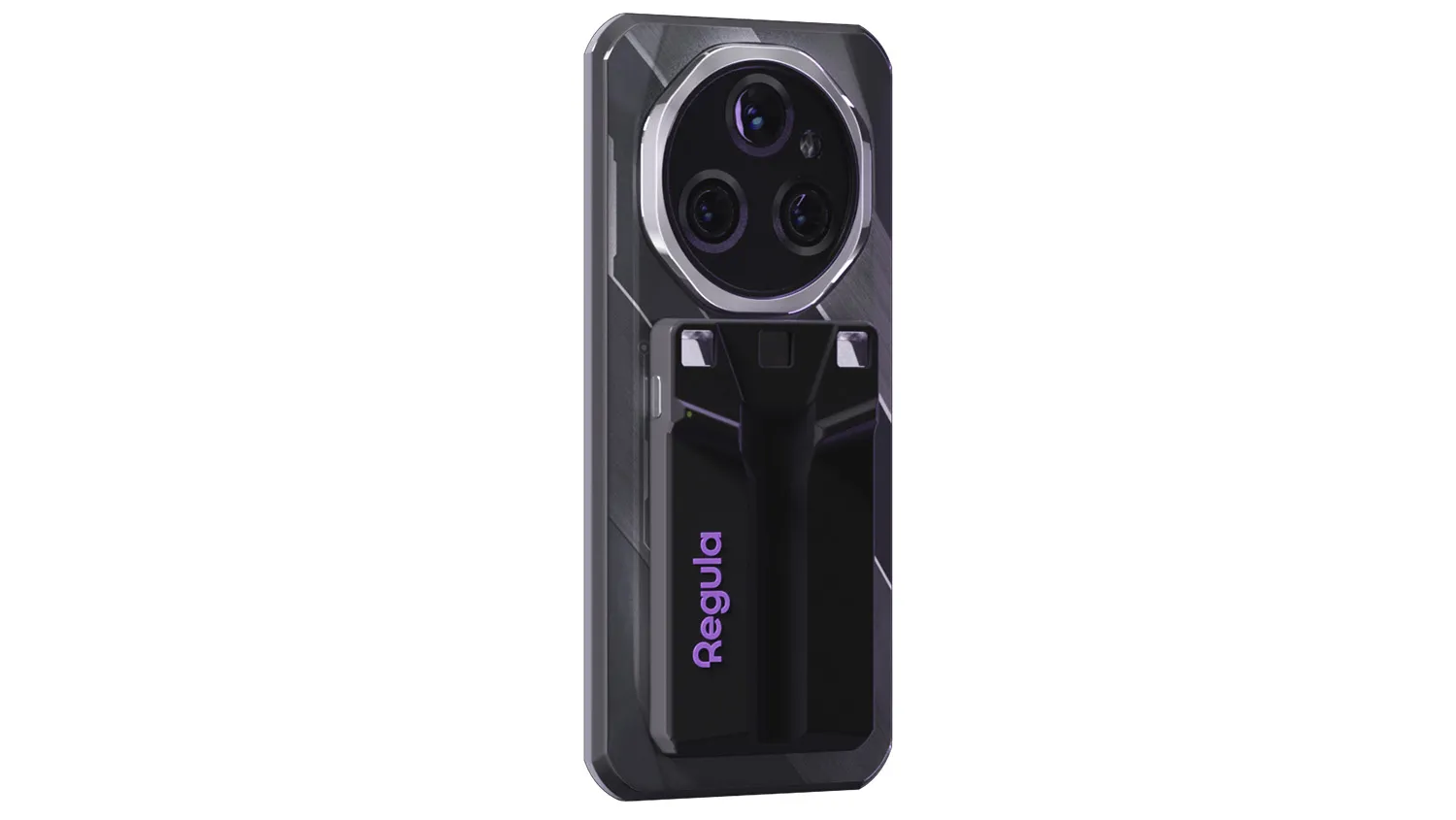
Regula 7320 combines document authenticity verification, fingerprint capture, and facial matching in a single mobile document reader.
Software-based ID scanning SDKs
In addition to hardware devices, many businesses are turning to software-based ID verification solutions. Instead of using a dedicated hardware reader, the user scans the document with a smartphone or webcam.
These capabilities can be provided by software development kits (SDKs) that integrate directly into the company’s systems. The primary function of these solutions is to ensure reliable and secure customer onboarding.
When SDKs meet document readers
Hardware ID document readers still rely on software for precise automated authenticity verification. Software also performs basic tasks like data capture and recognition, and automates data entry, as well as more advanced functions such as RFID chip verification.
In practice, these components often collaborate seamlessly. For example, Regula Document Reader SDK is compatible not only with the company’s own readers but also with third-party devices.
Learn more: Replacing Software on Document Readers: What to Do If Default ID Scanning Software Is Not Enough →

Regula Document Reader SDK.
Where are ID scanners used?
ID scanners are used wherever an organization needs to capture identity document data, verify a document, or connect a document to the person presenting it. The required setup depends on the risk level, document type, user flow, and operating environment.
Border control and law enforcement
Border control and law enforcement workflows require fast document processing without sacrificing security. Officers may need to check passports, visas, ID cards, driver’s licenses, residence permits, and other documents at airports, immigration checkpoints, police stations, border posts, or in the field.
In these scenarios, ID scanners and document readers help capture document data, read MRZs and RFID chips, compare data across document zones, and inspect security features. Fixed checkpoints usually rely on desktop or embedded document readers, while mobile teams may use handheld readers or portable workstations.

Banking and customer onboarding
Banks, fintech companies, and other regulated businesses use ID scanners to speed up customer onboarding and reduce manual data entry. Instead of typing names, dates of birth, document numbers, and expiration dates by hand, staff or customers can scan the document and send structured data directly into internal systems.
For KYC workflows, data capture is only the first step. The organization may also need to verify that the document is valid and authentic, check that the data is consistent, and match the document's portrait to the person presenting it.

Travel, hospitality, and check-in
Airlines, hotels, car rental companies, cruise operators, and other travel businesses use ID scanners to accelerate check-in and reduce queues. A passport, ID card, or driver’s license can be scanned once, and the extracted data can be sent to a booking, passenger, guest management, or compliance system.
Staff should not waste time retyping document data, and customers should not repeat the same identity step at every counter. Depending on the setup, travel and hospitality businesses may use desktop readers, self-service kiosks, or software SDKs in mobile apps.

Age-restricted services
For industries that must restrict underage access, such as casinos, alcohol retailers, or adult-only events, automated age verification is crucial. ID scanners, equipped with OCR technology, can instantly verify age and flag any fake or borrowed IDs.
A basic scan can confirm the age shown on the document. Higher-risk scenarios may require stronger checks, such as document authenticity verification, face matching, or liveness detection, because a valid ID doesn’t prove that the person presenting it is the rightful holder.

Visitor and restricted access management
Government buildings, embassies, corporate offices, prisons, data centers, laboratories, and other restricted facilities use ID scanners to register visitors and control access. The scanner captures document data, reduces manual entry errors, and helps create a cleaner visitor record.
In higher-security environments, the system may also verify the document, check watchlists or access rules, and store document images or extracted data for audit purposes, depending on the organization’s policy and local regulations.
How to choose the right ID scanner
The right ID scanner depends on your workflow: where documents are scanned, which documents users present, and how deeply you need to verify them. Use this quick guide to match the scanner type to the job.
| If you need to… | Choose… | Why |
|---|---|---|
| Capture ID data at a staffed counter | Desktop document reader like Regula 70X7 | It speeds up data entry and reduces manual typing errors |
| Process passports at border control, immigration, or government offices | More advanced desktop document reader like Regula 70X4M | It supports stronger document authentication, including MRZ, RFID chip, and security feature checks |
| Support self-service document scanning | Embedded document reader like Regula 70X8M | Users can scan documents without staff assistance |
| Read card-format IDs | Reader with ID-1 like Regula 72X3 | It helps process card-format documents without forcing staff to scan each side. |
| Verify documents in the field | Mobile reader or portable workstation like Regula 7320 | These devices support field inspections and mobile law enforcement workflows |
| Scan IDs in a mobile app or web flow | ID scanning SDK, such as Regula Document Reader SDK | It lets users capture and verify documents remotely with a smartphone camera or webcam |
To sum up
Automated document reading has a clear business value: it helps organizations capture personal data faster and verify identity documents with less manual work.
The right ID scanner can reduce data entry errors, speed up onboarding or check-in, reduce staff workload, and make document checks more consistent. In higher-risk workflows, professional document readers also add a stronger security layer by checking document data, authenticity features, and electronic data sources.
Since ID scanners vary from desktop and embedded readers to mobile devices and software SDKs, the best choice depends on your workflow, document types, verification requirements, and operating environment. If you’d like to learn more about what type of ID scanner can better serve your goals, or how to build an effective verification pipeline, feel free to consult with the experts from Regula.

.webp)

