

Remote onboarding is convenient, but it also creates a basic trust issue: how do you know the ID shown to the camera is a real physical document or just a representation of one? That is the role of ID document liveness detection.
While liveness checks are often associated with selfies and facial biometrics, they are just as important for identity documents. In this article, we explain what ID document liveness detection is, how it works, where it fits into the identity verification flow, and how it helps businesses protect remote onboarding from presentation attacks.
In brief: Document liveness detection helps businesses trust automated remote onboarding by reducing presentation-attack risk without defaulting to manual review. Its reliability depends on three things: strong document intelligence, good capture guidance, and seamless integration into the broader verification flow.
What is ID document liveness detection?
ID document liveness detection is a set of checks used to determine whether the identity document presented during remote verification is physically present and genuine, rather than a screenshot, printout, or replayed video. Merely requesting an ID photo is no longer effective, as an uploaded or captured image alone does not prove physical presence.
Unlike face liveness detection, which checks whether a real person is in front of the camera, document liveness detection focuses on the ID itself. It typically involves the “shake it” component, and the use of the mobile flashlight to observe the document under white light.
Despite the check taking only seconds, the technical side of the process is somewhat more complicated. Using neural networks trained on a large number of physical document images, the system can determine whether a submitted document behaves like a real physical passport, ID card, or driver’s license, and evaluate all the peculiarities of the particular document.
Where does ID document liveness detection fit in the identity verification process?
In practice, document liveness detection takes place during document verification. By the time this check runs, the system has already captured the document image, identified the document type, and extracted the data needed for further analysis.
Using the Regula identity verification flow as an example, the process looks like this:
-
Document capture. The user presents their ID to the camera during a guided capture session. The system collects the images and motion data needed for verification.
-
Document assessment. The solution evaluates the scan, determines the document type, and identifies key document attributes.
-
Data extraction. The system applies the relevant document template and extracts textual and visual data from the ID.
-
Document verification. The solution runs authenticity checks on document elements such as barcodes, the machine-readable zone (MRZ), and the holder’s portraits. At this stage, it performs document liveness detection to help determine whether the submitted ID is a real physical document.
The data collected during capture is then sent to the server, where it can be further analyzed and used for decision-making.
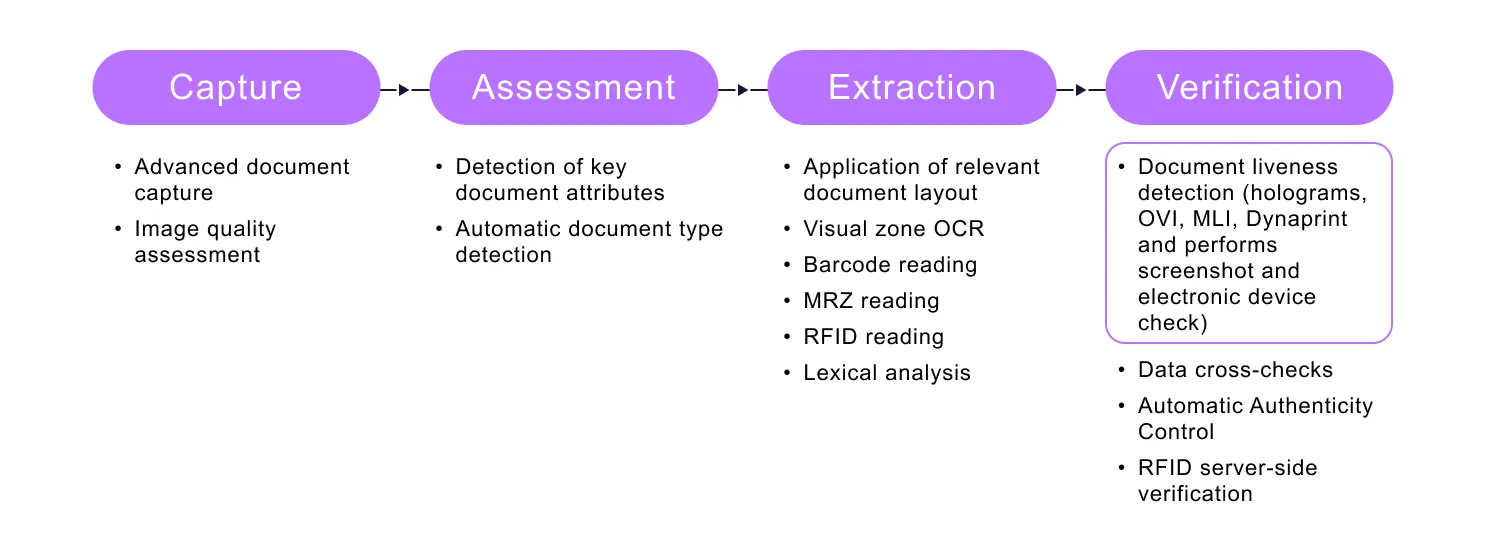
ID document liveness detection is a process within a broader identity verification process.
How does ID document liveness detection work?
Once the system identifies the type of document presented, it applies the relevant document template, extracts the data, and begins analyzing the document’s visual and physical characteristics.
One important signal in this process is the presence of dynamic security features. These are elements that change appearance when the angle of illumination or observation changes. They include, but are not limited to:
-
Holograms: Diffractive optically variable elements that may contain nano- and/or microprinting, microimages, covert laser-readable images, etc.
-
Elements printed in Optically Variable Ink (OVI): These are applied with a non-transparent scaly pigment with a layered structure that allows for color changes.
-
Multiple laser images (MLIs) and Dynaprint®: Composite images comprising several initial images. When tilting the document with these features, one or the other initial image becomes visible.

Detecting the presence of dynamic security features, such as holograms, in IDs is one way to check document liveness.
Detecting dynamic security features in a document where they are expected is one way to determine whether the user is presenting a real physical document. The larger the document template database, the more precise and accurate the verification process is. For reference, Regula provides a library with over 16,000 items from 254 countries and territories.
But dynamic features are only a part of the check. To reduce the risk of presentation attacks, the software also looks for signs that the submitted ID is being shown on another screen: a tablet or monitor.
In addition, a document liveness check evaluates the document’s physical properties. It assesses the spatial position and ratio to conclude whether it behaves like a real object in front of the camera.
If each item on the checklist is okay, the system declares that the ID submitted by the user is a physical document.
How does electronic ID verification amplify document liveness detection?
Companies that build onboarding flows around biometric passports or electronic ID cards can add another layer of security by verifying the RFID chip embedded in the document. Document liveness detection helps them establish physical presence, while chip verification helps confirm that the electronic data can be trusted.
Biometric passports and other electronic IDs store personal data, including biometrics, in a chip. The chip is secured with a series of cryptographic mechanisms that make cloning or alteration a nearly impossible task for fraudsters. As a result, businesses can verify not only the visible document, but also the integrity and authenticity of the chip data.
In a typical flow, the user scans the document with an NFC-enabled smartphone, and the system reads and verifies the chip data. To reduce the risk of tampering on the user’s device, the results can be re-verified server-side within the company’s secure environment. In this zero-trust-to-mobile approach, businesses do not rely on the smartphone alone to validate chip authenticity and data integrity.

Server-side chip verification may seem complicated, but for a user it takes only seconds.
CASE STUDY
When UBS, the largest bank in Switzerland, modernized its onboarding process, it wanted to replace live video interviews with a fully automated remote flow. The bank preferred biometric passports, which provide stronger security than standard IDs due to the RFID chip embedded in the document.
After integrating Regula’s identity verification technology, UBS automated document authentication, chip data verification, and facial matching. Regula’s server-side RFID authentication helped the bank confirm that the chip was genuine, its data had not been altered, and the document showed no signs of cloning or manipulation.
The result was a faster onboarding process completed in under five minutes and available directly in the UBS Mobile Banking app. The new flow reduced friction for customers while giving the bank a more reliable way to verify biometric passports remotely.
What are the challenges of ID document liveness detection?
ID document liveness detection is powerful, but it is not foolproof. Its performance depends on the quality of the captured images, the capabilities of the user’s device, the system’s knowledge of identity documents, and the quality of the verification experience itself.
Device-related issues
Not every customer uses a high-end smartphone. Lower-cost devices may have cameras that struggle to capture sharp, detailed images of identity documents, especially when dynamic security features such as holograms need to be analyzed. If the image is blurry, the system has less reliable input for liveness checks.
Some smartphones also lack NFC support, which creates a separate limitation for biometric passports and other electronic IDs. Even if the user has a chip-based document, they may not be able to submit it for RFID verification remotely.

Mobile devices that customers use to take an ID scan may not have the auto focus to achieve a clear image.
Poor capture conditions
Document liveness detection depends on image quality, lighting, and the angle at which the document is presented. In real onboarding sessions, users often scan IDs in dim rooms, under harsh glare, or with the document partially out of focus.
As a result, the system may receive dark, blurry, or overexposed images that are not suitable for reliable analysis. That can increase retake scores and harm conversion rate in your apps.

ID scans taken in dimly lit rooms or affected by glares are unsuitable for use during document liveness detection.
Weak document intelligence
Document liveness detection is only as strong as the system’s understanding of real identity documents. To interpret dynamic security features and other document-specific signals correctly, the solution needs accurate templates and up-to-date reference data. This is why some vendors don’t include this check among the features of their solutions at all.
If document coverage is limited or outdated, the system may miss fraudulent submissions or reject legitimate users by mistake. In other words, weak document intelligence can lead to both higher fraud risk and more false positives.
Poor guidance for non-tech-savvy customers
Even a strong liveness engine can fail if the user experience is badly designed. Customers may present the document at the wrong angle, move too quickly, cover part of the ID with their fingers, or ignore prompts during capture.
Clear instructions, real-time prompts, and a well-designed interface help users submit images that are actually suitable for liveness analysis. Without that support, abandonment rates and failed verifications are more likely to rise.


Your app should provide customers with clear instructions to avoid ID scans taken from inappropriate angles or with hands and other objects in the camera's focus.
Why is document liveness detection critical for a modern identity verification flow?
As remote onboarding becomes the default across banking, fintech, travel, telecom, and other regulated industries, businesses need stronger ways to verify identity without adding manual friction. A simple photo of an ID is no longer enough, and human review does not scale well. It is slow, expensive, and prone to inconsistency.
Automated solutions have already started to displace this time-consuming and costly approach, and identity document liveness checks give businesses a stronger basis for automated decision-making.
How to evaluate the best document verification services for liveness detection
To make reliable ID document liveness detection feasible, businesses need three things:
-
Advanced technologies under the hood: Strong identity verification software, enhanced with automation, makes the process secure and smooth. Image preprocessing techniques ensure successful document scans on the first try. Automated image refinement algorithms eliminate low-quality shots from the verification pipeline without hassle for users. Determining the type of document presented helps initiate the correct set of checks to validate all details.
-
In-depth knowledge of identity documents: The identity verification solution, relying on a large collection of data, enables accurate verification of dynamic security features and other attributes of physical IDs. It helps avoid situations where a legitimate document submitted by a user from a new customer group isn’t recognized.
-
Perfect UX and UI: A user-friendly interface with clear prompts streamlines the digital onboarding experience for your clients. In a well-guided process, users can take a series of appropriate images for analysis on the first try.
Businesses evaluating vendors often ask not only what makes document liveness detection reliable, but also how to integrate document verification and liveness checks into one remote onboarding flow without creating extra friction for users or operations teams.
Regula Document Reader SDK supports seamless document verification and integration of liveness checks within a single solution. It can work with your existing technology stack or be combined with Regula’s face biometrics and identity orchestration solutions to create a setup tailored to your operational and compliance needs.
Talk to our team to see how Regula can help you detect presentation attacks, verify physical and electronic IDs, and build a more reliable identity verification process.