


In brief: RFID verification helps businesses use the chip inside an electronic identity document as a strong document trust signal. In remote onboarding, the safest setup is to use the customer’s phone only to read the chip, then recheck RFID results server-side before approval.
Electronic passports, national ID cards, residence permits, and some driver’s licenses contain more identity evidence than the printed page can show. Their RFID chips can store personal data, a facial image, document metadata, and cryptographic proof that the chip data was digitally signed by the issuing authority and has not been changed since issuance.
For KYC and identity verification teams, reading the chip is only the first step. The real task is to validate the certificate chain, compare chip data with the visual inspection zone, MRZ, barcodes, and portrait, and make sure remote onboarding flows do not treat the customer’s phone as a trusted source.
This article explains:
-
How RFID chip data is protected
-
How to check whether a chip and its data are genuine
-
Why remote RFID-based verification needs server-side rechecking
What is RFID technology?
RFID, or Radio Frequency Identification, is a wireless technology that uses radio waves to exchange data between a reader and a tag or chip. In identity verification, RFID usually means reading the contactless chip embedded in an electronic passport, national ID card, residence permit, or driver’s license.
RFID technology is also widely used outside identity documents. For example, in retail RFID is often used to conduct inventory checks and conveniently locate tagged items in stores and warehouses.
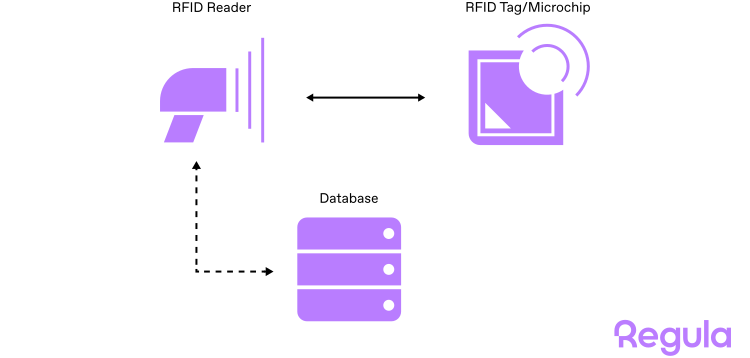
While the tag is a passive asset that transmits information “upon request,” the chip can interact with the reader in a “dialog” manner.
Get posts like this in your inbox with the bi-weekly Regula Blog Digest!
What frequency is used for RFID?
RFID data exchange can happen at different frequencies, and the frequency affects read range, data transmission speed, and available communication protocols. For instance, RFID chips in electronic IDs have a read range of 1-10 centimeters, while RFID tags used in retail can be read from up to 100 meters away.
| RFID frequency | Common uses |
|---|---|
| Low frequency, 125 KHz | Access cards, key fobs, animal tracking |
| High frequency, 13.56 MHz | Electronic identity documents, NFC, payment systems |
| Ultra-high frequency, 840–960 MHz | Logistics, retail, manufacturing, toll collection |
How do RFID chips work in identity documents?
The RFID verification flow looks simple from the user’s perspective:
-
You scan the RFID chip with a specialized passport reader or NFC-enabled smartphone.
-
The device creates an electromagnetic field with its antenna that powers the chip inside the document, so it can communicate with the device.
-
Then it sends some commands to obtain the required data.
-
The chip “replies” with the requested information.
-
Finally, you can see the results via the particular application you use.
CASE STUDY
UBS, Switzerland’s largest bank and the world’s largest private bank, wanted to enhance account opening in its mobile banking app. At the time, the bank used real-time video interviews to verify new customers, which made onboarding costly, time-consuming, and harder to scale.
One key requirement for the updated process was the use of electronic biometric passports only, as their RFID chips can be cryptographically checked for integrity and authenticity.
With Regula, UBS automated the flow end to end. The solution identifies the document, reads the RFID chip, and rechecks chip data server-side. It then compares the customer’s selfie with both the visible document portrait and the portrait stored on the chip, with liveness detection included.
As a result, UBS now has a 24/7 mobile onboarding process that takes only a few minutes.
What standards apply to RFID chips in identity documents?
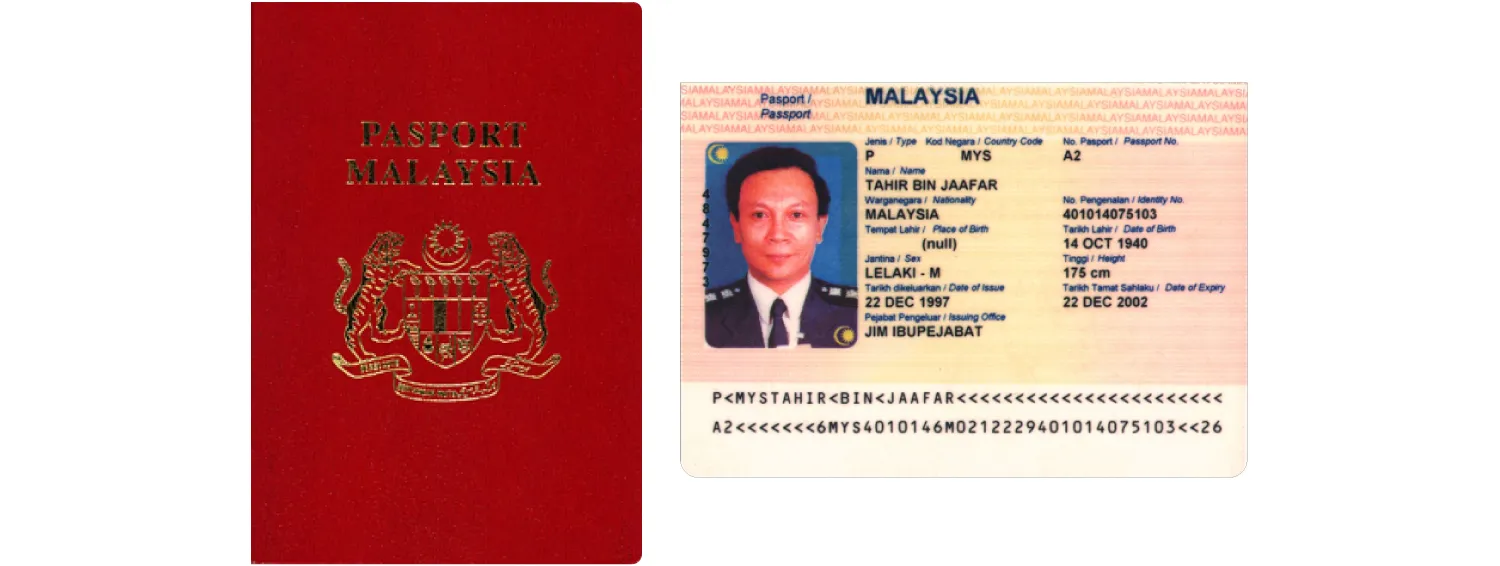
The first attempt to use RFID technology in identity documents was a Malaysian electronic passport issued in 1998. At that time, even specifications for this technology didn’t exist.
For electronic machine-readable travel documents (MRTDs), including ePassports, the key international standard is ICAO Doc 9303. It defines how electronic travel documents should store and protect data, including data kept on a contactless chip.
In ICAO terminology, the document’s RFID chip is called a contactless integrated circuit (CIC): a semiconductor device that stores data and communicates with a reader through radio frequency energy. For eMRTDs, the contactless chip follows the ISO/IEC 14443 standard for contactless communication.
There are also separate standards that define the use of CICs in other types of electronic identity documents. For instance, the ISO 18013 series is dedicated to driver’s licenses.
According to current guidelines, the "chip inside" emblem must be visibly present on either the front cover and/or the personal data page for all electronic identity documents.
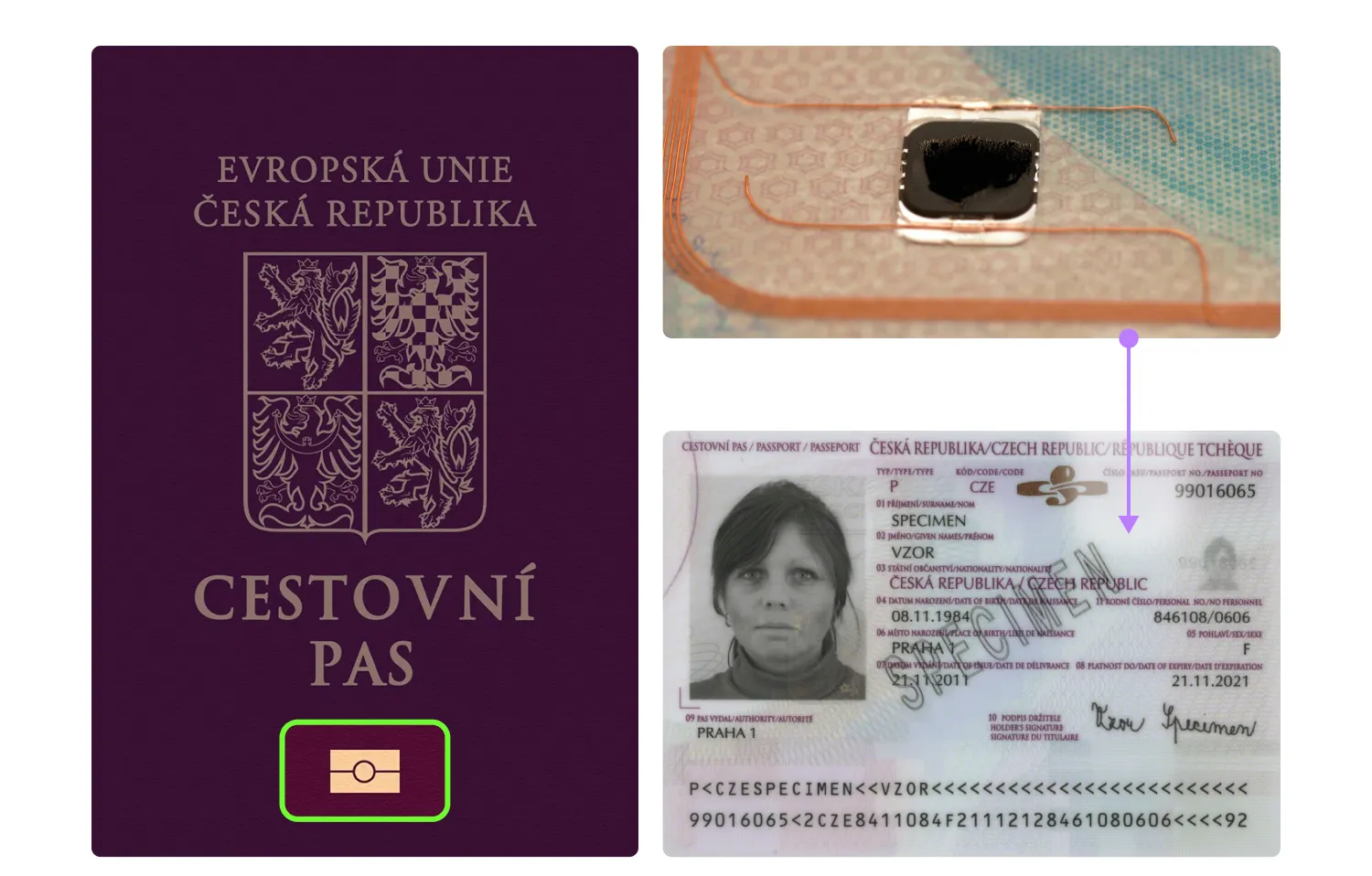
The “Chip Inside” emblem.
What data is stored on an RFID chip?
The content of an RFID chip depends on the document type, issuing country, and chip application. In ePassports and many other electronic machine-readable travel documents, data is organized into separate files called data groups (DG).
There are two types of data groups:
-
Information data groups – store identity, biometric, document, and authentication-related details.
-
Service data groups – support secure access and verification procedures.
Information data groups in an RFID chip
In the ePassport application, the most common data groups include:
| Data group | What it usually contains |
|---|---|
| DG1 | MRZ data, including document type, name, date of birth, nationality, sex, and check digits |
| DG2 | Holder’s facial image and additional metadata, including detailed facial landmarks, precise eye and hair color, and other biometric attributes. |
| DG3 | Fingerprints, where stored and legally accessible |
| DG4 | Iris data, where stored and legally accessible |
| DG7 | Holder’s signature or usual mark |
| DG11 | Additional personal details, such as place of birth, personal number, address, or local-language name |
| DG12 | Additional document details, such as issuing authority and issuance date |
| DG13 | Optional national-use details defined by the issuing state |
| DG14 | Security information used for Chip Authentication |
| DG15 | Security information used for Active Authentication |
| DG16 | Emergency contact information, where used |
Data groups DG6 and DG8-DG10 are reserved for further standard development.
This structure matters for security and access control. For instance, the DG2 file with the document holder’s photo is checked during routine verification sessions like customer onboarding in a bank. However, only authorized entities like border control or police officers can access biometric data, such as fingerprints stored in DG3. In some countries, such as Germany, the ability to read all the biometrics encoded in the chip is restricted to authorized entities.
Service data groups in an RFID chip
The service data groups contain files for secure data access procedures, digital signatures, and chip authentication algorithms. One of the key service files is the Document Security Object (SOD).
Generally, the SOD holds hashes of all data groups that map data of any size stored on the chip to fixed-size values, a digital signature generated during the document personalization stage by its issuing body, and the issuing authority certificate (Document Signer Certificate). All data in data groups is recorded in ASN.1 format.
Hashing helps turn data from informational data groups into impersonal unique values that don’t expose any sensitive details. For example, DG1’s hash may look like:
“8743b52063cd84097a65d1633f5c74f5”
The SOD is also digitally signed to prevent fraudulent alterations.
How is data secured on an RFID chip?
Data stored on an RFID chip is protected with cryptographic mechanisms. They transform plain text into a ciphertext that looks like a jumbled mess to anyone who might intercept it. This can be done using symmetric or asymmetric cryptography. Both mechanisms are involved in protecting RFID chips.
Symmetric cryptography uses the same key (a shared secret) for “packing” and “unpacking” incoming and outgoing messages. Since the secret key is available to both the sender and recipient, this method is less secure than asymmetric cryptography.
Asymmetric cryptography uses a related key pair: a private key for encryption and a public key for decryption. The public key is available to both parties, but only the message recipient has access to the private key. This makes asymmetric algorithms more reliable.
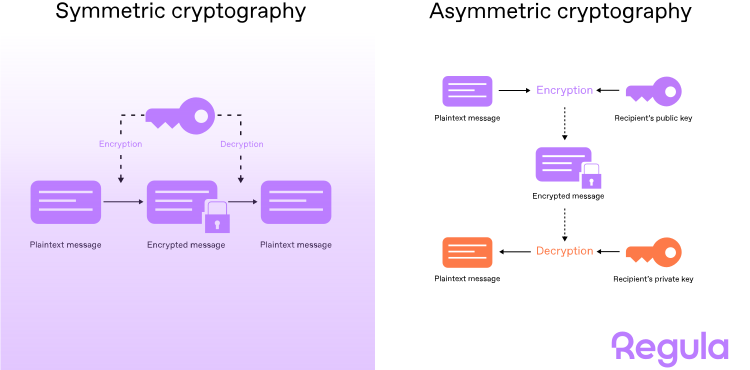
Asymmetric cryptography is used to create and verify digital signatures for chip data. The private key is used to create a unique signature attached to the message. The corresponding public key, available to the recipient, verifies the signature's authenticity, ensuring that the owner of the private key generated it.
The identity document issuing bodies — the country’s authorities — cryptographically sign chip content in newly issued documents with a digital signature using the private key. However, the entire data set is not signed; only a hash is calculated based on it.
The process follows these steps:
-
Specific data is selected, based on which the hash will be calculated.
-
The hash is calculated.
-
Using a pair of keys, a signature from the hash (or multiple hashes) is calculated. The public key is placed in a DS certificate, and the certificate is further signed by CSCA following the same process.
Later, during verification, the system recalculates the hashes from the chip data and uses the corresponding public key to check the signature. If the hashes match and the signature is valid, the system has evidence that the chip data hasn’t been changed since issuance.
The next question is whether the public key itself can be trusted. This is where certificates come in.
Trusted certificates
Each country that issues electronic identity documents also generates corresponding security certificates:
-
The Country Signing Certification Authority Certificate (CSCA)
-
The Document Signer Certificate (DSC)
The CSCA private key digitally signs the DSC, and the DSC private key digitally signs the SOD in the chip. Together, these signatures establish a chain of trust.
During RFID verification, the system checks whether this chain can be validated against trusted certificate sources. Many countries exchange certificates directly or through the ICAO Public Key Directory (PKD), a centralized certificate catalog used to support verification of electronic travel documents. Another source is the German certificate catalog run by BSI, the Federal Office for Information Security, which has alternative country coverage.
If the certificate chain can be validated, the system has evidence that the chip data came from a legitimate issuing authority and hasn’t been changed since issuance.
If a certificate is missing or expired, the RFID verification result is inconclusive and should trigger fallback rules, additional checks, or manual review.

How to access an RFID chip?
To protect the privacy of electronic identity document holders, RFID chips use an access control mechanism. This mechanism prevents chip data from being read unless the inspection system can prove that it’s authorized to access the chip.
Access control also helps prevent eavesdropping on the “dialog” between the chip and the reader, and stops fraudsters from skimming the data using third-party scanners.
There are three forms of access control currently used in electronic IDs:
-
Basic Access Control (BAC)
-
Password Authenticated Connection Establishment (PACE)
-
Extended Access Control (EAC)
Basic Access Control (BAC)
BAC is one of the earliest methods to secure communication between chip and reader, but it’s still in use today.
With BAC, the reader derives the secret key for encrypting/decrypting transmitted data from the document's MRZ code by combining some lines. This method allows the terminal to access the chip only if it confirms the document's physical presence: it verifies if the MRZ data in the visual inspection zone matches the data stored on the chip.
The limitation is that BAC relies on symmetric cryptography, so it can be vulnerable to attacks if the key is compromised. Moreover, the MRZ is not so unique that it cannot be guessed. Some countries, like Germany, have stopped issuing biometric documents compatible with the BAC protocol in favor of other methods like PACE.
Password Authenticated Connection Establishment (PACE)
PACE is a stronger access control mechanism than BAC, because it uses asymmetric encryption. The process itself remains similar, following the logic of BAC. PACE uses either MRZ code fragments or a Card Access Number (CAN) as the chip access credential.
Extended Access Control (EAC)
EAC provides extra security for sensitive biometric data, such as fingerprints and iris scans stored on the chip. It allows only authorized terminals to access restricted biometric data.
For many commercial identity verification flows, reading restricted biometric data is not required. In these cases, EAC may not be part of the standard verification process.
EAC usually combines two mechanisms:
-
Chip Authentication
-
Terminal Authentication
We’ll describe both of them, along with some other methods, below.
How to tell if RFID chip data can be trusted?
RFID verification uses several checks to answer different trust questions: whether the chip data has been changed, whether the data was signed by a trusted issuing authority, whether the chip is original, and whether the reader is authorized to access restricted data. The exact RFID verification flow is determined by the issuing country, the specific use case, and the identity verification software in use.
There are four methods to authenticate the chip:
| Method | What it helps verify |
|---|---|
| Passive Authentication | Whether chip data is intact and signed by the issuing authority |
| Active Authentication | Whether the chip is original, not a clone |
| Chip Authentication | Whether the chip is original, not a clone (an improvement over Active Authentication) |
| Terminal Authentication | Whether the reader is authorized to access/update chip data |
All of the methods may be used in business operations, save for Terminal Authentication — in most cases, it is available only to authorized entities, such as law enforcement agencies.
💡Document Reader SDK can be used to execute any of the four procedures.
What is Passive Authentication?
Passive Authentication checks the integrity and authenticity of the data stored on an RFID chip.
Here’s how it works:
-
The mechanism engages the service data package (SOD), where the hashes of the data groups are located.
-
The SOD is cryptographically signed with a digital signature generated at the ID document issuance stage. The document issuing authority does it with the use of the DSC and the corresponding CSCA certificate; both are also digitally signed.
-
In this scenario, the DSC holds a public key used to validate the SOD, while the CSCA holds a public key used to validate the DSC.
-
Since the CSCA is self-signed, its signature can be verified using the public key contained in the certificate itself. The certificates are available in the ICAO PKD, as well as other trusted sources.
-
The authenticity of the information data groups is verified by comparing the computed hash values of the data groups’ content with their respective counterparts stored in the SOD. If all components, including the cryptography algorithms and SOD structure, are consistent, the data in the RFID chip is considered genuine.
What is Active Authentication?
Active Authentication aims to verify whether the chip is genuine and not a clone. The method requires a challenge-response exchange between the reader and the chip using asymmetric cryptography.
Here’s how it works:
-
During active authentication, the reader generates and sends the chip a random “challenge” (control piece of data).
-
The chip digitally signs the “challenge” using the private key and sends it as a “response”.
-
The private key is stored in the protected memory of the RFID chip and cannot be read from outside. The reader verifies the validity of this digital signature using the public key from DG15 (for electronic passports) or DG13 (for driver’s licenses) and identifies the chip as authentic only if the returned signature is correct.
Active Authentication is now used less often than before and has been gradually replaced by Chip Authentication in newer documents.
What is Chip Authentication?
The Chip Authentication procedure is an improvement over Active Authentication. By using two pairs of public and private keys, it employs a shared secret key accessible to both parties involved in the process. This serves two purposes: establishing secure messaging between the passport and the reader, and protecting against chip cloning.
How it works:
-
The chip and the reader exchange their public keys to mathematically derive the secret key using their private keys as a required part of the calculation.
-
The private key is recorded on the chip during the production of the biometric ID and is available for reading from “inside” only. DG-14 contains a public key and a crypto scheme for calculations.
-
If the RFID chip data is copied to another chip, its private key will change as well. As a result, the secret key calculated on the chip’s side won't match the one derived by the reader, which may point out chip alterations.
What is Terminal Authentication?
Terminal Authentication prevents unauthorized terminals (readers) from accessing sensitive data stored on the RFID chip, primarily biometrics. Terminal authentication also enables authorized parties to update the information stored on the chip.
How it works:
-
The RFID chip and the terminal engage in a mutual verification process. The chip sends a challenge to the terminal. The terminal must respond with a signed response based on the cryptographic keys stored within it to prove its legitimacy.
-
The response is encrypted using cryptographic algorithms and shared keys to ensure secure communication.
-
If the terminal’s response is verified, it gains access to the sensitive data on the chip.
What are the limitations of RFID verification?
RFID verification is a strong document trust signal, but it is not a complete identity verification flow by itself. All RFID chip authentication mechanisms were developed with the idea that the readers used were trusted devices. That was true in the early 2010s. Over time, as more people used smartphones, they became a part of the inspection process in addition to authorized passport readers.
With the growth of digital onboarding, many sessions involving RFID verification are now conducted remotely. In remote scenarios with identity verification apps, users’ mobile devices supporting the NFC protocol are used as chip readers. This is generally a reliable practice, but it carries two risks:
-
Fraudsters can try to generate positive NFC verification results during a mobile session.
-
Fraudsters can try to present a genuine passport equipped with an RFID chip containing information cloned from someone else’s document.
This means that counterfeit documents submitted online might be mistakenly verified as valid.
How to build a reliable remote RFID verification process?
In remote onboarding, the smartphone should act as an NFC reader, not as the source of truth. This is the idea behind the zero-trust-to-mobile approach: the RFID result is rechecked server-side before the business makes a trust decision.
Here is how it works with Regula:
-
A user reads the document chip with an NFC-enabled smartphone, and the chip data and verification materials are sent to the server.
-
All the data is rechecked within a trusted perimeter. During Active Authentication/Chip Authentication, transaction-specific keys are generated and validated through the server-side process. This allows the server to check whether the mobile RFID session is consistent with the data received and whether signs of tampering or chip cloning are present.
-
If mismatches or suspicious traces are detected, the result can be rejected, escalated, or sent to manual review.

During server-side verification, the user’s mobile is not a trusted source; it’s just a data transmitter.
You can make server-side RFID verification a mandatory part of your online identity verification flow. It also can be a way to conduct additional checks upon request. The outcome of each mobile authentication session is securely saved on your server, giving you the option to revisit them later if needed.
Importantly, all of this occurs solely within your premises; no third parties, including Regula, have access to the data.
How should RFID checks fit into a full identity verification flow?
Many businesses are already using RFID verification of electronic IDs as a high-assurance step in online onboarding. It’s a strong document trust signal, but it should not carry the whole identity decision alone. A reliable flow should connect RFID results with other identity signals:
-
Document data consistency: Compare chip data with the VIZ, MRZ, barcode, and document image to detect mismatches or altered document data.
-
Document authenticity: Check the printed document, layout, MRZ, barcode, and visible security features to catch physical or digital tampering.
-
Biometric matching: Compare the selfie with both the visible document portrait and the portrait stored on the chip.
-
Liveness detection: Confirm that the person presenting the document is physically present, not using a photo, screen replay, mask, or injection attempt.
-
Remote-session trust: Recheck mobile RFID results server-side and consider device, session, IP, geolocation, or behavioral risk signals where the flow requires stronger assurance.
With Regula, businesses can turn RFID verification into part of a broader decision flow, where chip results are evaluated alongside document, biometric, and session signals before approval. Get in touch to see how Regula supports RFID-based identity verification for electronic documents.


