

In today's article, we will focus on the element of an identity document that we almost always look at first when we pick it up — and which, at the same time, can become one of the most vulnerable points in the hands of a fraudster.
Here comes the morphing
The photograph serves as the cornerstone of identity verification. It enables fast, reliable confirmation that the person presenting the document is indeed its rightful holder.
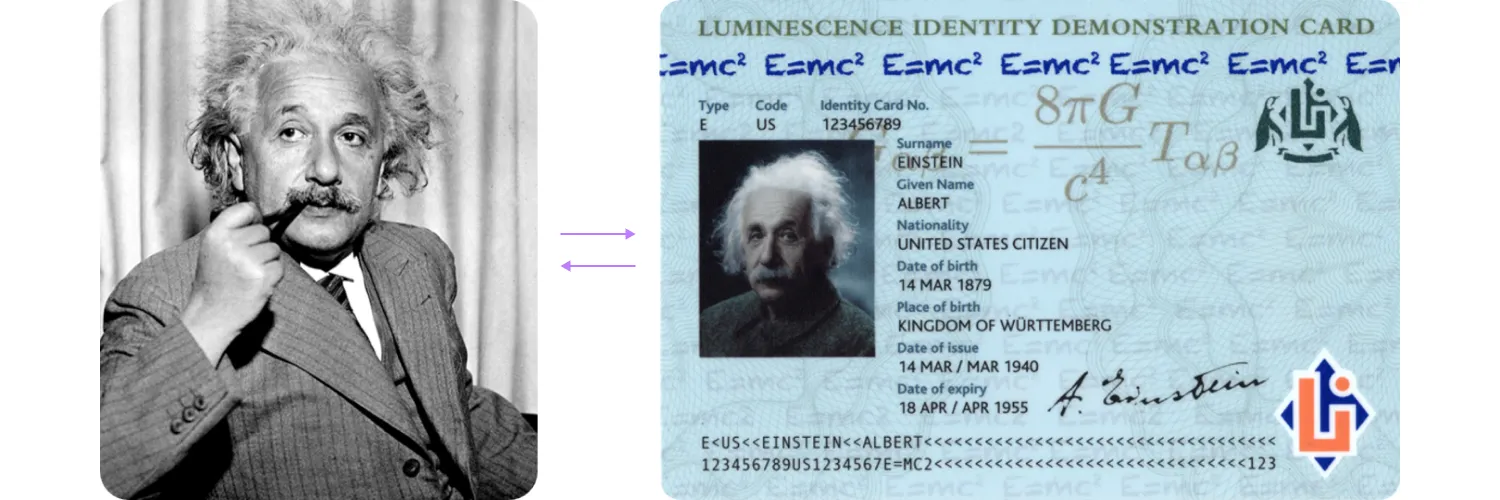
However, the photo is also the element most frequently targeted for forgery. A successfully altered image can allow a criminal to cross borders, access sensitive information, operate a vehicle, and more. Numerous fraud cases show that one of the most common, sophisticated, and dangerous methods of photo substitution is morphing.
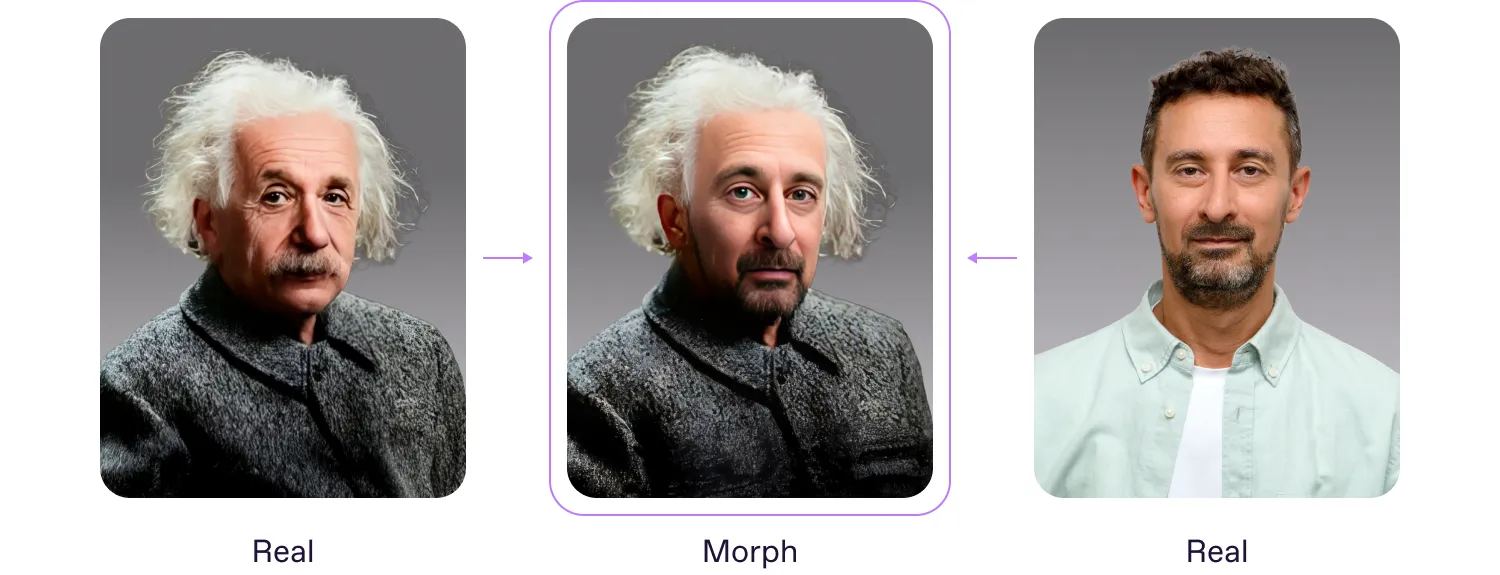
On the left is Einstein's photo, on the right is a photo of a Regula forensic expert, and in the middle is a morphed face that resembles both persons.
According to ICAO Doc 9303, morphing is an image manipulation technique where two or more subjects’ faces are morphed or blended together to form a single face in a photograph.
If you’re interested in learning more details about morphing, read Face Morphing: Why It Can Threaten National Security & How to Protect Against It
A genuine document can be stolen, lost, or obtained through an illegal deal, after which fraudsters can change the holder’s portrait. Once they possess a genuine document, fraudsters then morph the holder’s portrait with another individual’s photo. Having an authentic ID or passport with a morphed photo, an impostor gets a chance to successfully cross the border or access secure environments using the blended portrait.
What tools help fraudsters to apply morphed images
Criminals need to find a way to efficiently integrate the morphed photos into the document.
Since paper photos are no longer used, fraudsters are using new printing technology: inkjet printer ink gets smeared on plastic, and laser printer toner crumbles. Their new printer of choice is an ultraviolet (UV) inkjet printer.
UV inkjet printers can print on almost any surface (paper substrate, laminate, polycarbonate, etc.). Modern inks for these printers are based on substances that polymerize under UV light. The ink polymerization process is irreversible, so it produces images that are highly resistant to erasure. The richness and brightness of the ink are similar to those of standard inkjet printers. Under UV light, the ink is cured/hardened, and a layer of ink coating is formed.

Types of morphing
There are two different types of morphed photos:
The photo is completely morphed.
The photo is subtly altered.
In the picture on the left below, you can see a case in which the document owner’s photo has been completely altered. On the right, only some elements of the appearance (eyes, ears, nose, etc.) have been altered.
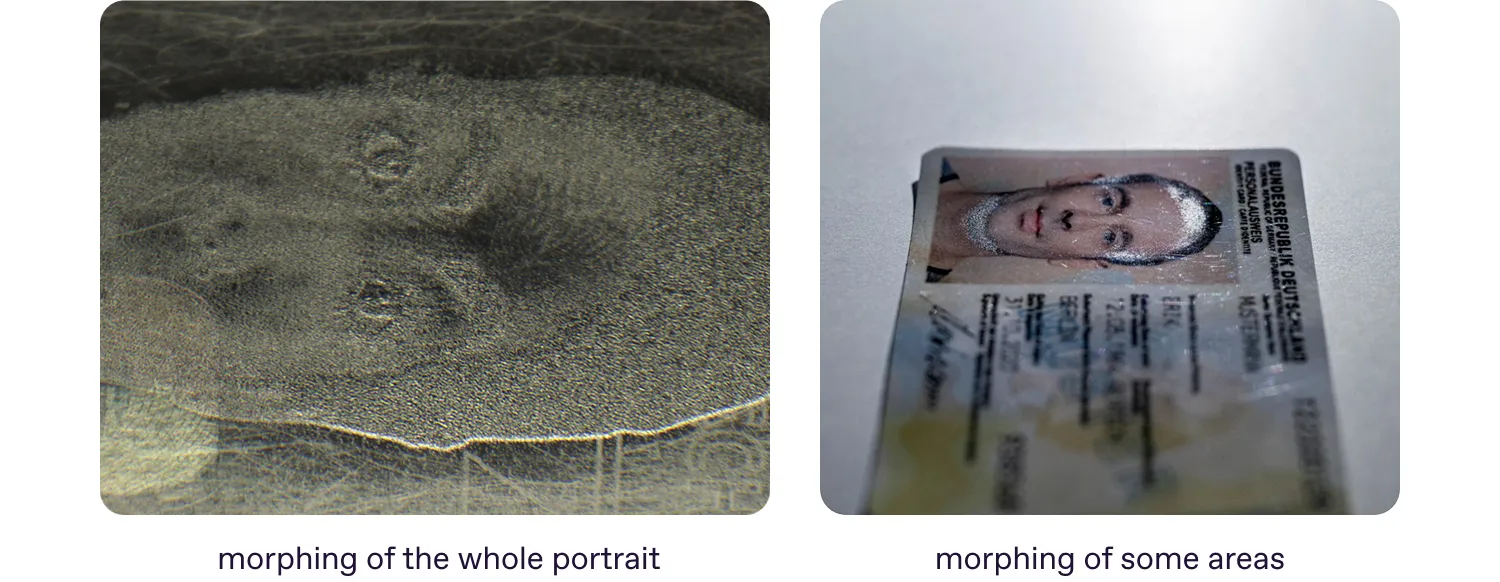
In ID documents with polycarbonate or laminate data pages, there’s a matte spot in the area where the overprint was made.
How to detect morphed portraits
These images of documents with morphed portraits were captured using the Regula 4306M Video Spectral Comparator.
In general, to detect morphing, you can use different types of light sources — incident and oblique white, infrared (IR) and UV. In the photo above, morphed photos featured unusual matte spots or spots that clearly differ from the background or other parts of the portrait.
When carrying out standard authenticity checks of security features, it becomes evident that the applied dye lies on the surface of the substrate. Under UV light, there may be partial or complete overlaps of the applied dyes on the surface with the UV pattern. Of course, this forgery feature may vary depending on the thickness of the applied dye layer.
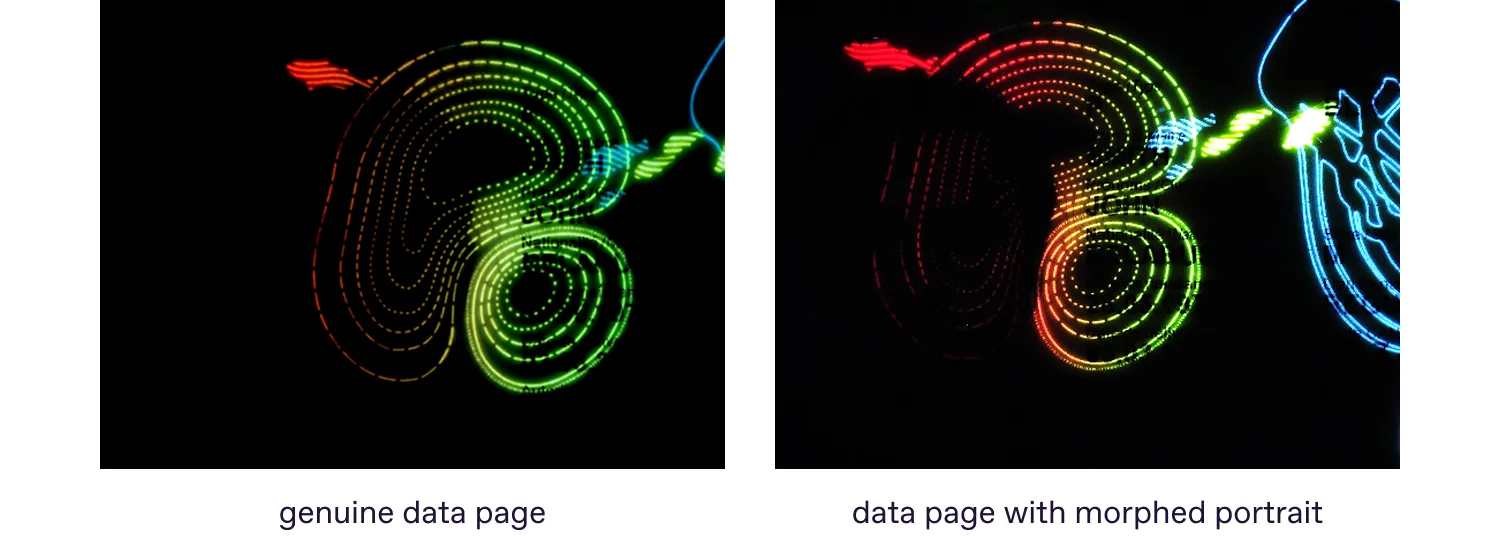
In this forged passport, the layer of applied dyes is noticeably thicker in the hair area, which significantly diminishes the visibility of the UV luminescence pattern. In a genuine document, however, the ink layer should remain uniform across the entire image.
Now let’s move on to real-world cases of document forgery involving morphing.
Morphing on paper data page
Nowadays, modern passport data pages are rarely made of plain paper; and when they are, they are typically protected with a laminate layer. Let’s take, for example, the French passport issued in 2019.
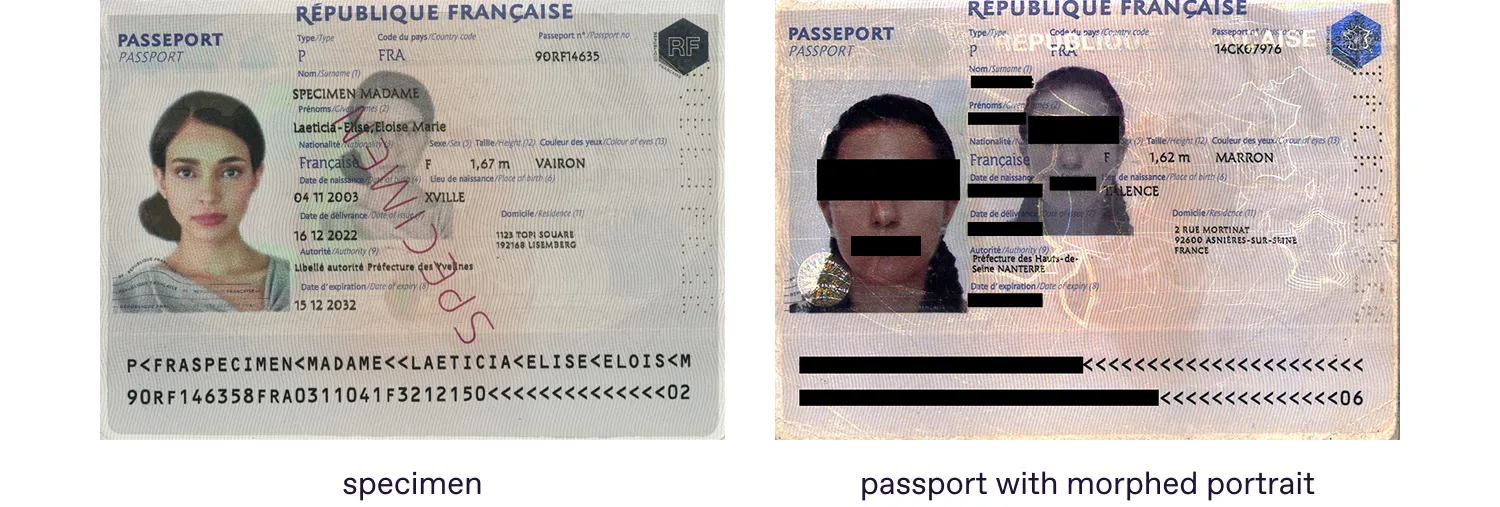
One of the features that secures this passport is the diffractive identification element (DID), developed by SURYS, France.
.webp)
This security feature changes its color when rotating the image by 90°.
When examining the altered document under oblique (sliding) light, traces of ink layering become visible as a matte spot in the areas of the photo and the DID security feature.
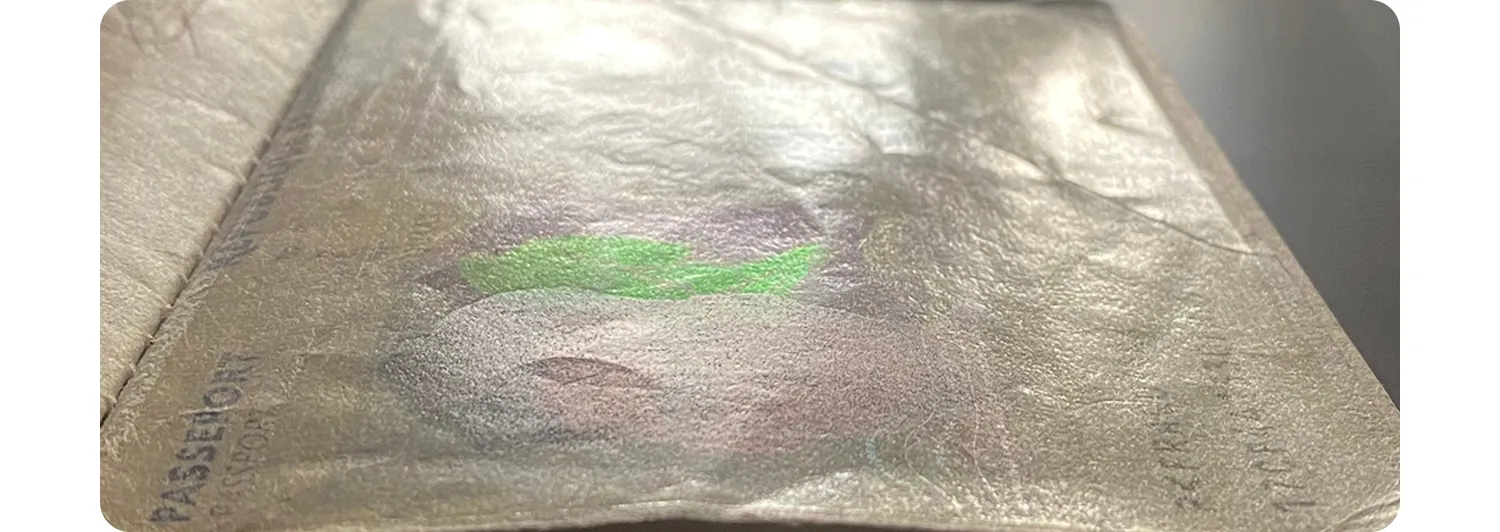
And of course, the DID element couldn’t remain untouched. Originally placed over the photo to provide security, it appears beneath the overprinted layer when a morphed image is applied.
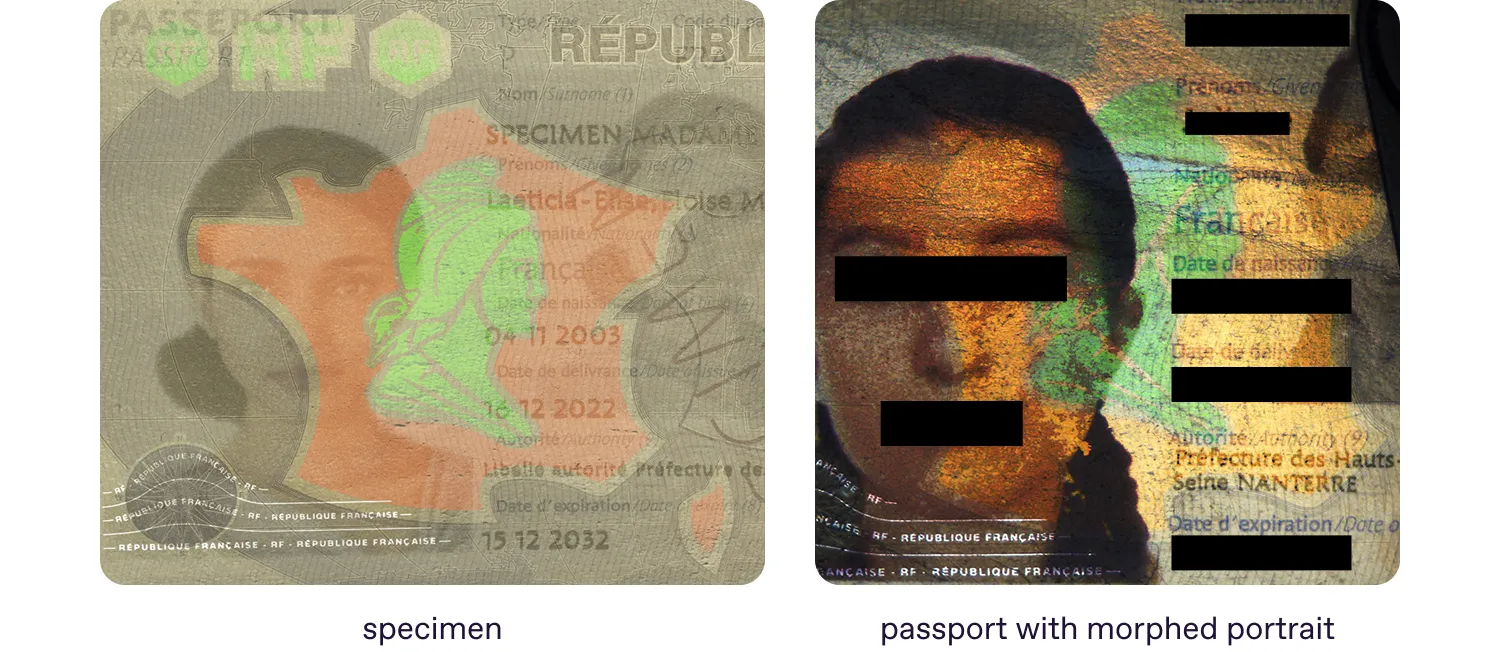
The hair area of the passport with the morphed portrait clearly overlaps the DID element.
Observing the same objects under UV light, we see the same signs of forgery – the morphed photo is located above the UV pattern which serves to secure the photo.
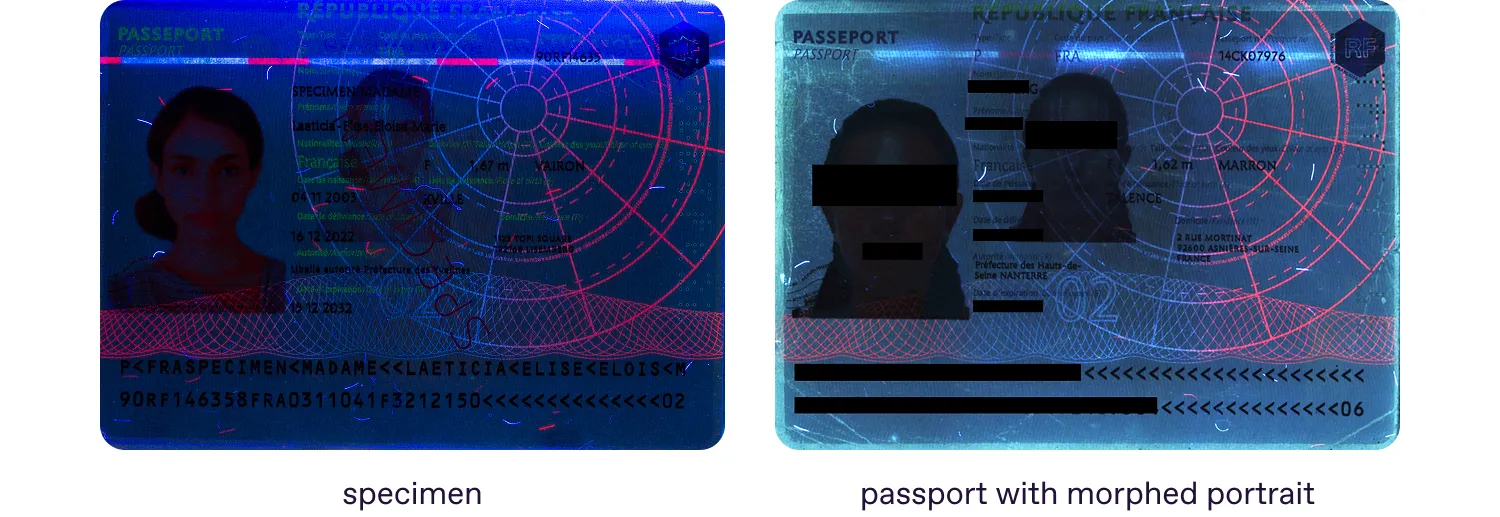
If you struggle with comparing, look at the bottom right corner of the main portrait. In the specimen, the UV pattern covers the portrait in the named area. The same is applied to the secondary holder’s portrait. Originally, it is applied under the UV pattern. The morphed portrait in the right image covers the UV pattern. Besides, the secondary portrait seems too solid, definitely covering fluorescence.
Another example of a security feature that helps easily detect morphed portraits is Invisible Personal Information (IPI). Developed by JURA, this feature has been implemented, for example, in the Bulgarian passport issued in 2010. When decoded, the portrait area displays the holder’s personal information — such as their name, surname, and passport number — instead of the actual photograph.
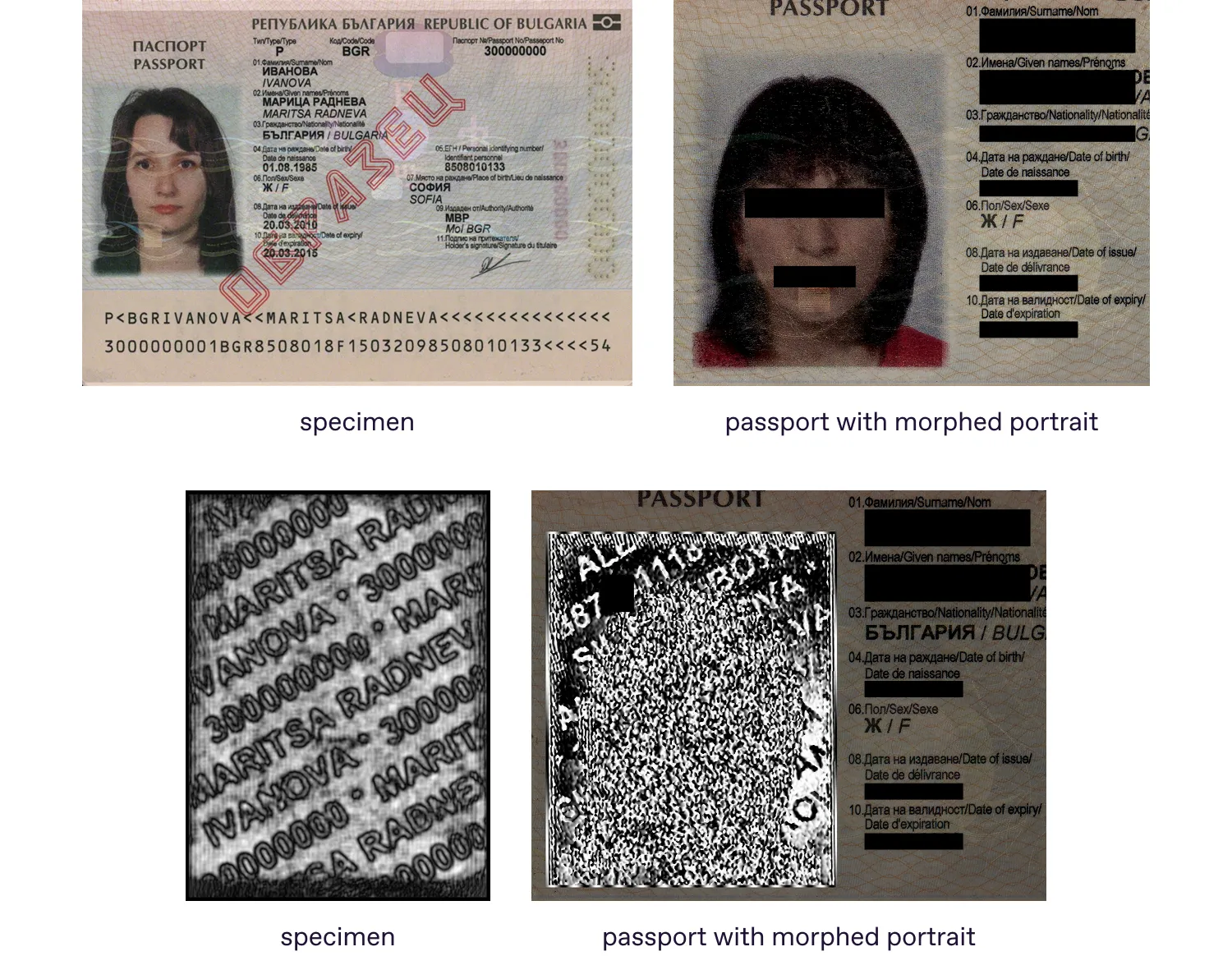
Even if a morphed photo looks untouched under white light, it immediately reveals itself once the IPI is visualized.
As shown in the image above, any manipulation of the photo will inevitably become visible when the IPI is decoded.
Morphing on polymer data page
Most modern passports now incorporate a polycarbonate data page. It offers significantly greater durability, withstanding everyday wear far better than its paper-based predecessors — even those protected by lamination.
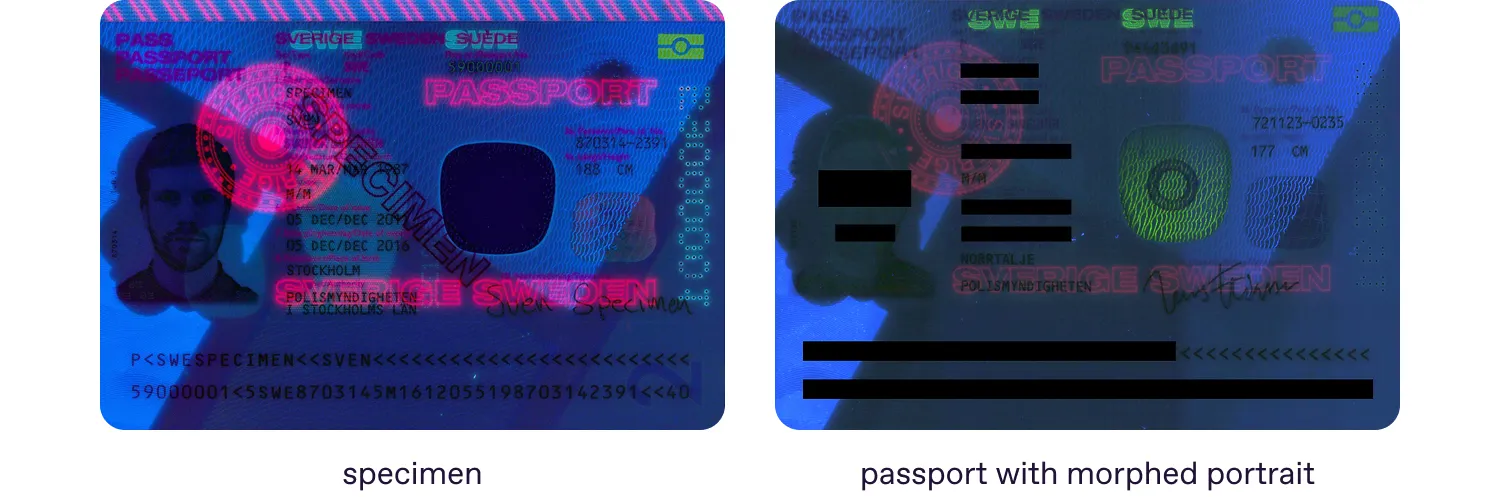
Let’s compare a specimen of a 2012 series Swedish passport and a forged version. Under white light, we see no huge differences or signs of alteration.
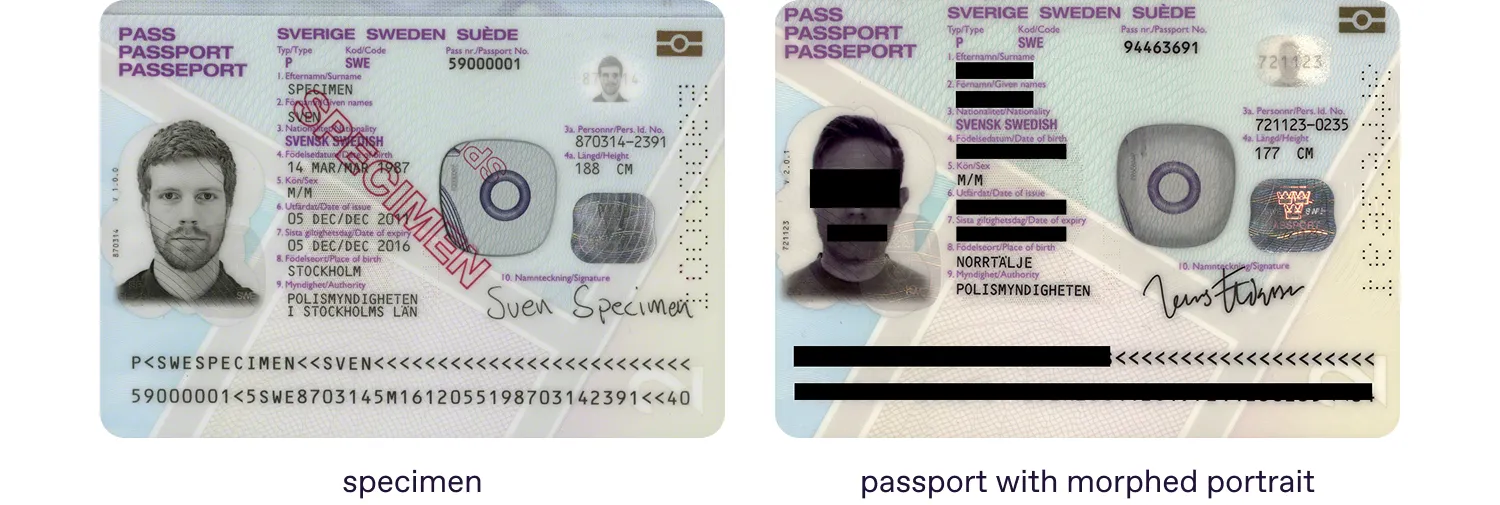
Under UV illumination, the altered document shows a pattern similar to that observed in the French passport. The morphed portrait overlaps with the fluorescent features. In the genuine specimen, the portrait is instead overlaid by the UV security pattern.
Ways to protect ID portraits
The photograph in the document is protected both by the way it is printed or applied, and by security features that are placed partially or completely on the top layer of the image.
Want to learn more about printing techniques applied to document portraits? We’ve described them in detail in our article, When an Image Lies: Exposing Photo Substitution in ID Documents.
Turning back to common security features that secure passport portraits, they include:
UV patterns.
Holographic elements (holograms, Kinegram, DID, etc.).
Blind embossing.
Latent security features such as IPI.
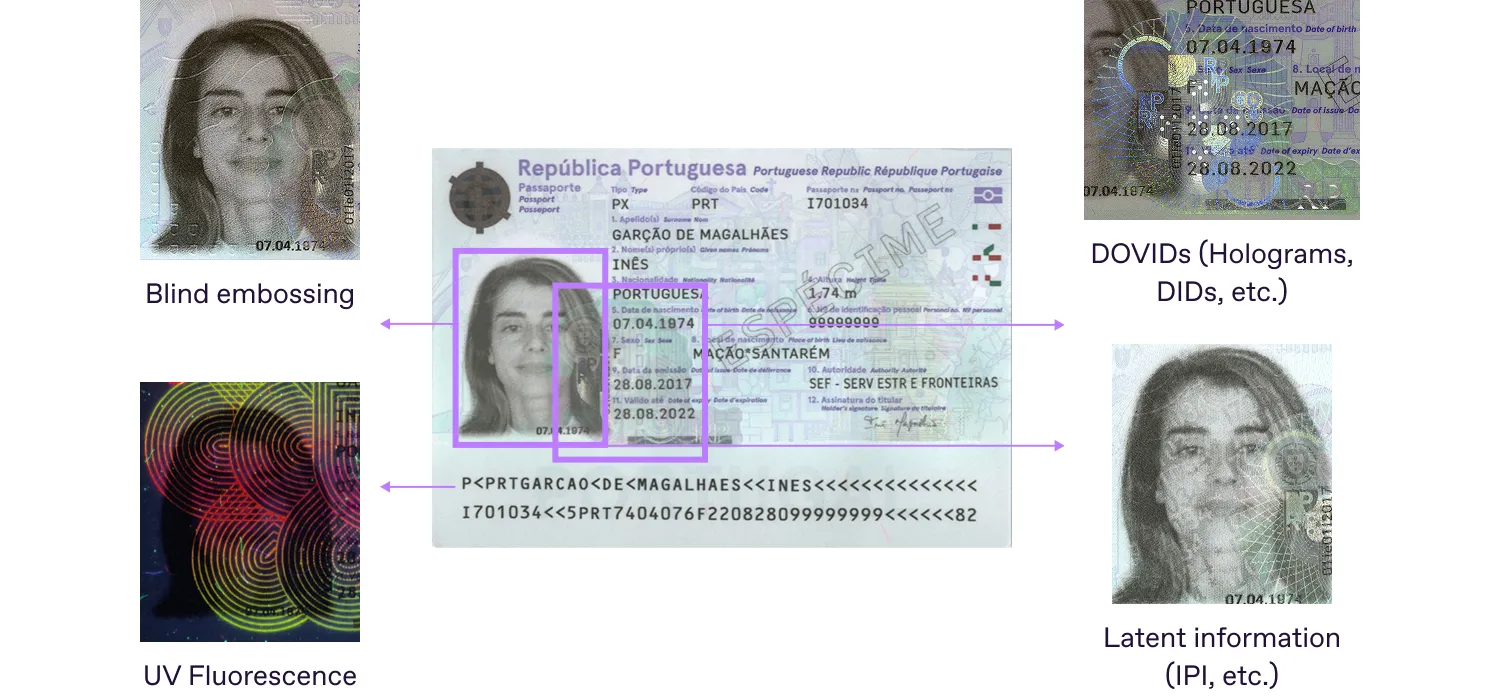
You’ve already seen the covering UV patterns and DID elements in the examples above. But let’s add a few more words about the UV pattern.
An even more effective security feature is a UV pattern that covers the entire surface of the portrait area (or as much as possible). It significantly reduces the chances of morphing.
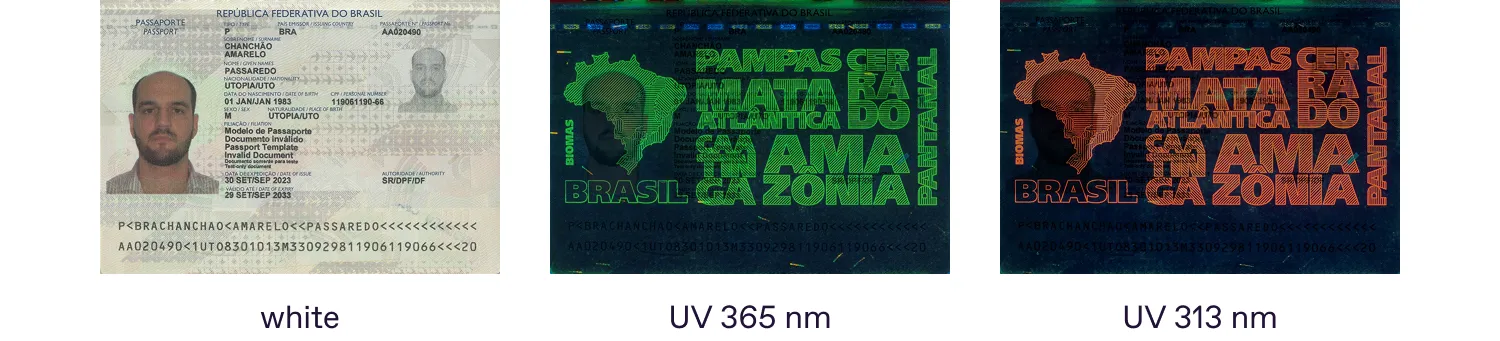
Brazilian passport issued in 2023. The UV pattern covers almost the entire area of the portrait. Additionally, it features fluorescence under UV 313 nm.
Blind embossing is a widely used security feature that helps protect the integrity of personal data embedded in a passport. At the same time, it may serve a dual purpose by safeguarding the portrait area against illicit manipulation.
Let’s examine two modern passports and compare how blind embossing is implemented in each of them.
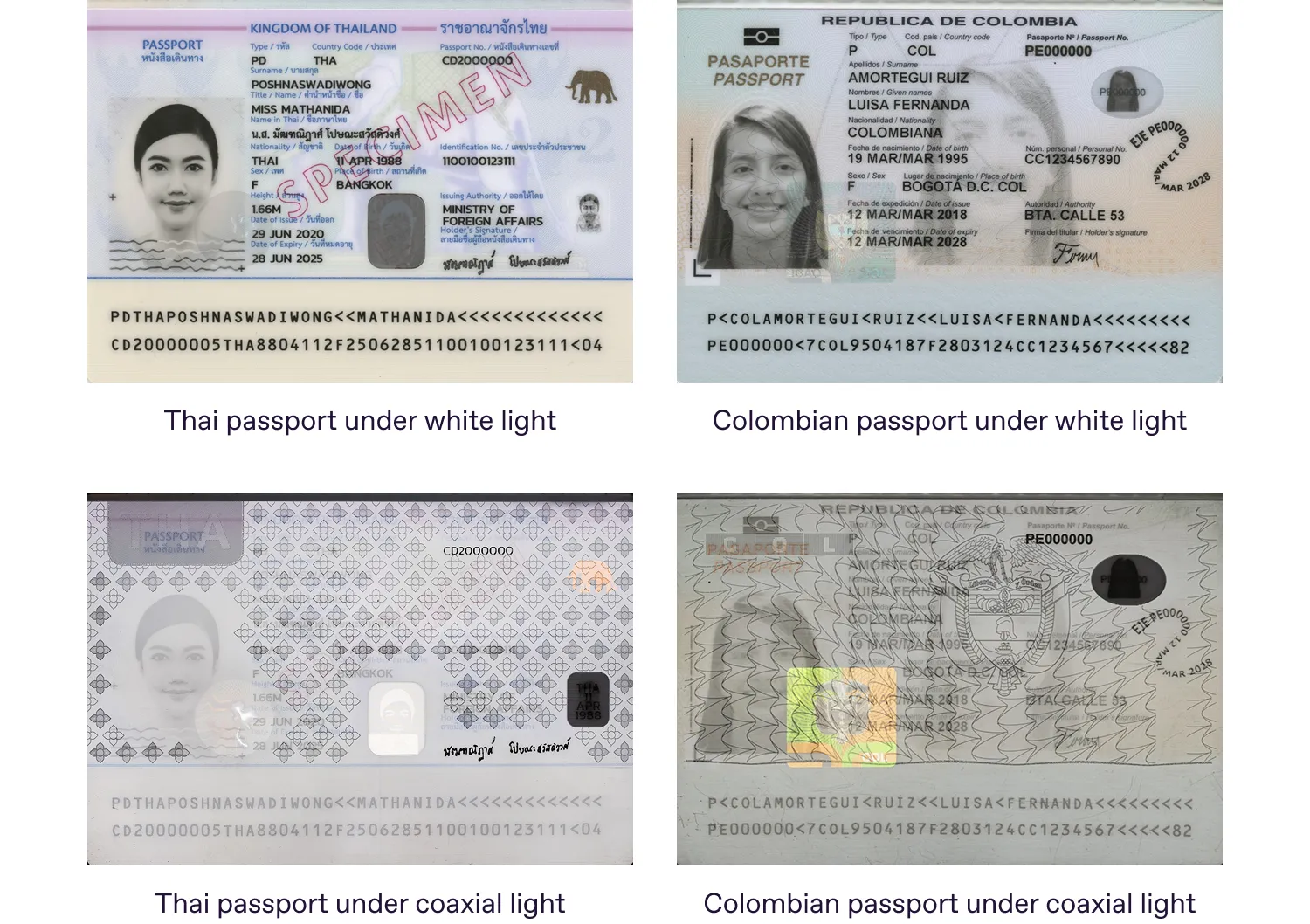
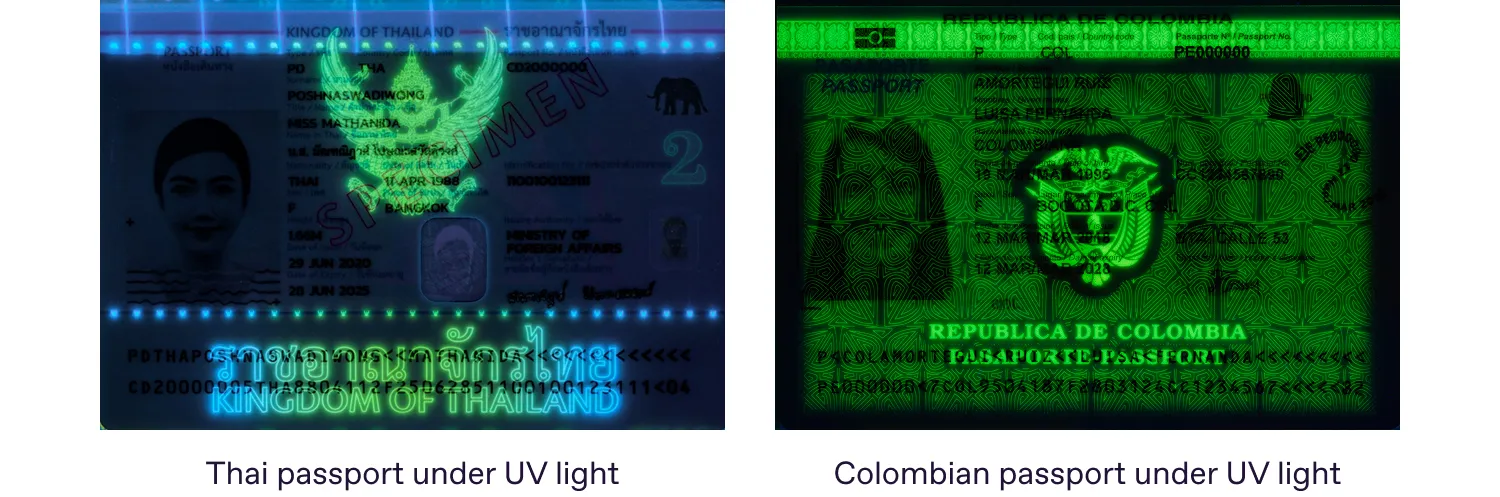
Both passports feature polycarbonate data pages with laser-engraved portraits. Under coaxial light, it becomes clear that the manufacturers have taken different approaches to photo protection. In the Thai passport, the entire surface except the photo area is embossed, whereas in the Colombian passport the embossing also covers the portrait — an approach that, in our view, provides stronger protection against morphing.
Under UV light, we see that a similar approach has been chosen by the manufacturers of these documents. However, there’s a difference. In the Colombian passport, any attempt to morph the holder’s portrait would inevitably damage both the blind embossing and the UV pattern, leaving clear signs of tampering. In the Thai passport, the security features surround the portrait area but do not extend across it, which reduces the level of protection for the portrait itself.
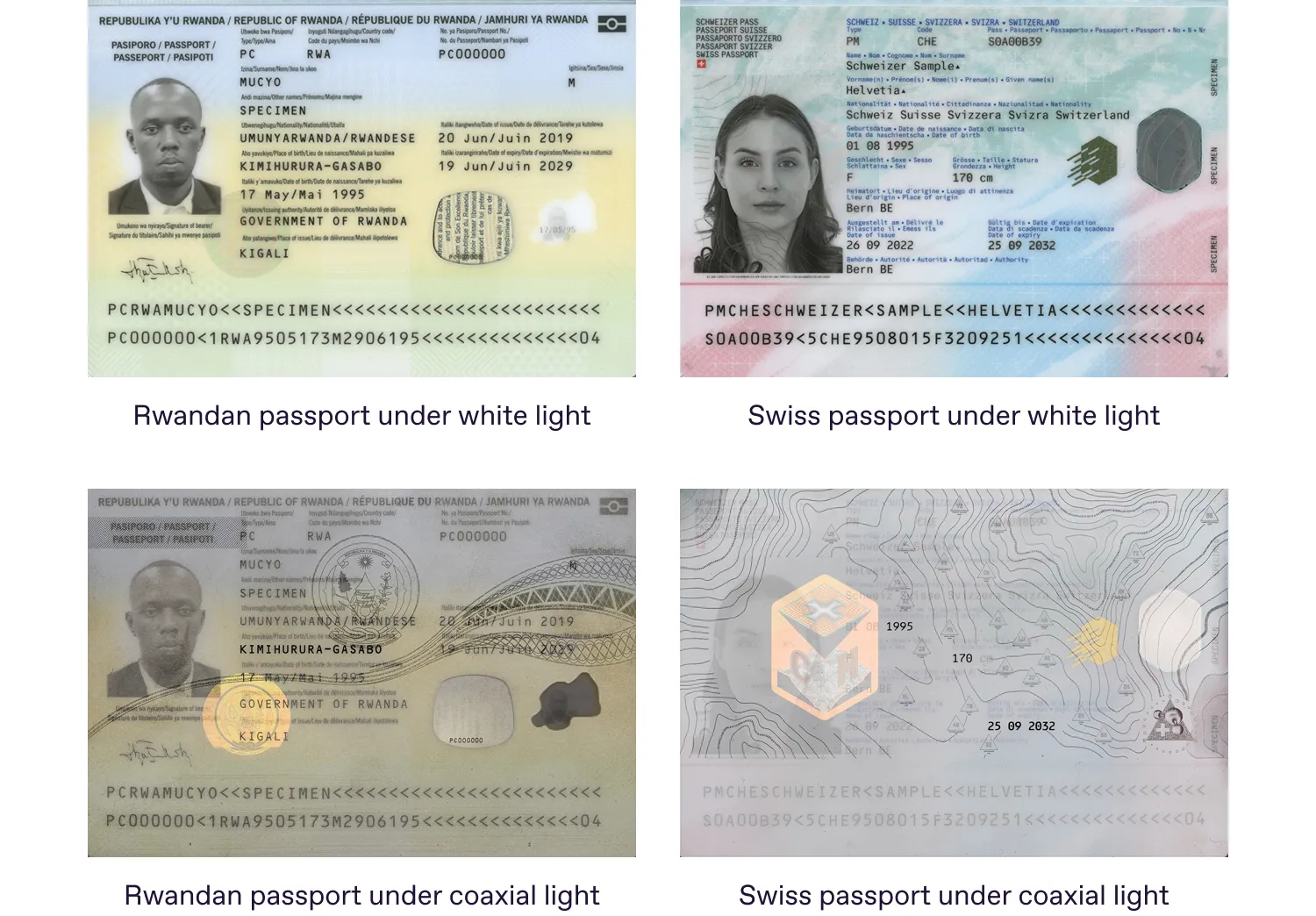
Considering once again the DOVID elements — holograms, kinegrams, DID — you can see the same trend.
In the case of the Swiss passport, the DID element covers half of the portrait, making it impossible to morph the face without spoiling the integrity of the DID element. But the Rwandan passport lacks protection over the portrait area, even though it incorporates the same security feature.
Conclusion
Proper placement of traditional security features remains one of the most efficient and cost-effective strategies for preventing document forgery. By integrating these elements directly into the portrait area or the surrounding design, manufacturers significantly complicate any attempt to alter or replace the portrait.
Such features allow both automated verification systems and forensic experts to identify inconsistencies quickly, even when the manipulated photo appears convincing under white light. Ultimately, thoughtful security feature design enhances overall document security without increasing production expenses.
As developers of forensic hardware, we not only create solutions for assessing the integrity and authenticity of identity documents, but also support users through our continuously updated Information and Reference Systems.
These systems provide images of a wide range of identity documents under various lighting conditions, along with detailed, magnified views of their security features. These images serve as trusted references when there are no physical specimens at hand.