



In brief: Facial recognition identifies a person by comparing one face against many stored images. It can speed up access control, watchlist screening, fraud detection, and other large-scale identification tasks. However, results are probabilistic, so organizations must account for image quality, database quality, matching thresholds, and review rules before relying on the technology.
At times, identity verification resembles a box of Lego bricks. There are basic bricks, without which you can’t build castle walls. Missing one brick increases the risk that the entire construction will collapse. There are also fancy bricks, such as flags, or even a dragon to sit on the wall. You can go without them — but it’s definitely less fun.
In this analogy, face recognition isn’t a basic brick for just any identity verification workflow, save perhaps surveillance. However, it definitely adds a layer of security for most businesses.
In this post, we’ll discuss how facial recognition works in identity verification and cover scenarios where it’s worth a shot.
What is facial recognition?
Face recognition is a biometric technology used to identify a person based on their facial features. Once it receives an image, the technology searches a database of faces for a likely match. This search is performed on a one-to-many basis (1:N): one face is compared against many others, with N referring to the size of the database.
Perhaps you entered a secured area after a camera recognized your face. This is a common use case for facial recognition. The system literally looks through all their employees' profiles to identify the one who’s standing at the turnstile before granting access.
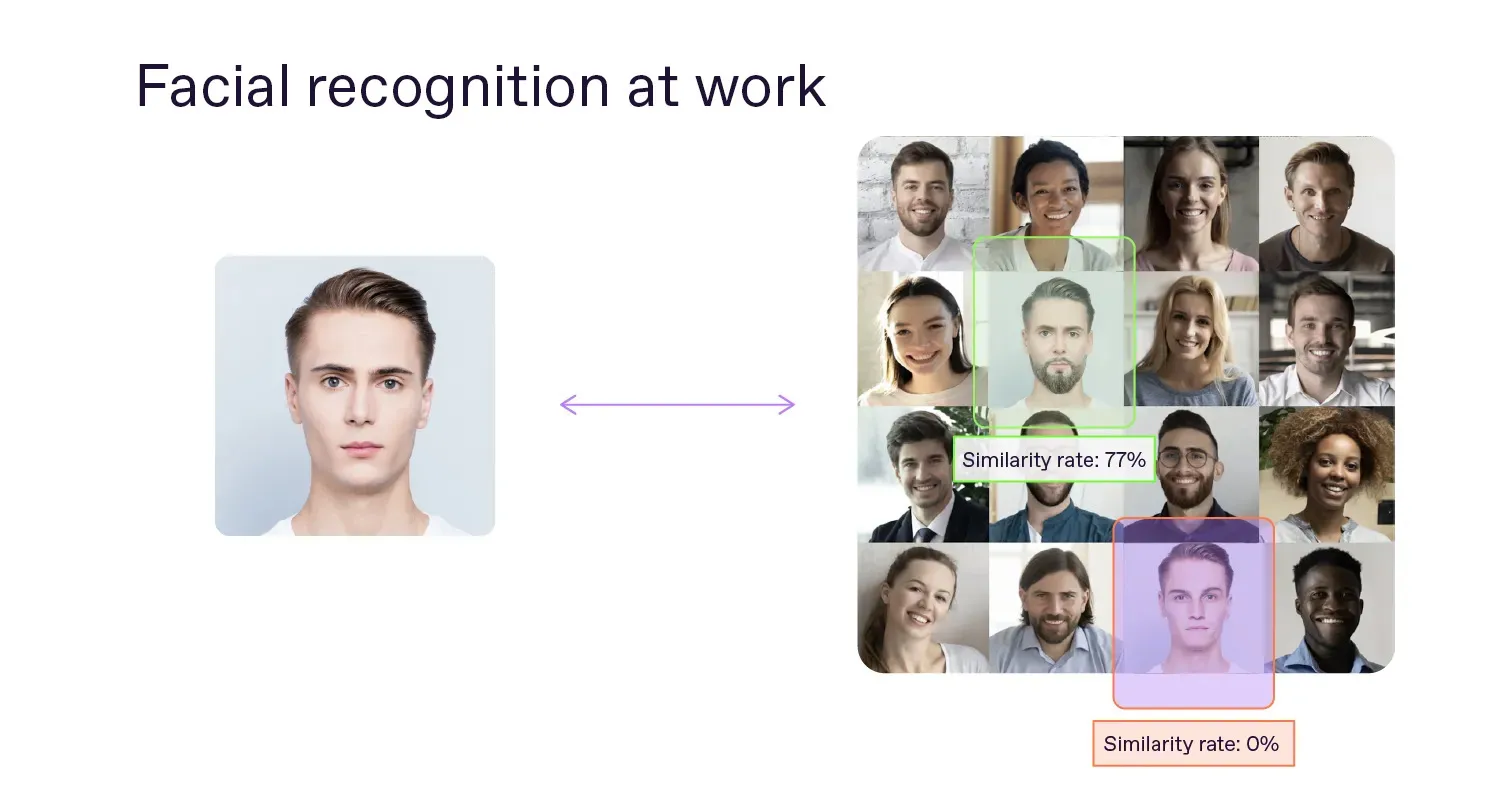
Typically, face recognition yields a similarity score rather than a binary match/no-match result. This is because faces are subject to variations in expression, capture angle, makeup, accessories, and age, among other factors.
Subscribe to receive a bi-weekly blog digest from Regula
Is face recognition the same as face matching?
Facial recognition and face matching are different procedures and serve different purposes.
Face matching, also called face verification, operates on a one-to-one (1:1) basis. For example, an identity verification system may compare a selfie with a portrait on an identity document to determine whether the two images depict the same person.
Facial recognition works on a one-to-many basis (1:N). If you need an alternative term for face recognition, then it’d be “face search” or “face identification."
💡Biometrics includes many related technologies and terms. We’ve prepared an explainer to help you understand the differences between the most common biometric processes.
How does facial recognition work?
A facial recognition process usually includes five steps:
-
Image capture. The system receives an image of a person’s face. It may be captured live, for example, during online onboarding or at a border crossing, or uploaded from a user’s device.
-
Face detection. The system locates the face in the image and separates it from the background.
-
Facial feature extraction. The system analyzes facial landmarks, such as the positions of the eyes, nose, jawline, and cheekbones. It then converts these features into a mathematical representation — a template. This template is a digital version of the face, which the system will use for comparison.
-
Comparison. The new template is compared with templates stored in a database.
-
Decision. The system returns a similarity score. A predefined threshold determines whether the result is treated as a match, a non-match, or a case that requires additional review.
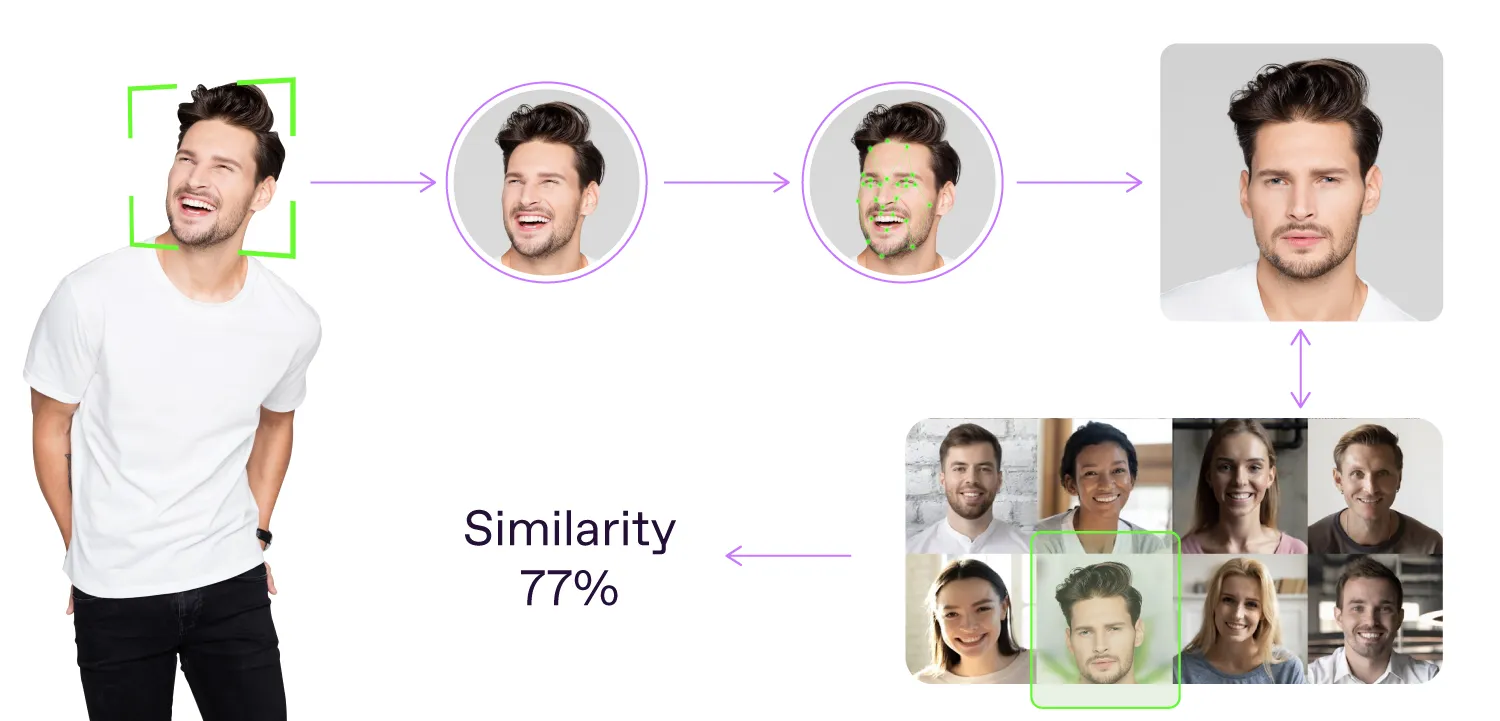
Facial recognition algorithm
How does facial recognition differ in identity verification?
In identity verification, facial recognition follows the same basic process: detection, analysis, and comparison. The main difference is a stronger focus on image quality.
Before comparing faces, advanced identity verification systems assess whether the image is suitable for analysis. Blur, poor lighting, extreme head angles, low resolution, or occlusions such as masks and glasses can reduce matching accuracy.
At the same time, this step may be less critical in controlled environments, where trained staff capture images under consistent conditions.
Where is facial recognition used?
Facial recognition is most useful when organizations need to identify people quickly and at scale. Common applications include:
-
Law enforcement. Agencies may search an image against watchlists or investigative databases to help identify a person.
-
Border control and aviation. Authorities may screen travelers against watchlists or government image databases.
-
Access control. Organizations can identify enrolled employees, residents, or visitors before granting entry.
- Banking and financial services. Banks may detect duplicate applicants or identify faces associated with prior fraud.
-
Large events. Organizers may use facial recognition to identify registered attendees or people on exclusion lists.
-
Retail and hospitality. Businesses may identify enrolled customers to personalize service or support loyalty programs.
-
Gambling venues. Operators may use facial recognition to identify people enrolled in self-exclusion programs.
What are the benefits of facial recognition?
Integrating a facial recognition component into your MFA strategy is a great way to safeguard against unauthorized access to your systems, platforms, and even brick-and-mortar facilities:
-
Faster identification. The system can search large image databases much faster than a human reviewer.
-
Scalability. Organizations can screen many people or images without expanding manual review teams at the same rate.
-
Fraud detection. Organizations can use it to detect duplicate identities or identify faces linked to previous fraudulent activity.
-
Operational efficiency. Automated identification can reduce queues, speed up investigations, and support faster decisions.
-
Reduced reliance on physical credentials. People can be identified without presenting cards, badges, or tickets.
What are the limitations of facial recognition?
Facial recognition can accelerate identification, but it should not be treated as a fully autonomous decision-maker.
First of all, facial recognition results are always probabilistic: the system calculates similarity and applies a threshold set for a specific use case.
Performance also depends on the data the system works with. Low-quality or outdated reference images can reduce accuracy, while large databases increase the likelihood of returning several plausible candidates rather than a clear match.
This means organizations still need rules for ambiguous results. In higher-risk scenarios, a facial recognition match may need to be reviewed by an operator or supported by additional evidence.
Last but not least, the technology also requires tuning for each deployment. A configuration suitable for event entry may be too permissive for banking, border control, or law enforcement.
For this reason, organizations rarely act on a facial recognition result alone in high-risk workflows. Before blocking an account, denying access, or stopping a traveler, they may also review identity documents, watchlist records, or relevant account and transaction data.
How to implement facial recognition in your workflows
Implementing facial recognition starts with defining the exact decision the system should support. A bank looking for duplicate applicants, an airport screening travelers against a watchlist, and a venue identifying registered guests need different database sizes, thresholds, and review rules.
The next step is to prepare the reference database. Images should be current, correctly labeled, and of sufficient quality. Poor or duplicated records will undermine even a strong matching algorithm.
Organizations also need to define what happens after the system returns a potential match. Depending on the use case, the result may trigger automatic access, additional checks, or manual review. The threshold should reflect the cost of both a false match and a missed match.
Finally, the solution should be tested under real operating conditions before rollout. This includes expected camera angles, lighting, crowd density, database size, and user demographics. Performance should then be monitored after launch, as the database and operating environment change over time.
While it's possible to undertake this work in-house, it demands considerable time and might not align with your company’s core expertise.
Regula has more than 30 years of experience in identity verification. Regula Face SDK supports face detection, image quality assessment, face matching, and face identification across devices and deployment environments.
Planning to add facial recognition to your workflow? Talk to Regula’s experts about the right setup for your use case.


