
Identity verification often embraces the principle of “the more, the merrier.” New elements are added, but older machine-readable features often remain because they are cheap, practical, and widely supported.
Barcodes are a good example. A barcode represents data in a visual, machine-readable form. It consists of codewords: combinations of bars, spaces, dots, or cells that correspond to numbers, letters, or other symbols.
Unlike their more intricate counterparts, such as CRLs or lenticular images, barcodes are inexpensive, easy to add to documents, and can be read with a regular smartphone. But despite their apparent simplicity, barcodes play a crucial role in document security.
This post covers how barcodes are used in identity documents, what data they can contain, and how barcode reading software helps you processes them effectively.
In brief:
-
Barcodes in ID documents can store names, dates, document numbers, addresses, portraits, biometric data, certificates, URLs, access codes, and digital signatures.
-
Common barcode types in identity documents include PDF417, QR code, Code 128, Code 39, Data Matrix, ITF-14, and Aztec Code.
-
For identity verification, barcode data should be parsed, validated, and cross-checked against other document sources, including VIZ, MRZ, and RFID chip data when available.
What types of barcodes are used in ID documents?
Barcodes are generally categorized into two main groups: 1D and 2D. 1D barcodes are read horizontally, so only their width carries the encoded information. With 2D barcodes, both width and height matter, allowing them to store more data in a smaller space.
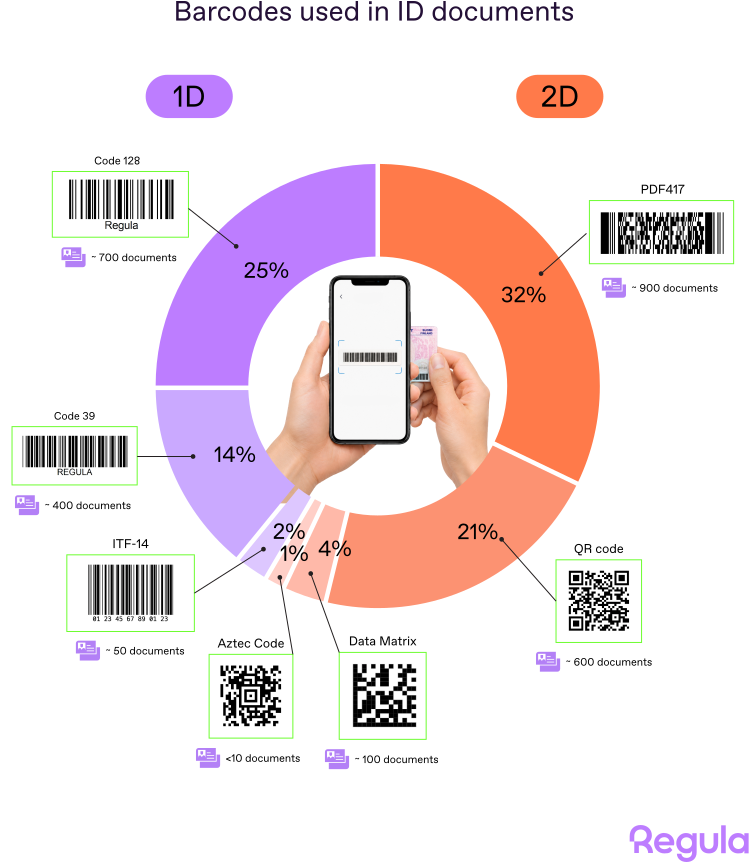
There are over 90 barcode types in total as new formats appear. In identity documents, however, the range is more conservative. According to Regula’s identity document template database, there are seven main barcode types: three from the 1D group and four from the 2D group.
Let’s have a closer look at each of them.
Get posts like this in your inbox with the bi-weekly Regula Blog Digest!
1D barcodes
1D barcodes, also known as linear barcodes, store data in a series of parallel lines of varying widths and spacings. This is the classic barcode format many people recognize from packaging, tickets, and labels.
In identity documents, 1D barcodes usually carry compact data, such as document numbers, dates, or other short identifiers.
Code 128

This barcode stands out due to its high data density and versatility. It’s often used in the shipping and packaging industries, and, of course, can be seen in identity documents too. It can encode full ASCII characters, making it suitable for encoding additional personal information.
Code 128 is the most widespread barcode type among the 1D group. It appears in almost 700 identity documents, mostly ID cards and driver’s licenses.

A Latvian ID card with a Code 128 barcode.
Code 39

Code 39 was invented in 1974. It can encode letters, numbers, and some special characters. Unlike Code 128, it doesn’t have a check digit, and its simplicity allows for easy scanning and decoding by any barcode reading software.
At the moment, Regula’s database of identity document templates includes about 400 documents with Code 39. Typically, they contain a number or series of numbers and dates.

Code 39 barcode in a Finnish driver’s license and Singapore work permit.
ITF-14

The ITF-14 barcode specializes in encoding digits, and can include a checksum as the final digit for added verification. It’s a barcode with very high data density, so it can be smaller than other codes with the same digits, meaning it can be used in limited spaces.
In the context of ID documents, ITFs are less common than the two previous types. This barcode appears in less than 50 types of documents: ID cards and driver’s licenses.

ITF-14 in Bosnia and Herzegovina ID Card (2013), reverse side.
2D barcodes
2D barcodes store information both horizontally and vertically, allowing them to hold much more data in a smaller space.
That extra capacity is why 2D barcodes are especially useful in identity documents. Depending on the document and issuing authority, they may contain personal data, document details, portraits, biometric-related data, certificates, digital signatures, URLs, or access codes.
PDF417

In PDF417, PDF stands for Portable Data File, while 417 means that each pattern in the code consists of 4 bars and spaces in a pattern that is 17 units long. Introduced in 1991, this barcode is the most popular of all barcodes ever used for identity documents. It can be found in almost 900 of them.
PDF417 is favored for its capacity to hold large amounts of data, including photographs and fingerprints. PDF417 barcodes are included in numerous passports, ID cards, and driver’s licenses. This barcode type is also the standard selected by the United States Department of Homeland Security as the machine-readable zone technology for Real ID-compliant driver licenses and state-issued identification cards.
Based on our experience, PDF417 is among the most demanding types among the barcodes used in ID documents. The thing is its extremely high density. Any physical bend or perspective distortion during capture can create significant reading challenges, because distinguishing its rows and columns is crucial for extracting the correct data.
With the growing popularity of smartphones, PDF417 is starting to lose its appeal because of its rectangular shape. Square barcodes are more mobile-friendly, because their centered alignment minimizes distortion during capture.

Examples of ID documents with PDF417 in them: Egyptian passport, Uganda ID card, Arizona driver’s license.
QR code

Initially, QR codes (short for quick-response codes) were originally invented for the automotive industry to label vehicle parts. Today, they are used across advertising, payments, healthcare, product authentication, and identity documents.
QR codes can encode a significant amount of data, including text, URLs, and other data types. In ID documents, they can contain detailed personal information, from names and dates to photographs and biometric data. Their square shape makes them convenient for mobile capture, while the design of QR codes can vary to ensure aesthetic appeal.
As of now, QR codes are present in over 600 documents, including passports, ID cards, driver’s licenses, and visas.

QR code in an overseas Korean resident card.
Data Matrix

A Data Matrix code can store up to 2,335 alphanumeric characters, and they are highly efficient for several reasons.
First, they can be used for marking small items, because they can encode fifty characters in a symbol that is readable at 2 or 3 square millimeters. Second, they can be read with just a 20% contrast ratio. Finally, they are very reliable: even if one or more cells are damaged, the message can still be read.
When it comes to identity documents, at the current time, these codes are present in less than 100 documents. For instance, they can be found in Belgian IDs.

A Data Matrix barcode in a Belgian ID card (2021).
Aztec Code

Aztec codes visually resemble QR codes, but the encoded data is placed in a spiral pattern around the square core in the center, called the bull’s eye. They are compact and robust, and can encode up to 2,000 characters even when space is limited.
In identity documents, Aztec Codes are rare. As of now, they can be found in only a few ID documents, including a Nigerian ID card.

An Aztec code used in a Nigerian ID card.
How VDS and digital credentials are changing barcode use
Many barcode types used in identity documents have existed for decades. What is changing is not only the barcode format, but also how the data inside the barcode is structured and protected.
The ICAO introduced a new universal format of barcode encoding for use in ID documents. It can be found in a recent Icelandic ID, for example.

A reverse side of an Icelandic ID (2024).
Another important use case is the Visible Digital Seal, or VDS. A VDS is a QR code or Data Matrix code that contains information about a document and a digital signature to protect that data against any manipulation.
VDS can already be found in European visas, where they store an applicant’s full name, gender, dates, visa number, passport number, and other document details.

German National Visa Type D with Data Matrix barcodes used in a VDS
Barcodes are also relevant to the development of Digital Travel Authorization and Digital Travel Credentials where the data within barcodes will be digitally signed.
In foundational long-term scenarios like travels, there will likely be leveraged a DTC-PC approach. It implies using a dedicated physical component, such as a chip or a particular device.
In short-term use cases or scenarios that play a supporting role and should be cheap (providing an access code, visas, permits, etc.), barcodes will likely be used everywhere. They even have the potential to replace MRZ in many cases.
In other words, barcodes and barcode reading technologies are definitely here to stay.
How barcode scanning software works in identity verification
Now, let’s have a look at how barcodes are handled during identity document verification. This process consists of three basic steps: detection, reading and decoding, and data parsing.
1. Barcode detection
If barcode reading software faces a new document type, it runs a barcode detector. The detector looks for objects that resemble barcodes, then analyzes each candidate and determines its type.
If the software already recognizes the document template, the detection step can be skipped. The system already knows where the barcode should be located and what barcode type to expect.
2. Barcode reading and decoding
Once the barcode area is found, barcode reading software fetches the data. It reads the codewords, turns them into a byte array, and checks them with an error correction algorithm to confirm that it’s the correct set of bytes that the issuer laid down.
What is error correction in barcodes?
Error correction is a mechanism used in 2D barcodes that acts as a safety net during the decoding process. It allows you to fix some errors that may arise because of capture issues or physical damage to the barcode itself.
All the codewords of a barcode either contain encoded data or information for correction. The ratio is called the level of error correction. It can vary, ranging from 0 to 9. The higher the level, the more backup codewords are included. At the highest level, you can damage a significant part of the cells and still read the barcode.
However, this comes at a price. Increasing the level of error correction requires more codewords, which eats up capacity and can lead to either a larger barcode size or a smaller payload.
3. Barcode data parsing
After decoding, the software still has only raw data. To make it useful, it needs to parse that data into structured fields. Those fields may include text fields, images, information for fingerprint verification, electronic signatures and certificates, access codes (like a card access number, or CAN), URLs, and more.
Regula Document Reader has over 200 parsers for data encoded according to different standards (ICAO, AAMVA, ISO, etc.) and for specific custom documents. This means it can translate the vast majority of barcodes into a set of structured information that is convenient to further work with. However, what exactly is possible to parse (or whether it’s possible at all) depends on the particular issuer.
For example, Brazilian authorities don’t disclose decoding algorithms for their identity documents, so all you can get is a set of bytes. On the opposite pole, there are American driver’s licenses, with all barcode data recorded according to the AAMVA standard. Within their barcodes, there are certain headers that can tell you the exact version of the AAMVA standard used to record the data, as well as how to parse it.
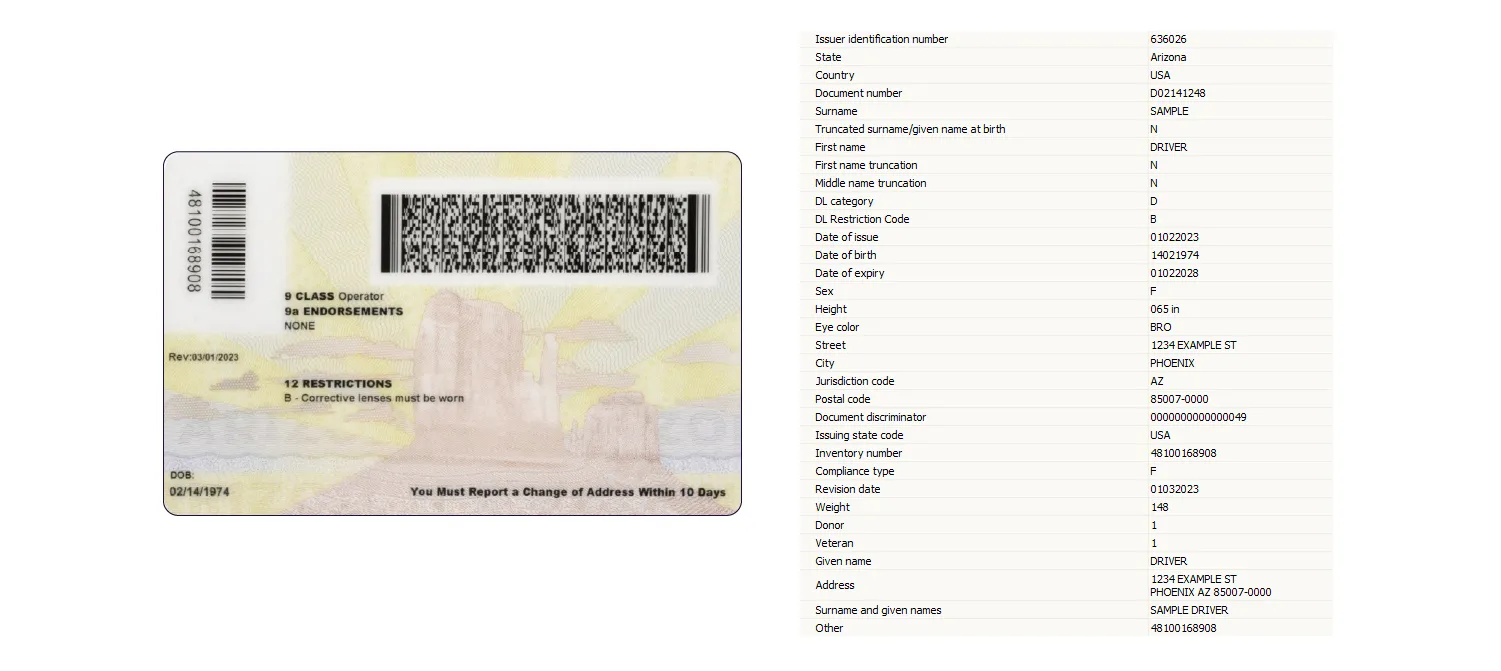
Well-structured and comprehensive data parsed from Arizona driver’s license.
How is barcode data checked during document verification?
Reading a barcode is not the same as verifying it. For verification, barcodes can be divided into two broad groups:
-
Barcodes with digitally signed data
-
Barcodes without additional cryptographic protection
This determines the scenario of using the barcode for document verification.
If a barcode contains a digital signature, it is enough to check the signature to be sure of the authenticity of the data. However, this requires access to the necessary publisher’s certificates.
However, many identity documents still use barcodes where the data can be read as is. In these cases, document verification software has to rely on indirect checks, such as:
-
Expected barcode type
-
Barcode size and location
-
Number of rows and columns
-
Error correction level
-
Encoded data format
That's why it’s key to find a vendor with expertise in ID documents.
For instance, Regula has a feature called a “barcode format check.” This feature checks the barcode for any incorrect or missing information, and verifies the barcode's layout. Even if a barcode has the right data and follows the encoding standards, any unusual patterns, like an unusual number of rows or columns for this specific document, will be flagged for further investigation.

A counterfeit barcode can appear authentic unless you know the precise size used on genuine documents.
What affects barcode reading accuracy?
Barcode reading accuracy depends on three main factors: image quality, barcode size, and support for diverse barcode formats. These factors matter even more in remote identity verification, where users capture documents with different devices, lighting conditions, and camera angles.
The contrast and image quality
Barcodes are elements that consist of tiny blocks, also known as codewords. To read barcodes, you need to accurately distinguish such codewords, so it’s crucial to have a good contrast.
Contrast, essentially, means the width of the transition between the black parts and the white parts. If you have a low resolution, there will be transitional gray areas. This complicates things.

With low resolution, the barcode elements become less distinct, making its reading harder.
A significant challenge arises during remote onboarding processes, often attributed to subpar camera quality or unfavorable capturing conditions (e.g., low-light environments). Take the cheapest smartphone, shoot in dim light, and even a perfectly printed barcode, regardless of the type, will have poor contrast and, hence, plenty of blurred areas.
This issue isn’t only caused by camera quality; older documents with visible signs of wear and tear can present difficulties as well, with barcodes that may have faded or sustained damage over time.
Barcode size and density
The physical size of a barcode matters, but size alone is not enough. A large barcode can still be hard to read if it contains a dense payload or if the user captures it from too far away.
Let’s take a look at a new Austrian ID as an example. Its QR code is large. However, they are also chock-full of information — the size of the minimal element in this barcode is only about 0.17 mm. Even if the ID fits perfectly into the camera frame in portrait mode, the minimal element will hardly exceed 2 pixels. To read such barcodes well, you’ll need a very good camera.

Among other things, this QR code contains a rather high-quality portrait photo.
Support for diverse barcode formats
The numerous existing barcode formats add to the complexity. While this article focuses on the seven most prevalent barcode types, even they can have sub-variations.
Barcode standards may define recommended proportions, but identity documents do not always follow ideal layouts. For example, the recommended aspect ratio for PDF417 is 3:7, but in practice barcodes may be flattened or stretched to fit the document design.
Again, expertise and experience with identity documents is invaluable here. Regula’s experts have analyzed thousands of identity documents from around the world, including the specific ways barcodes are printed, positioned, sized, and encoded across different document types.
Because of this document-specific knowledge, Regula’s reading algorithms can account for known deviations from barcode standards, such as unusual proportions, placement, density, or issuer-specific formatting.
What to look for in barcode reading software for identity documents?
The key to reliable barcode processing is barcode reading software that can handle poor capture conditions, process different barcode types, confidently work with rotated, bent, or skewed barcodes, and parse issuer-specific data formats. For identity verification, however, barcode reading should also be part of a broader document verification workflow.
Regula Document Reader SDK is an example of such a solution.
-
Regula processes barcodes from various sources, including photographs, scans, and real-time video streams.
-
Its barcode reading technology is equipped to scan barcodes in documents under a wide range of conditions. It’s designed to handle all types of barcodes, even when they are inverted or captured in low light.
-
The foundation of Regula’s barcode verification capabilities is the world's largest database of identity document templates, comprising over 16,000 documents from 254 countries and territories.
-
With support for 220 parsers, it can pull meaningful information from almost any barcode on ID documents globally, independent of their origin or specific format.
-
Regula Document Reader SDK works across different platforms and devices, contributing to user experience along with security.
Would you like to see it in practice? Talk to Regula’s experts or test-drive the solution right away.