



OCR is useful when the job is simple: find text in an image and turn it into editable characters.
Identity documents are not that simple. The same document can contain visible text, an MRZ, a PDF417 barcode, and an RFID chip. The same field may appear in several places, in different formats, or in different scripts. For a business, the question is not just “Can we read this?” It is “Can we trust this data enough to use it?”
In this article, we’ll look at where basic OCR works, where template-based OCR starts to break down, and how ID parsing helps businesses get structured, verified data from identity documents.
In brief:
-
OCR capabilities alone have nothing to do with ID document verification.
-
The point of identity document parsing is to return structured, analyzed, and verified data that is ready for further usage.
-
Make sure the provider you choose for ID OCR and ID parsing has proven forensics-level expertise in identity documents.
What is OCR, and where does it fall short with IDs?
Optical character recognition, or OCR for short, is a technology that can turn an image of text into actual editable text. For example, a scanned passport is an image, so you can’t just press Ctrl+C and Ctrl+V to copy the details and paste them somewhere else. OCR distinguishes text characters within images and converts them into text format, so you don’t have to type anything manually.
A great example of OCR is the Live Text feature available with Apple devices. It allows you to fetch text from photos and images with a tap, which comes in handy when you need to extract a phone number or add something to your notes.

A really convenient feature, though the resulting text requires a bit of editing.
However, what might be a solution for a single task won’t always help you cope with the same task at scale. OCR turns images into machine-readable text, and that’s it. If you have a lot of documents (especially if those documents contain various data) you’ll likely end up with a messy heap of text that’s hardly actionable without some prior brush-up.
OCR providers didn’t ignore this problem and offered a solution: template-based OCR.
Subscribe to receive a bi-weekly blog digest from Regula
What is template-based OCR?
Template-based OCR allows you to create document maps — templates — using a set of your most common documents as a foundation. With these OCR templates, the computer will know where important elements are located on the page. As a result, you get more actionable output than with ordinary OCR because it allows you to mark up and pull out information in a more structured way.
OCR templates are often used in robotic process automation (RPA) solutions. RPA is a technology that allows you to automate repetitive tasks that follow the same rules with the help of software bots. If you were to build a bot for paying the same invoices every week, template-based OCR would be a perfect candidate for that kind of task.

For example, in an invoice, the date might be always in the upper right corner, and the total amount appears at the bottom. A perfect candidate for template-based OCR.
What are the limitations of template-based OCR?
As good as it sounds, if your goal is to OCR ID documents, the template-based OCR method might still not be quite enough.
Amount of manual work. To make template-based OCR templating work, you need to manually mark up the data in every document type you need. So, if you need to process passports from different countries, you’ll have to mark up a passport from each country to create its template. Add other identity documents, such as ID cards, to this, and you’ll have an even larger amount of painstaking labor.
The need to maintain templates. The created OCR template only works as long as the document itself doesn’t change. If there are new fields, or they are placed in a new location, you need to update the template.
No verification capabilities. Worse still, the challenge with ID documents isn’t just getting some data from them. It's about making sure the data and the document are valid. No OCR solution, which simply recognizes text, can help you with that.
OCR cannot read non-text data sources. ID documents contain information not only in text format, but also encrypted in barcodes, RFID (radio frequency identification) chips, and machine-readable zones (MRZs). For conventional OCR tools, it’s impossible to read and verify these elements.
What is ID document parsing?
ID document parsing is the process of extracting, structuring, normalizing, and validating data from an identity document so it can be used in a business workflow. Unlike basic OCR, which mainly recognizes visible text, ID document parsing uses lexical analysis to read different data sources inside the document, including the visual inspection zone, MRZ, barcodes, and RFID chip, where available.
Let’s have a look at it in comparison with OCR.
| Capability | OCR | Template-based OCR | ID parsing |
|---|---|---|---|
| Extracts visible text | Yes | Yes | Yes |
| Identifies document type automatically | No | Limited | Yes |
| Reads MRZ | No | Limited | Yes |
| Reads barcodes | No | Limited | Yes |
| Reads RFID/NFC chip data | No | No | Yes |
| Normalizes dates, names, and formats | No | Limited | Yes |
| Compares data across VIZ, MRZ, barcode, and chip | No | No | Yes |
| Flags invalid or inconsistent fields | No | Limited | Yes |
| Supports document authenticity checks | No | No | Yes (the scope of checks depends on the solution used) |
How does ID parsing work?
To illustrate the point, we’ll further use the data parsing capabilities of Regula’s document parsing software, which is purpose-built for reading identity documents. Generally, the process of document parsing consists of five steps:
-
Scanning a document
-
Automatically identifying its type by comparing the document against a database of document templates
-
Reading and validating the fields that are defined by the template
-
Structuring the output
-
Document verification
While the first three steps of the document parsing process resemble the principles of template-based OCR, there can be major differences, depending on who created the document templates, the number of templates, and how well they are done.
The templates for ID parsing
When using an in-house OCR solution, the number of templates is usually limited to the few most common ones. In contrast, Regula’s document parsing software leverages the world’s largest document templates database, which currently includes over 16,000 templates of passports, ID cards, visas, driver’s licenses, and other documents from all over the world.
The depth of template detail is another point in favor of using specialized ID parsing software. To create a reliable template, you need to have information about all the possible variations for each field in the document. This isn’t something you can do with just a couple of samples at hand.
Let’s take ID cards OCR as an example. Usually, the expiration date on ID cards is usually written as a date. In some countries, like Bulgaria or Vietnam, there are the words “No expiration date” (or words to that effect in the respective language) for people over a certain age. If you don't know these peculiarities, the template becomes useless.
Before a new template gets in the database, Regula’s in-house forensic experts scrutinize it and report every security feature using advanced proprietary equipment. Thanks to this, you can be sure that the automated check matches the quality of a lab examination (but much faster).
Even if your customer submits a document you’ve never seen and in a language you don’t speak, Regula will be able to recognize it in a moment and tell you what it is and what its characteristics are.

Can document parsing software verify documents?
It depends on the level of analysis depth you need, but the short answer is: yes, it can.
Lexical analysis. ID parsing by Regula starts with lexical analysis and validation that every field in the document says exactly what it should say. It checks if the expiration dates are valid, and flags, for example, if it’s 2022 but the document expired in 2021.
The lexical analysis also includes mask violations: say we expect a field to contain a date, but there’s no date or the field has another value. There is also an analysis for stop words: the provided documents shouldn’t have words such as “sample,” “specimen” or “test.” All this happens automatically and is indicated in the field statuses.
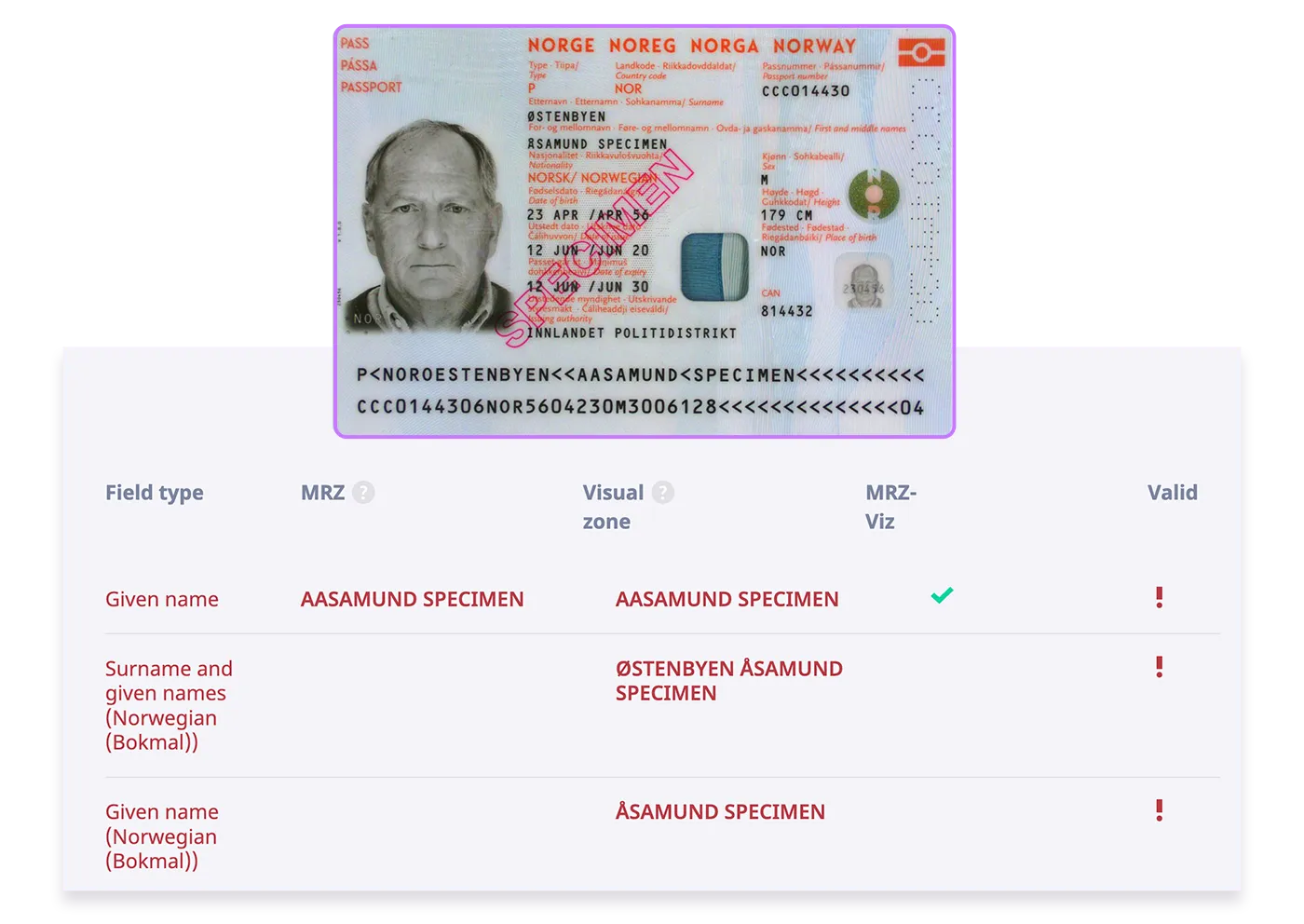
Lexical analysis detected the word “specimen” and marked these fields as invalid.
Data cross-checks. Identity documents can have four types of data sources: visual inspection area, MRZ, RFID chip, and barcodes. The data in different sources is often duplicated.
Unlike an OCR solution, Regula’s data parsing software reads all the sources and automatically compares all similar fields. For example, it can take a person’s last name from the RFID chip and compare it to the last name written in the MRZ and the one in the visual inspection zone. So, if someone altered their name in the visual inspection zone (relatively easy to do) but failed to update the chip (a way harder thing to do), it’ll be detected.
Validating encoded information. Another example of verification that became in demand recently is decoding Visible Digital Seals (VDSs).
A typical VDS looks like a QR code. For example, it was used for issuing Covid-19 vaccination certificates. It’s also used for visas: starting from May 2022, all Schengen visas have VDSs. Regula can effectively analyze the digital signature that the VDS barcode contains and verify that it was signed with a specific certificate issued by a specific country, not just randomly generated.
How does ID parsing process barcodes and MRZs?
There’s one thing in common between barcodes and MRZs — their diversity. If your solution lacks the knowledge of at least a few of their possible variations, it’ll lead to an influx of false positives and eventually undermine trust in the check.
There’s a huge variety of barcodes, and each type requires its own parser for processing. For example, Regula uses 220 different barcode parsers built for specific documents to handle this task. The main difficulty with this is that you need to understand what format is used to encode the data to be able to distill it down to text fields.
For example, Canadian and US driver’s licenses often contain a PDF417 barcode, but you can’t read it without knowing what format was used for encoding. This barcode has a header that says what parser type to use. Regula gets this information and then uses this parser to decipher the rest of the barcode body into specific text fields marked with their types for the end user.
AAMVA, the American standard for encoding, also has numerous versions that have been used to fill in documents over time. This fact must be taken into account if you want not only to read encoded information but also verify it.
As for MRZ, there’s the ICAO 9303 standard, and in theory, everyone should adhere to it. The reality is that many countries bring their own innovations. Romania, Kuwait, and the UAE, for instance, count checksums differently, thus creating a fork for the standard MRZ. With the most comprehensive document template database, Regula effectively handles these nuances too.

A PDF417 barcode, when properly handled, contains plenty of information for verification purposes.
How does an ID parsing SDK structure data?
An ID parsing SDK should return structured data that business systems can use without manual sorting. For this purpose it does at least four jobs:
-
Assigning data to field types. All the data read is divided into groups and fields. Each field is assigned a type. Thanks to this, users can scan a document and instantly pull out the specific information they need: for example, they can request only the full name.
-
Handling repeated and multilingual fields. There can be several fields of the same type in one document, but in different languages (say, Latin characters and a national language). ID parsing SDK allows you to retrieve the data regardless of what kind of document it is and where exactly it is located in the document, and in the language that is relevant for your purposes.
-
Extracting visual elements. This includes the image of the document itself and cropped-out visual elements, such as the portrait photo, ghost portrait, and signature. Regula, for example, saves each element separately, so it’s ready for further use. You can use the portrait extracted at this step to conduct face matching checks.
-
Normalizing formats. It’s about converting data in different measurement systems (metrical/imperial) and date formats (yyyy/dd/mm, dd.mm.yyyy) into a unified format set by the user. This allows you to provide values that users are familiar with (say, converting a Thai year to the Gregorian calendar) and immediately compare data at verification checks.

Not only text fields but also visual elements of IDs are quickly accessible with document parsing.
The bottom line
Data can hardly be used in its raw state. Once collected, it needs to be broken down and analyzed to have value and eventually turn into decisions. While OCR is a great technology that has revolutionized data collection, it’s no longer enough to deal with identity documents effectively.
The main idea behind ID parsing is to quickly deliver ready-to-use results. You quickly get the analysis, make sure the document is authentic, quickly fetch information from certain fields, and quickly scan and digitize the document to fill out a form in your internal system.
Not only is it convenient, as it speeds up the workflow, but also informative and secure. Having provided an executive summary of the analysis, ID parsing allows you to dig deeper into each check down to the raw data.
When backed up with solid expertise in protected document forensics, as in the solution Regula provides, it helps you solve most challenges with identity document processing. If you need to OCR IDs but don’t know yet where to start — Regula experts are here to help.
.webp)


