
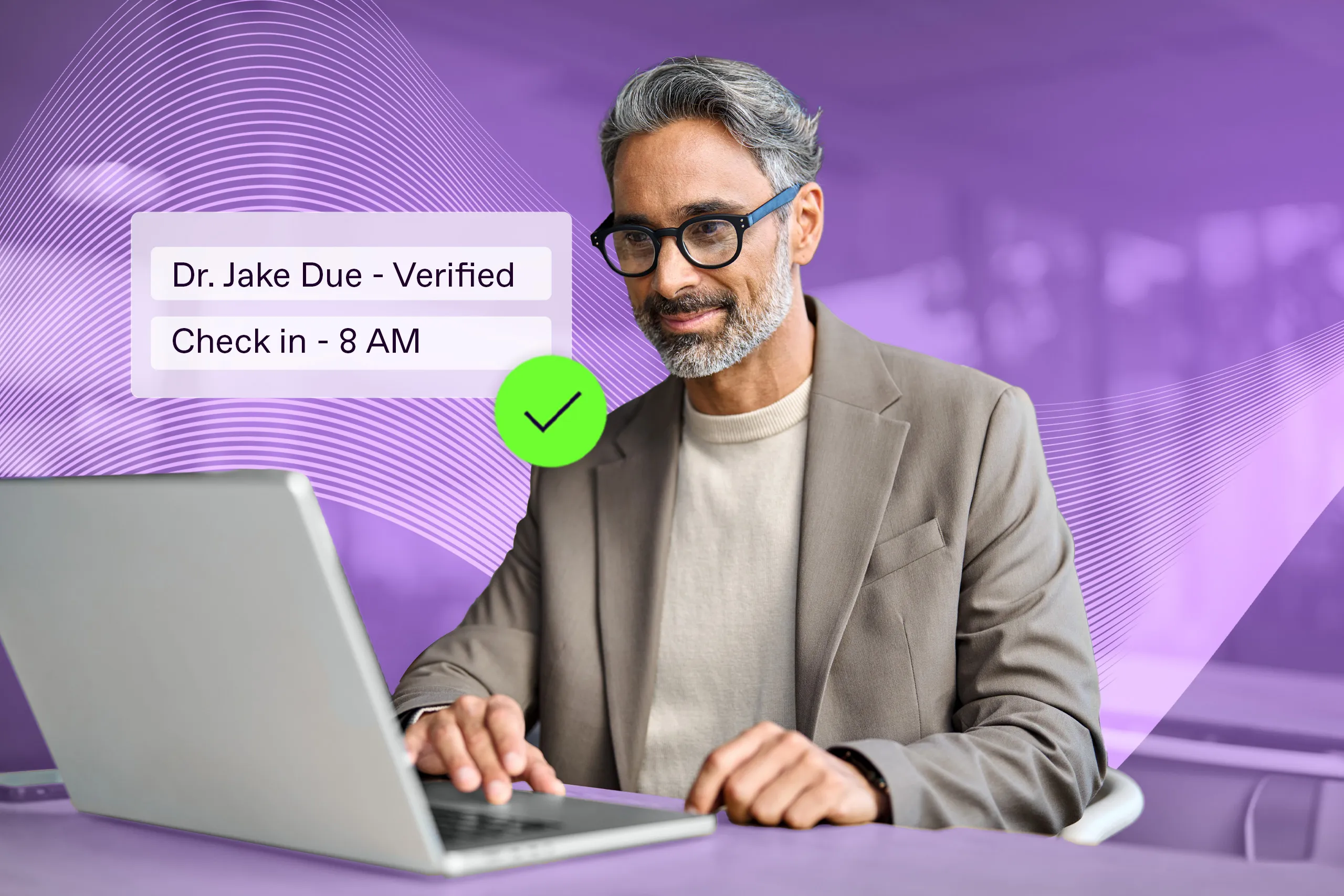
Tracking attendance in hybrid and distributed workplaces comes with its own challenges. Besides the operational issues of handling daily check-ins across different time zones and locations, companies also face a higher risk of fraud.
Modern face verification systems are poised to simplify these processes, making attendance tracking easier and more secure through mobile phones.
- But how well does the technology actually work?
- What types of use cases can it support?
- And what should you weigh when choosing a mobile attendance solution?
Let’s explore in detail.

Get posts like this in your inbox with the bi-weekly Regula Blog Digest!
What is a mobile employee attendance system?
Implemented as a mobile app, this system tracks employee check-ins and check-outs using biometrics like facial scans or fingerprints, or digital credentials such as QR codes.
In this article, we focus on facial matching. As part of a mobile attendance system, this technology helps organizations automate time and attendance tracking for employees working in different offices and remote locations.
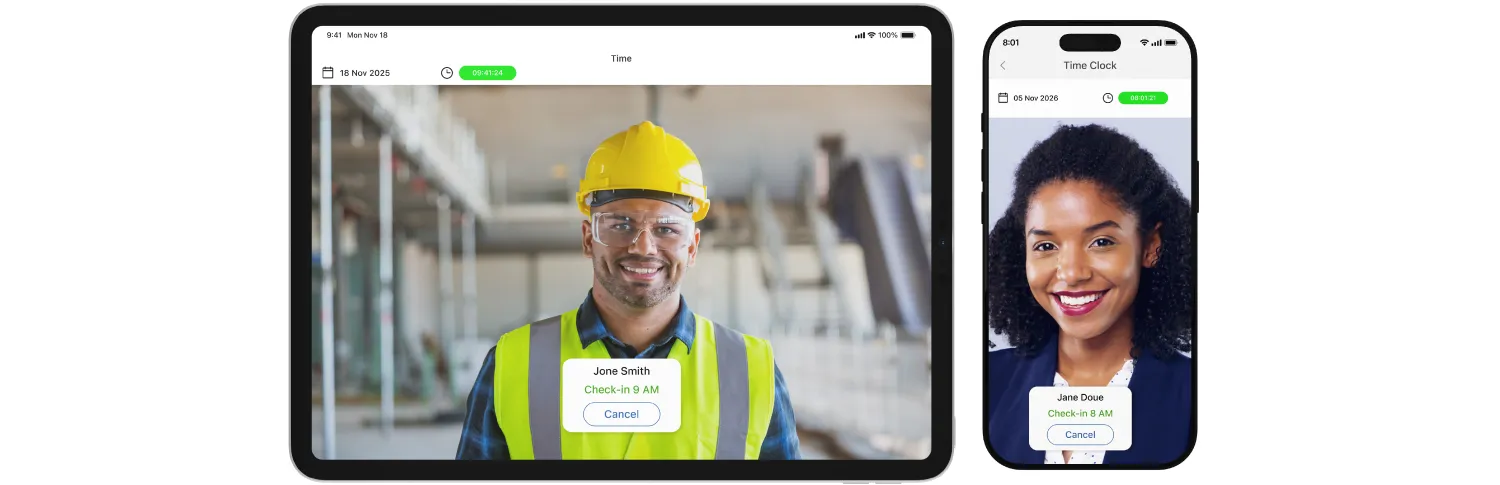
An employee attendance system works best for managing a distributed and remote workforce.
To begin, users must be registered in the system by submitting a photo and other credentials. These photos are typically stored as digital descriptors, not as standalone images. A descriptor is a unique token that contains all the data needed to match a selfie with a specific individual.
Then, the app uses the employee's mobile phone camera to detect and identify their face, automatically logging clock-in and clock-out times. This can be done using facial matching algorithms.
By the way, this term is often used as a synonym for facial recognition. However, they differ.
Facial recognition uses a 1:N model, where N is the number of users in the database. This allows the system to identify an unknown person by searching through all image reference databases (e.g., PEP watchlists).
Face matching, on the other hand, uses a 1:1 model. It compares a submitted selfie to the employee’s stored photo to confirm identity.
Both methods use a similarity rate to measure accuracy, though the output may differ slightly. For example:
“Here is John Doe at 95% certainty.”
“This selfie matches John Doe’s photo with 95% similarity.”
In mobile employee attendance systems, face matching is the preferred technology, as companies only need to perform a simple task: find this person in the staff database.
However, remote verification introduces a loophole: user input can be manipulated.
Liveness detection: The security backbone of an online attendance tracking system
A key goal of any attendance system is to prevent fake check-ins — whether employees are clocking in for someone else or breaking the rules to manipulate their own hours. In remote settings, these risks grow. Employees may attempt presentation attacks, using photos, images on screens, or even AI-generated faces to fool the system.
That’s why liveness detection is essential for a mobile employee attendance monitoring system. It verifies that the face in front of the camera belongs to a real, live person, not a static image, mask, or replayed video. Without it, online systems are vulnerable to spoofing and attendance fraud.
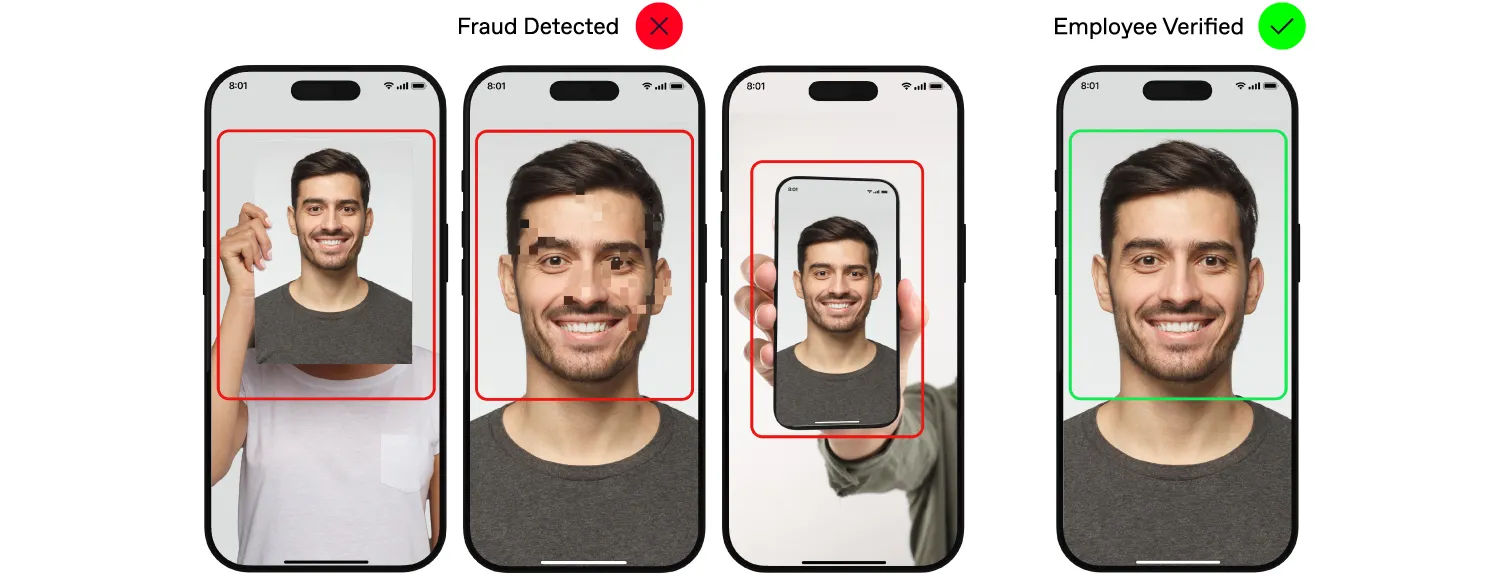
In a mobile attendance system, liveness checks help stop presentation attacks, where employees impersonate others or try to cheat using their own photos.
Common in remote biometric verification, liveness detection typically activates right after a selfie is taken. It works in one of three ways:
Active liveness: The system asks the user to perform random actions like smile, then turn your head left.
Passive liveness: The user just takes a selfie and waits for the system to verify it.
Hybrid liveness: A light version of active liveness, often asking for a single movement like a nod.
In all cases, the goal is to confirm that the submitted image shows a real human face, not one with non-anthropomorphic features.
To do this, algorithms powered by neural networks scan the face and generate a 2D map (for passive liveness) or 3D map (for active and hybrid) that captures its unique traits. These models, trained on hundreds of thousands of real images in diverse settings, are tuned to spot synthetic clues — unnatural skin tone, moiré patterns, odd shadows, or excessive glare.
This way, companies can trust that attendance data reflects actual people showing up, and catch fraud attempts before they succeed.
How the technology works together: Face + Liveness + Automation
Now, let’s walk through how a mobile face attendance system works from start to finish:
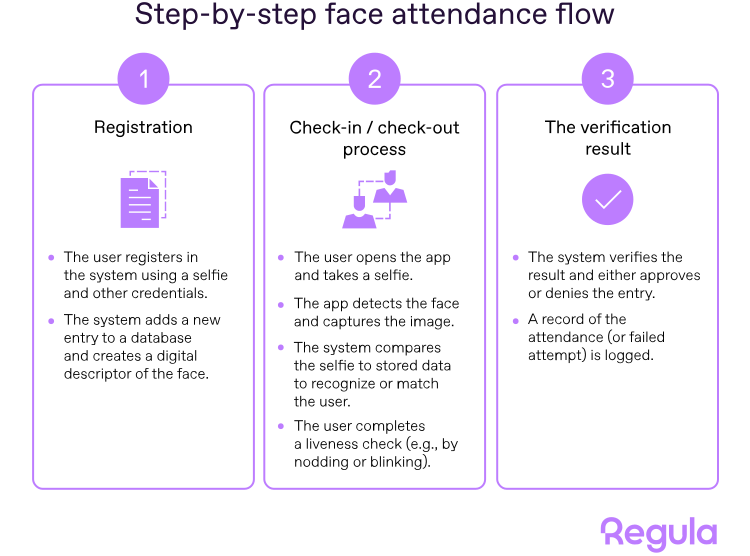
Thanks to automation, the whole process, from selfie to confirmation, takes just a few seconds. The system not only tracks clock-ins and clock-outs but also creates audit trails for ongoing monitoring. Many solutions can integrate with real-time dashboards, HR platforms, and payroll systems, making face-based attendance a reliable part of an organization’s security and compliance toolkit.
Key benefits and challenges of mobile attendance systems
Like any technology, mobile face-based attendance comes with both strengths and limitations. Below are the key advantages and challenges to consider:
| Two sides of mobile face attendance systems | |
|---|---|
| Pros | Cons |
|
|
While the benefits are clear, some challenges deserve a closer look. One is accuracy. Face matching performance largely depends on the system’s setup — image quality, the reliability of the neural network, and environmental consistency. That’s why careful calibration and human oversight are still essential. Improving app UX to guide users in capturing clear selfies and setting optimal similarity thresholds can significantly boost reliability. Testing with real-world data is the most effective way to fine-tune the system.
Deepfakes and other sophisticated presentation attacks may also raise concerns. Fortunately, advanced liveness detection, especially active flows that require random user actions, can effectively block most of these attempts.
When it comes to privacy, it helps to know that most systems store digital descriptors, not raw face images. Even in a data breach, these descriptors can’t be reverse-engineered into identifiable photos. The rest of the privacy protocols usually align with existing employee data protection standards.
💡Explore more from Regula experts:
Are Businesses Overtrusting Biometric IDV? An Expert Opinion
Are Deepfakes Truly a Challenge for Standard ID Verification Tools?
Business types and user scenarios where mobile face attendance shines
As a scalable and flexible way to track employee time, mobile face attendance is especially useful for companies with a distributed workforce and a high volume of daily check-ins. It’s also a strong fit for businesses with elevated fraud risks where staff work 100% remotely without direct supervision.
Industries and organizations that benefit most include:
Field services (telecom, utilities, maintenance)
Logistics and last-mile delivery teams
Retail execution teams, including merchandisers and territory reps
Security and facility staff working across multiple locations
Cleaning and outsourced workforce providers
Construction companies with multi-site crews and subcontractors
Home healthcare and social care providers offering visit-based services
Hospitality groups with staff moving between properties
Large enterprises with many satellite offices and remote teams
A unique case comes from HR tech providers that track employee attendance on behalf of other companies. These vendors typically offer full-service platforms that automate time tracking, monitor absences and breaks, integrate with payroll, and include features like geo-fencing, leave management, and analytics — especially valuable for hybrid or remote teams.
Many of these providers handle massive volumes of data — up to 500K entries annually — across multiple countries and jurisdictions. A mobile employee attendance tracking system, with its flexibility and scalability, greatly streamlines this process while helping HR tech firms stay compliant with local regulations.
Mobile-first use cases for a face attendance system
From a practical point of view, mobile face attendance systems address two key tasks: confirming that employees start and end work at the correct time, and detecting fraud or manipulation attempts. The first is achieved through face matching. The second requires strong liveness detection to prevent tricks like using someone else’s photo or replaying a video.
Depending on the scenario, one or both technologies may be critical — but automation powers them all.
Here are common use cases for automation with face attendance:
Start/end of shift for field teams: Employees clock in and out using their phones. Liveness detection is vital here to prevent “buddy punching” (i.e., a friend checking in for them).
Proof of visit at a customer site: Popular in service industries like home healthcare or public utilities. Employees check in upon arrival and check out when leaving a client’s location.
Multi-site workforce with scheduled check-ins: Used by mobile staff like cleaners or security guards. The system ensures check-ins happen at the correct times and locations.
Temporary or pop-up work sites: Applicable to construction phases, events, or short-term retail setups. Mobile attendance removes the need for costly check-in kiosks that will soon be dismantled.
Remote employee verification: For home-based or freelance workers, face attendance confirms shift start and prevents account sharing, replay attacks, or time theft.
Contractor-heavy operations: In high-turnover environments with shared devices, mobile ID checks reduce the risk of someone using another person’s credentials.
In all these cases, face attendance can be enhanced by requiring a selfie plus submission of a professional or employee ID, adding an extra layer of security. The system can also log timestamps to track service duration, record GPS location, and flag missed or suspicious check-ins for ongoing monitoring.
How to choose the right face attendance system
When evaluating employee attendance systems, companies often look for easy implementation, strong UX, offline support, alerts for mismatches, and, of course, competitive pricing.
Let’s take a closer look at the key factors worth prioritizing:
Enrollment quality
Registration is the system’s starting point, and it must be accurate. Poor-quality enrollment can lead to false positives, where the system mistakenly “recognizes” the wrong person. To reduce these risks, initial registration should include a liveness check and, for high-risk roles, supervisor verification.
Keep in mind that employees’ appearances change over time: someone might grow a beard, start wearing glasses regularly, or change hairstyles. That’s why routine re-verification should be built into the process.
UX that works in daily use
Under normal conditions, face check-in should take seconds: opening an app and taking a selfie.
This flow can be fine-tuned through UX settings and customizations. For example, passive liveness checks where just one photo is needed are perfect for low-risk scenarios where speed is more important than deep fraud detection.
That said, even in simple cases, user guidance matters. Tips on lighting, distance, and angle help users take a valid photo on the first try.
So look for systems that offer customizable UX and flows, built-in image quality assessment, and configurable prompts for better user input. These features make the tool effective for employees with different tech skills, while aligning with your business needs.

Offline and weak-network reality
Many face attendance systems break down in remote areas without internet access — like construction sites or rural locations — unless they support offline mode.
For these environments, look for features like time synchronization mechanisms, tamper-resistant audit trails, and secure local data storage. These capabilities ensure data — for instance, selfies submitted for face matching — stays accurate and verifiable even when the network is down.
Standards-compliant technology
Attendance tracking may seem like a basic task, but accuracy and security matter, especially in regulated industries.
That’s why it’s reasonable to choose systems evaluated by independent labs, such as NIST and iBETA. They run tests to evaluate biometric solutions’ compatibility with industry benchmarks — for instance, Face Recognition Technology Evaluation (FRTE) for 1:1 verification or prevention attack detection (PAD) through liveness checks.
Even outside regulated sectors, certifications signal reliability and industry-grade performance.
Hire Regula as your biometric verification partner
Today’s evolving work environments demand attendance systems that are fast, secure, and smart. Face verification with strong liveness detection helps prevent fraud, boost compliance, and support seamless workforce management.
Regula Face SDK offers exactly that. The solution delivers precise and reliable face recognition and matching, with smooth integration into your existing platforms. The toolkit includes:
Passive and active liveness checks
Face image quality assessment
iOS, Android, and cross-platform SDKs for mobile integration
Wide customization options, including localization in 30+ languages
Reliable performance across varied lighting and environments
Let’s explore your use case and build a custom solution that meets your exact needs.