
.webp)
In brief: Passport verification means checking whether the document is genuine, untampered, and consistent across its visible, machine-readable, and chip data. Manual checks can catch obvious issues, but reliable verification depends on advanced cross-checking multiple data sources.
From lobbies of luxury hotels to taxi cabs, businesses increasingly require passport verification. Yet, the task falls to employees who, of course, aren't forensic experts.
In this article, we’ll guide you through the essential security features used on passports and the tools that majorly simplify the task so that any employee will perfectly manage the task. By the end, you’ll be better prepared to verify passports accurately and confidently.
💡Curious about other ID documents and what makes them unique?
Read our expert reviews of:
What can you check manually vs. using specialized passport verification solutions?
A manual passport check can catch obvious problems, such as a clear mismatch between the passport photo and the person presenting it, visible damage, unusual wear, or signs of tampering. That makes it useful as a first-pass review, especially in face-to-face scenarios.
Manual review has clear limits, but it still plays an important role. Even border control officers begin with visual passport inspection before using specialized equipment or additional checks.
A reliable passport verification, however, needs to go further. It requires reading machine-readable data, comparing information across different parts of the document, validating embedded security elements, and checking the passport against trusted reference templates. These are tasks that are difficult or impossible to perform accurately without specialized document verification solutions.
Remote verification adds another challenge. In this scenario, it is not enough to inspect the passport image itself. The system also needs to confirm that the user is presenting a real physical document — this is called document liveness detection.
| Check | Manual check | Specialized passport verification solutions |
|---|---|---|
| Basic visual match between the passport and the holder | Yes | Yes |
| Obvious damage or visible tampering | Yes | Yes |
| Machine-readable data and consistency checks | No | Yes |
| Embedded or optical security features | Limited | Yes |
| Barcode data consistency | No | Yes |
| Comparison with authentic document templates | No | Yes |
| Electronic chip data verification, NFC | No | Yes |
| Document liveness during remote processes | Limited | Yes |
Get posts like this in your inbox with the bi-weekly Regula Blog Digest!
Which security features should you check in a passport?
Passport verification starts with a few core elements: the data page, machine-readable data, optical security features, and, in many passports, an RFID chip. Although passport designs vary by country and series, ICAO Doc 9303 standardizes the main machine-readable elements used in passports worldwide. That gives document examiners and verification systems a common structure to work with.
Visual inspection zone (VIZ)

The visual inspection zone, or VIZ, is the part of a passport that a person can review directly without specialized document verification tools.
The Visual Inspection Zone (VIZ) is the area of a passport that contains the holder’s personal details: their name, date of birth, sex, passport number, and photograph. This section is designed for quick and easy visual verification by any examiner, be it a border control officer or a bank clerk.
Reading the VIZ is straightforward unless you deal with international passports. Such documents may include fields written in non-Latin scripts, such as Thai or Chinese documents. The dates can also be written using different calendars. For example, Thai documents may use the Buddhist calendar alongside Gregorian dating.
Machine-readable zone (MRZ)

The MRZ contains encoded data that matches the information in the visual inspection zone.
The passport’s machine-readable zone, or MRZ, is the block of encoded text that typically has two lines of letters, digits, and separators. In passports, it usually appears at the bottom area of the data page.
The MRZ contains key personal and document details encoded in a way that document readers can process quickly and consistently. The MRZ also includes check digits, also called checksums. These are calculated from key data fields (such as passport number, date of birth, and expiry date), optional data fields, and the entire second MRZ line according to the ICAO algorithm.
Barcodes

Barcodes can’t be read and verified manually without using any barcode scanner device or software.
Barcodes are another machine-readable data element used in passports. They encode numbers, letters, or other symbols as patterns of bars and spaces.
Passports may use different barcode formats, including linear (1D) and two-dimensional (2D) barcodes. Unlike 1D barcodes, 2D barcodes can store data both horizontally and vertically, which allows them to hold more information in a smaller space.
Barcodes cannot be read or verified manually in any reliable way. Plus, professional barcode-reading technology has to evaluate not only the encoded data itself, but also indirect features specific to the document type and series. These include the barcode’s size, location, number of rows and columns, and expected data format.
Holograms

In remote verification, holograms help you confirm that the user is presenting a real physical passport.
Holograms, also known as diffractive optically variable devices, produce optical effects that change with the angle of observation or illumination. This often creates a dynamic, three-dimensional appearance, making holograms difficult to fake and visually striking.
Quite often, holograms resemble nesting dolls. Being a security feature themselves, they may also contain an additional security feature within: nano- or microtext, microimages, covert laser readable images, etc.
Optically variable ink (OVI)

Optically variable ink in a Korean passport shows a visible color shift when the document is tilted.
Optically variable ink, or OVI, is a security ink used in passports that changes color when you look at it from different angles or lighting. Unlike ordinary inks, it relies on tiny, shiny layers of material that reflect light in different ways.
The exact OVI effect varies by document type and issuing country. That’s why professional verification teams rely on reference materials to know what the genuine color shift and image should look like. For example, Regula’s Information Reference System serves as a digital encyclopedia of identity documents and includes reference images of passports and their specific security features.
OVI matters as a security feature because it’s difficult to reproduce with standard printing methods. In passports, it is often used for symbols, text, or graphic elements that inspectors can check quickly during visual examination.
RFID chip
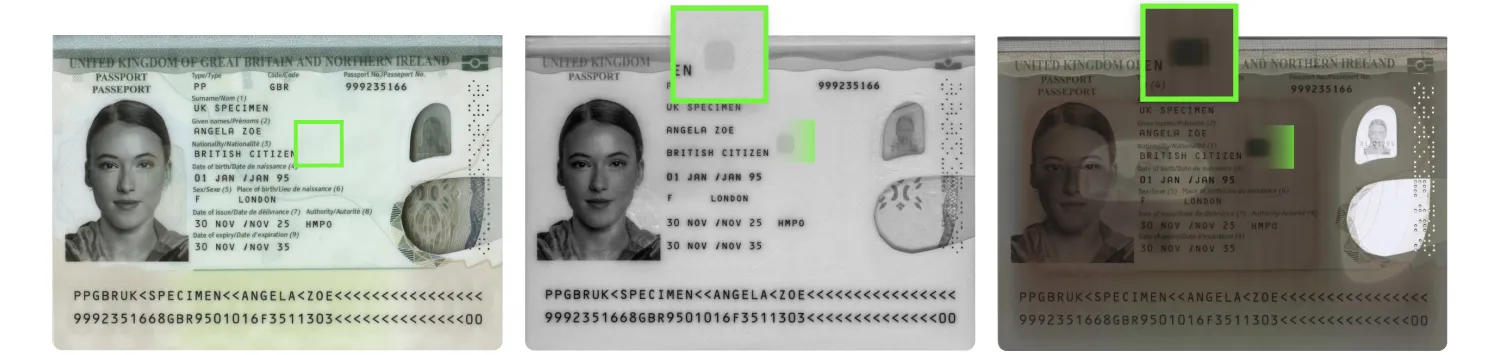
In the new UK passport, an RFID chip, normally invisible, can be seen in IR and transmitted light.
An RFID chip in a passport is a tiny, contactless electronic chip that stores the holder’s personal and biometric data, such as their name, date of birth, and a digital copy of their photograph. The chip and its antenna are embedded within the document, typically in one of the covers, the data page, or a special page when the document is produced.
The RFID chip can be read using specialized document readers or smartphones with NFC capability, which makes it possible to verify chip data in both onsite and remote scenarios.
How to check each passport element
Passport verification works best as a sequence of checks. A reliable process starts with the visible data page and moves through the document’s machine-readable and electronic elements. The table below outlines a practical passport verification workflow and explains why each step matters:
| Passport element | What to check |
|---|---|
| Visual inspection zone |
|
| MRZ |
|
| Barcodes |
|
| Holograms |
|
| OVI |
|
| RFID chip* |
|
*A quick note on how RFID passport checks
When a passport includes an RFID chip, verification goes beyond reading the stored data. The system first needs to access the chip securely, then confirm that the data on it is authentic, unaltered, and bound to a genuine chip.
That process usually includes several checks:
- Access to chip data. In most cases, the system uses the MRZ to access the RFID chip. Some passports support access through a CAN, or card access number.
-
Passive authentication. Once the chip data is read, the system performs passive authentication by verifying the digital signature and recalculating hashes for the stored data to confirm that it matches the data originally signed by the issuing state.
-
Protection against cloning attacks. The final step is to confirm that the chip itself is genuine. This can be done through active authentication (AA) or chip authentication (CA). CA is generally considered the more secure option, as it employs a more secure protocol for communicating with the chip.
Read more about how RFID chips are verified in our in-depth guide: RFID Technology for Identity Verification →
What should a business actually look for in a passport verification solution?
The right passport verification setup depends on the verification scenario. Some businesses check passports in person, some do it remotely, and many need both. A bank may verify customers in branches and through mobile onboarding. A hotel may support both staffed check-in and self-service flows.
In these cases, consistency across the whole process is an additional challenge. That is why the best passport verification solution isn’t the one with the longest feature list, but the one that fits the business’s actual verification workflow.
Onsite, remote, and hybrid passport verification: what changes?
| Scenario | What matters most in practice | Typical solution types |
|---|---|---|
| Onsite verification | Fast checks in front of the customer, minimal staff effort, and reliable data capture | Desktop document readers, kiosk readers, workstation software |
| Remote verification | Good image capture on user devices, proof that a real physical document is being presented, and reliable reading of passport data from mobile or web flows | Mobile SDKs, web SDKs, SaaS identity verification platforms |
| Hybrid verification | Consistent verification logic across in-person and digital channels, centralized control, reusable document intelligence | Combined hardware and software stack, centralized orchestration platform, SDK-based integration layer |
Build a passport verification workflow that fits your process
Passport verification sounds simple until you look at what it actually takes to do it well. That is why businesses rarely rely on manual checks alone. They use specialized solutions to make the process faster, more consistent, and more reliable, whether the passport is checked at a service desk, through a mobile app, or across both.
For onsite scenarios, Regula offers a range of document readers designed for fast passport verification and data extraction at in-person points of control. Depending on the model, they can extract data automatically, read RFID chips, inspect documents under different light sources, and run authenticity checks to help flag suspicious passports.
If you already use passport readers but are running into software limitations, Regula can help too. Document Reader SDK for hardware is compatible with nearly all third-party passport readers and can expand verification capabilities without replacing the existing devices.
For remote flows, Regula Document Reader SDK supports passport capture and verification across mobile and web environments. It combines Regula’s document verification expertise with the capabilities remote processes need most, including document liveness checks that help confirm a real physical passport is being presented.
For businesses that need a broader setup, Regula also offers an Identity Verification Platform. It goes beyond document reading and helps orchestrate identity checks across the full user journey, with workflow automation, customizable scenarios, document and biometric verification in one flow, and integration with existing systems and third-party tools.
Whether you need a full passport verification workflow or want to strengthen one part of an existing process, the best setup depends on your scenario. Contact the Regula team to find the option that fits your workflow.