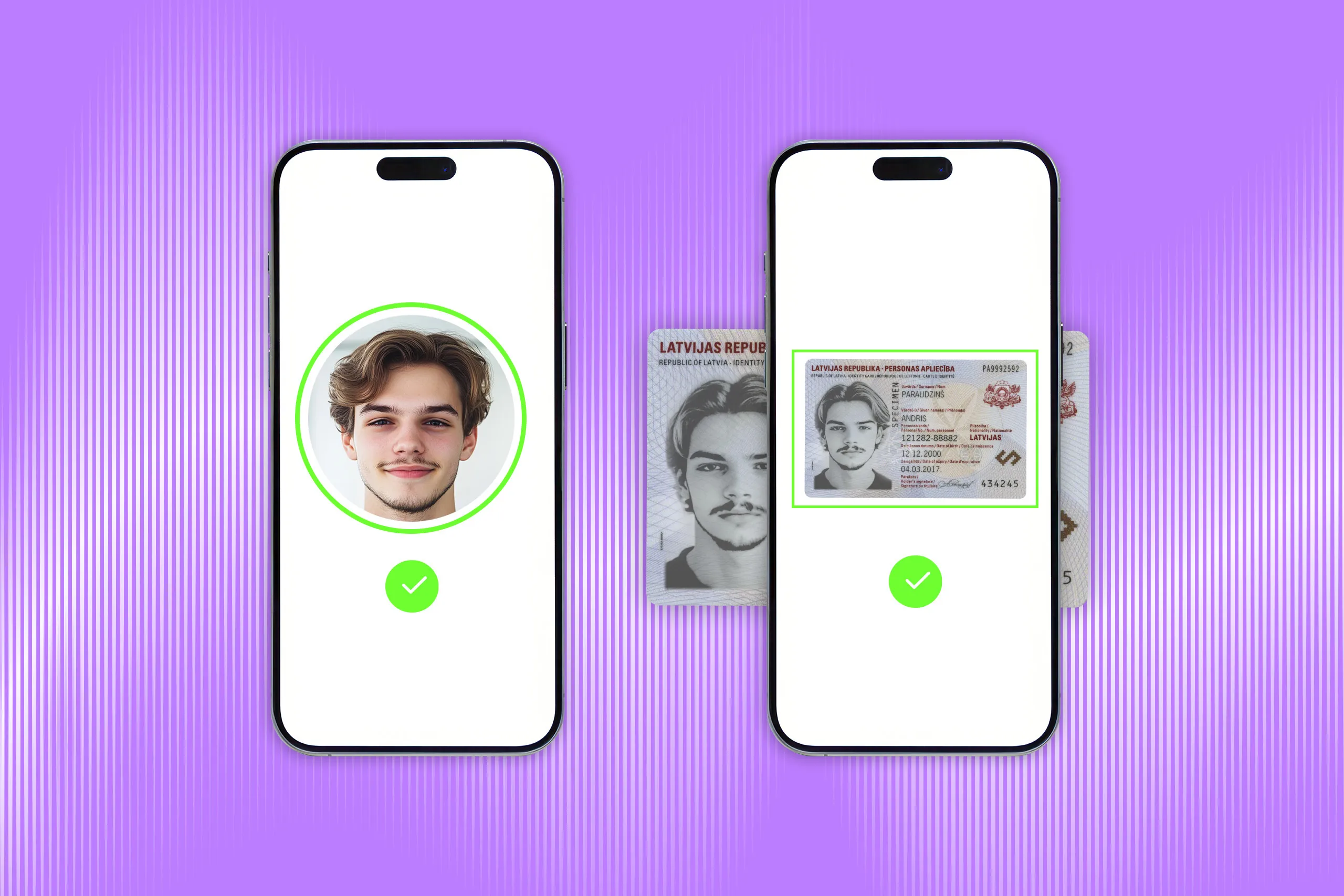


Identity verification confirms that a person is who they claim to be before they can open an account, access a service, pass a compliance check, or complete a high-risk transaction.
In digital flows, identity verification usually combines ID document checks, biometric liveness detection, and face matching. The goal is to confirm three things: the document is genuine, the person is physically present, and the identity data remains consistent across the identity signals.
What identity verification means in practice
Identity verification is the process of checking identity evidence before deciding whether an identity claim can be trusted. That evidence may include a government-issued ID and its data, biometric data, database records, device signals, geolocation, compliance screening results, and more. All of it is used to check whether the submitted details are valid, consistent, and tied to the person going through the process.
The goal is to prevent fraud involving fake, stolen, synthetic, or manipulated identity data.

The evidence can vary by use case.
In an on-site identity verification process, a bank employee or car rental agent may inspect a physical ID, compare the portrait with the person standing in front of them, and check whether the document data looks valid.
In a digital identity verification flow, the same logic moves online. A user captures their ID document, takes a live selfie, and the system checks whether the document is genuine, whether the person is present, and whether the face matches the document portrait. In higher-risk scenarios, the process may also include database checks, sanctions or PEP screening, device and geolocation signals, and more.
The key point is that identity verification is a decision process, not a single check. A document may look valid while the person presenting it is not the rightful holder. Personal details may be correct because they came from a breach. Reliable identity verification compares multiple signals before approving or rejecting the user.
How does digital identity verification work?
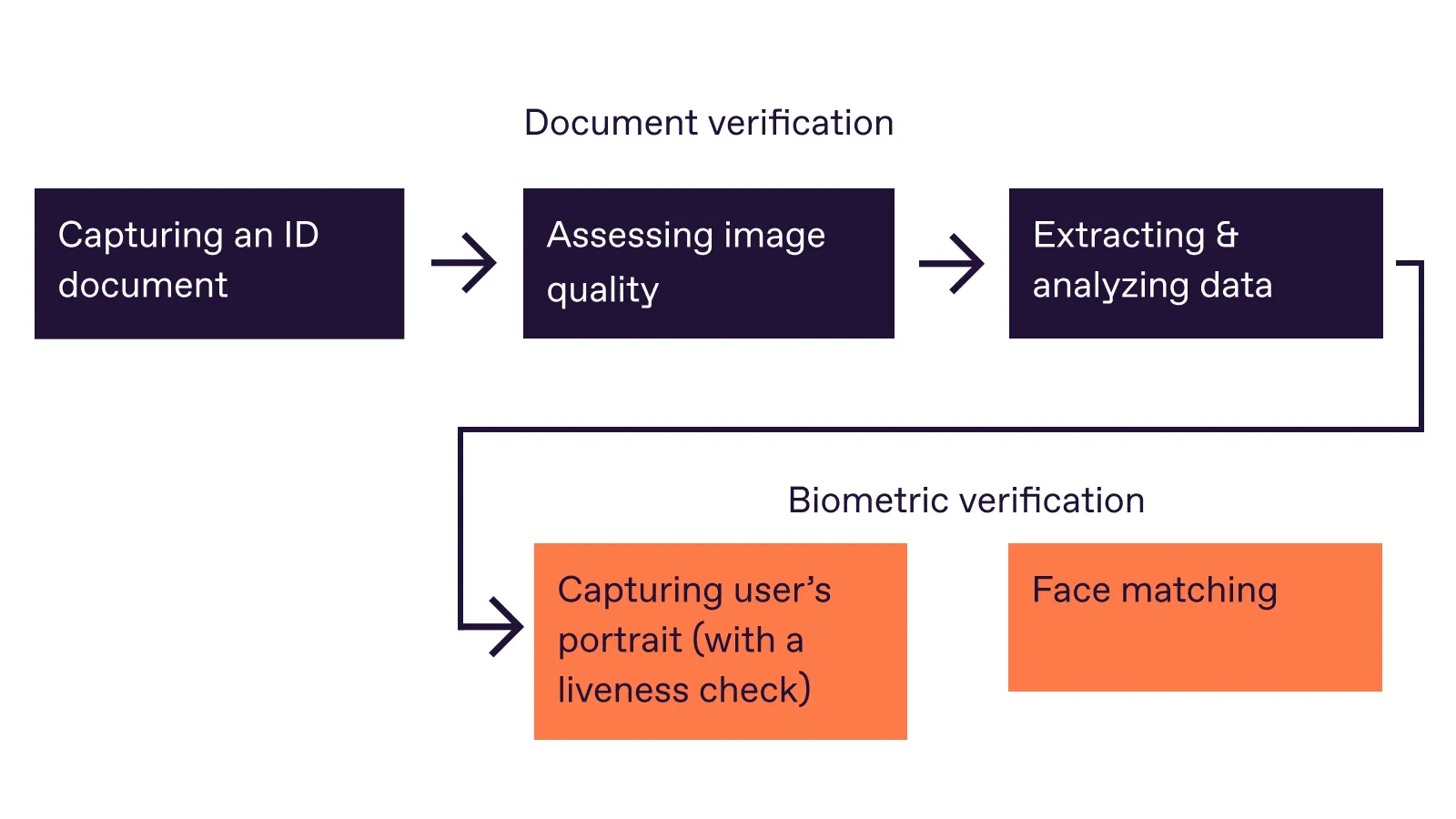
Identity verification protocols may vary depending on the technologies used or the industry's needs. Still, a typical digital identity verification process usually includes these steps:
Step 1. Capture an identity document
The user takes a photo or scan of an accepted identity document, such as a passport, ID card, or driver’s license.
The system may guide the user to place the document inside the frame, avoid glare, and keep all important fields visible. It also assesses whether the image is readable. If any important elements are missing, blurred, cropped, or covered, the user may be asked to recapture the document.
If needed, the system can also improve the image for further processing. For example, it may adjust brightness or contrast, deskew an image taken at an angle, or correct perspective distortion without changing the document data.
Step 2. Recognize the document and extract data
The system identifies the document type, country, version, and expected layout. This matters because each document type has its own structure, fields, fonts, security features, machine-readable zones, and validation rules.
Advanced solutions, like Regula, are equipped with data parsing technology, and can automatically recognize the document type and country of origin.
Get posts like this in your inbox with the bi-weekly Regula Blog Digest!
Step 3: Validate document data and authenticity
Next, the system checks whether the extracted data is valid and consistent across sources. For example, the document should not be expired, and the name, date of birth, document number, and other fields should not contradict each other across the visual zone, MRZ, barcode, or chip. It also checks whether the document matches known rules for that specific document type and version.
Cross-checks are also important here because some document features are easier to manipulate than others. For example, it’s a relatively easy task for a counterfeiter to alter the data in a visual inspection zone, while replacing the data on an RFID chip is a much more serious challenge. That’s why they often damage the chip in an attempt to avoid being caught.
Advanced algorithms also check document liveness to prove that the user captured a real physically present document.
💡A failed identity verification attempt does not always mean fraud. For a deeper look at onboarding friction and fraud-control gaps, read our guide to Identity Verification During Customer Onboarding: 5 Failure Points & Best Practices →
Step 4: Capture and verify the user’s biometrics
The user takes a live selfie or short video. Face matching technology analyzes biometric data of each face image and compares them to the portrait in the submitted document to make sure it’s the same person.
Also, face liveness detection is key for digital identity verification. It helps you check if the selfie was taken normally, without using masks, pre-recorded videos, GIFs, altered photos, or even deepfakes.
Step 5: Return a decision
The system returns a result: approved, rejected, or manual review.
A reliable digital identity verification process doesn’t rely on one successful check, but evaluates all the identity signals for integrity before deciding whether the user can move forward.
Optional additional steps
Depending on the industry and risk level, the process may include database checks, sanctions or PEP screening, AML checks, age checks, device signals, IP address, geolocation, fraud rules, or manual review.
These checks don’t replace document and biometric verification, but add context for the final decision.
Digital identity verification vs. identity authentication: What’s the difference?
Identity verification and authentication are related, but they happen at different moments in the user journey.
Identity verification establishes who a person is and confirms that their personal details are genuine, valid, and up to date.
Identity authentication checks whether a returning user is the same person who was previously verified. It usually happens after identity verification, when the user logs in or confirms a sensitive action.
| Process | When it usually happens | Typical methods |
|---|---|---|
| Identity verification Is this person who they claim to be? |
During onboarding, account opening, compliance checks, high-risk transactions, or re-verification | Submission of an ID document, taking a selfie |
| Identity authentication Is this the same verified user returning? |
During login, account access, payment approval, password reset, or step-up checks | Passkey, MFA code, device-bound credential, or biometric check |
What industries need identity verification services?
Identity verification is used wherever a business or public organization needs to know who is behind an account, application, booking, transaction, or access request. It matters most where trusting the wrong person can lead to fraud and regulatory exposure.
Common use cases include:
-
Banking, fintech, and crypto. The goal is to meet KYC and AML requirements, reduce mule accounts, and prevent fraud during onboarding.
-
Travel, hospitality, and car rental. Here, the task is practical: confirm that the customer matches the document they present, and reduce manual data entry errors.
-
Telecom and digital platforms. Telecom providers may use identity verification for SIM registration, account setup, number porting, and account recovery. Marketplaces, gig platforms, and online services use it to reduce fake accounts, duplicate profiles, impersonation, and abuse.
-
Gaming, age-restricted services, and entertainment. The goal is to protect minors, reduce fraud, and comply with market-specific rules.
-
Healthcare and insurance. The goal is to protect sensitive medical and insurance data, reduce medical identity theft, prevent false claims, and make sure services or payouts go to the right person.
-
Government and public services. The goal is to prevent identity fraud in high-trust public systems by making sure the right person receives the right document, service, or benefit.
CASE STUDY
Netpositive, a Hungarian IT provider for large-scale events, uses Regula in its Backstage Ticketing Access Management App to verify visitors’ identity documents during event access.
Before switching to mobile ID verification, Netpositive used separate ID scanners, barcode readers, NFC readers, laptops, and POS terminals at redemption points. This made each entry point harder to manage and maintain. With Regula, Netpositive replaced that setup with multi-purpose mobile devices that can read and verify passports, ID cards, and driver’s licenses, including data from barcodes and NFC chips.
The solution was integrated within one month and is now used across 20–120 redemption points depending on the event size. It has already supported major festivals including Untold Dubai, visited by more than 185,000 people, and Massif in Romania, with a capacity of 12,000 people per day.
The bottom line
Identity verification helps businesses answer a question: should this person move forward? And the stakes are rising. Fraudsters have better tools now: synthetic identities, leaked personal data, face spoofing, deepfakes, and AI-generated attacks. Regula’s 2026 identity verification trends report points to the same shift: disconnected checks are becoming harder to defend. Businesses need verification flows that show what was checked, what failed, and why.
For businesses, a good verification flow should do two things at once: help legitimate users pass with less friction and route risky cases to closer review.
Regula helps teams build identity verification flows that connect document verification, biometrics, liveness detection, compliance checks, and decision rules across digital and on-site channels. See how Regula Identity Verification Platform can support your verification scenario.