
.webp)
In Brief: Mobile ID verifcation (IDV) is the best fit when a KYC flow needs NFC chip reading, offline document processing, tighter camera control, or repeat checks inside an app. Regula Document Reader SDK and Face SDK cover those mobile needs while still fitting iOS, Android, Flutter, React Native, Ionic, Cordova, and .NET MAUI.
A browser can open a camera and guide a basic capture session. A smartphone can go further: it can control the camera experience more tightly, use device hardware more directly, and, on many models, read RFID chips in electronic identity documents through NFC. That gives a KYC program stronger proof than a pair of uploaded images.
This article reviews Regula Document Reader SDK and Regula Face SDK on mobile with a practical lens: what runs on the device, what needs server support, which database and package choices affect product design, and how the same SDK logic fits native and cross-platform app stacks.
Supported platforms
Regula Document Reader SDK and Regula Face SDK are both available for native mobile apps and common cross-platform frameworks, so you can add document and biometric verification to the app stack you already use.
Supported mobile platforms and frameworks include:
-
iOS
-
Android
-
Flutter
-
React Native
-
Ionic
-
Cordova
-
.NET MAUI
The platform mainly affects package setup, permissions, dependency management, and release testing.
Subscribe to receive a bi-weekly blog digest from Regula
Regula Document Reader SDK on Mobile
A mobile document scan needs to understand what kind of ID it is looking at, pull out the right fields, check whether the capture quality is good enough, and give the verification team something stronger than raw OCR text. In higher-risk flows, that may also mean reading the RFID chip and comparing chip data with what was captured visually.
Document Reader SDK handles that scan as a structured session rather than a single photo upload. It can find the document in the frame, identify its type, read MRZ, barcode, and visual-zone fields, crop the portrait or signature, return image quality feedback, run supported authenticity checks, and add RFID results when chip reading is part of the flow.
|
Feature |
What it does in a mobile flow |
|---|---|
|
Document location |
Detects document boundaries and crops the document from the source image. |
|
Document type identification |
Detects the document type automatically, so the app does not require manual country, type, or series selection. |
|
MRZ OCR |
Reads and parses machine-readable zone lines into separate fields. |
|
Barcode recognition |
Reads 1D and 2D barcodes, including PDF417, QR, Aztec, and Datamatrix. |
|
Visual zone OCR |
Reads document visual-zone text fields using document templates from the database. |
|
Security feature checks |
Runs supported authenticity checks for the detected document type, which may include holograms, UV/IR patterns, optically variable inks (OVIs), multiple laser images (MLIs), Dynaprint®, and other security features. |
|
RFID chip processing |
Reads data from contactless chips in electronic documents using NFC hardware when present. |
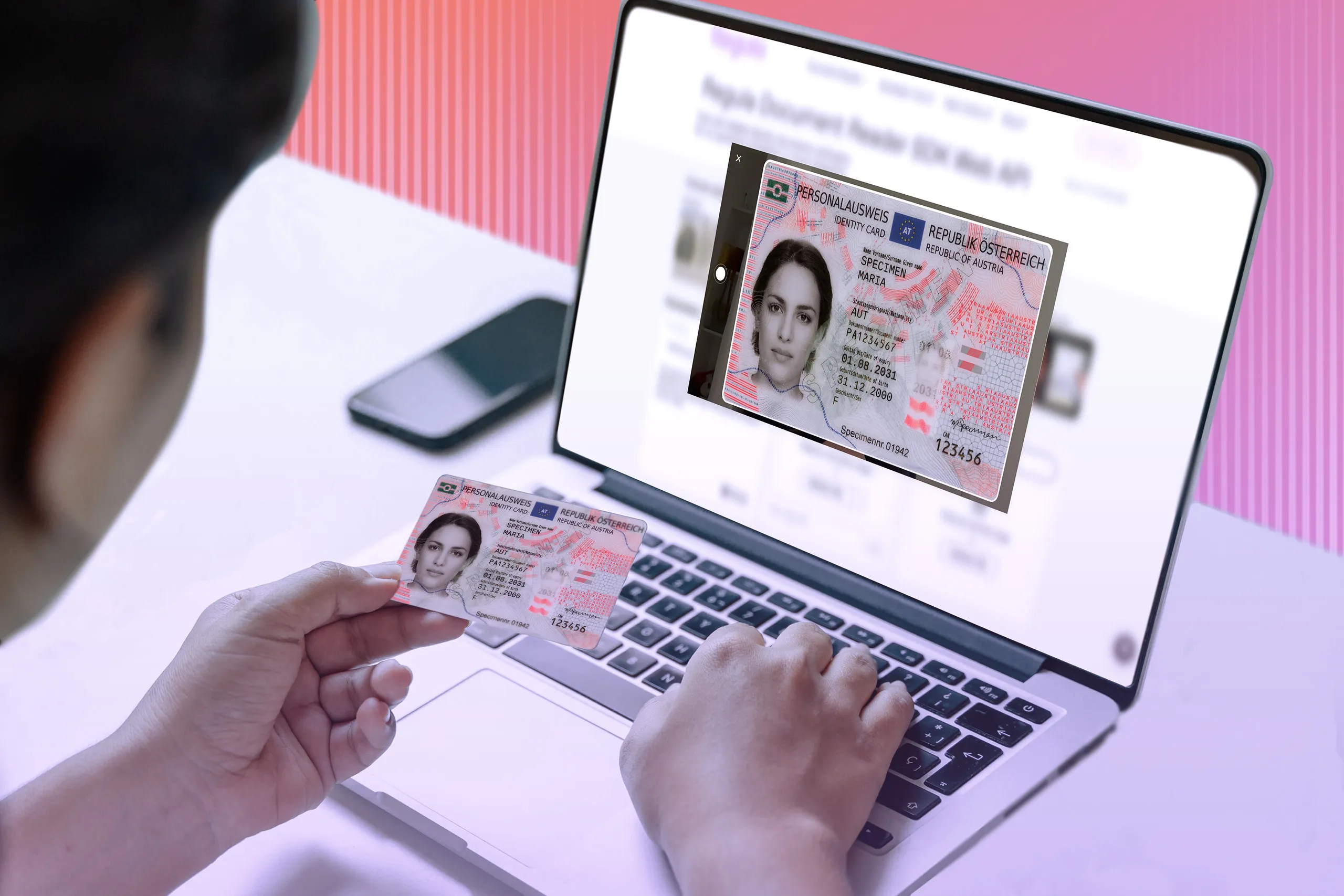
Document Reader SDK automatically recognizes the type of ID document with no manual input.
The above Document Reader SDK features are available for all platforms, so a Flutter document reader build, an iOS document reader or a document reader for Android will function very similarly. More detail is available in the Document Reader SDK Mobile documentation.
What a document scan gives a KYC team
The SDK works through scan sessions. You select a processing scenario, start capture with the built-in camera UI or a custom camera flow, and receive structured results.
For common IDs, output can include:
-
MRZ data, MRZ validation, and MRZ codes
-
Barcode fields
-
VIZ OCR
-
Graphic fields such as portrait or signature
-
Image quality feedback
-
Authenticity outcomes
-
RFID session data when chip reading is part of the flow
A visual example for visual zone OCR technology for reading and extracting all the typed, printed, or embossed data. Once the analysis is complete, the data is ready for cross-validation with other sources of information, like MRZ or barcode.
The exact output depends on the selected scenario, the document, the engine package, and the database included with the app. A lightweight flow that only needs MRZ scanning and barcode reading can stay smaller and simpler, while a stronger document check normally needs document type identification, VIZ OCR, authenticity checks, a database, and, for supported electronic identity documents, RFID processing.
Databases, package size, and verification depth
The document database is a db.dat file. It is required when the app needs document type recognition and visual zone recognition, but it is not required for MRZ recognition, barcode recognition, or image cropping.
When richer document logic is needed, the database can be bundled for offline use, downloaded with prepareDatabase, or updated with runAutoUpdate. A custom database can reduce app size by limiting coverage by country, document type, language, documents with RFID chips, or selected security checks.
Engine package selection works by the same principle on iOS, Android, and Flutter. The app includes the API package plus an engine package that matches the licensed functions and the verification depth required by the project. The difference between platforms is mainly how the dependency is added, not what the SDK can do: iOS uses CocoaPods, Swift Package Manager, or manual integration; Android uses Gradle or manual integration; Flutter uses packages listed in pubspec.yaml.
The available engine package families cover different combinations of MRZ reading, barcode recognition, RFID chip processing, document type identification, VIZ OCR, document boundary detection, graphic field cropping, and security checks.
RFID chip processing on mobile
RFID chip processing reads data stored in the contactless chip of an electronic identity document through NFC. The chip can store the same personal data printed on the document data page, such as full name, date of birth, place of birth, issue date, and expiration date. It can also store a digital portrait image, a chip identification number, and a digital signature used as a protection measure.
Document Reader SDK reads RFID chips according to ISO/IEC 14443 on NFC-capable devices and can run passive, active, chip, and terminal authentication procedures. Mobile apps usually use the phone’s built-in NFC module, while specialized deployments can also use external RFID readers over Bluetooth.
In most verification flows, chip reading follows optical processing. If optical processing has already run and the license covers chip reading, the SDK can use the access key obtained during that optical step.
mDL, DTC, and mobile hardening
Document Reader SDK also covers mobile driver’s license (mDL) and Digital Travel Credential (DTC) workflows. These credential types deserve separate planning because they are not simple photos of a physical card.
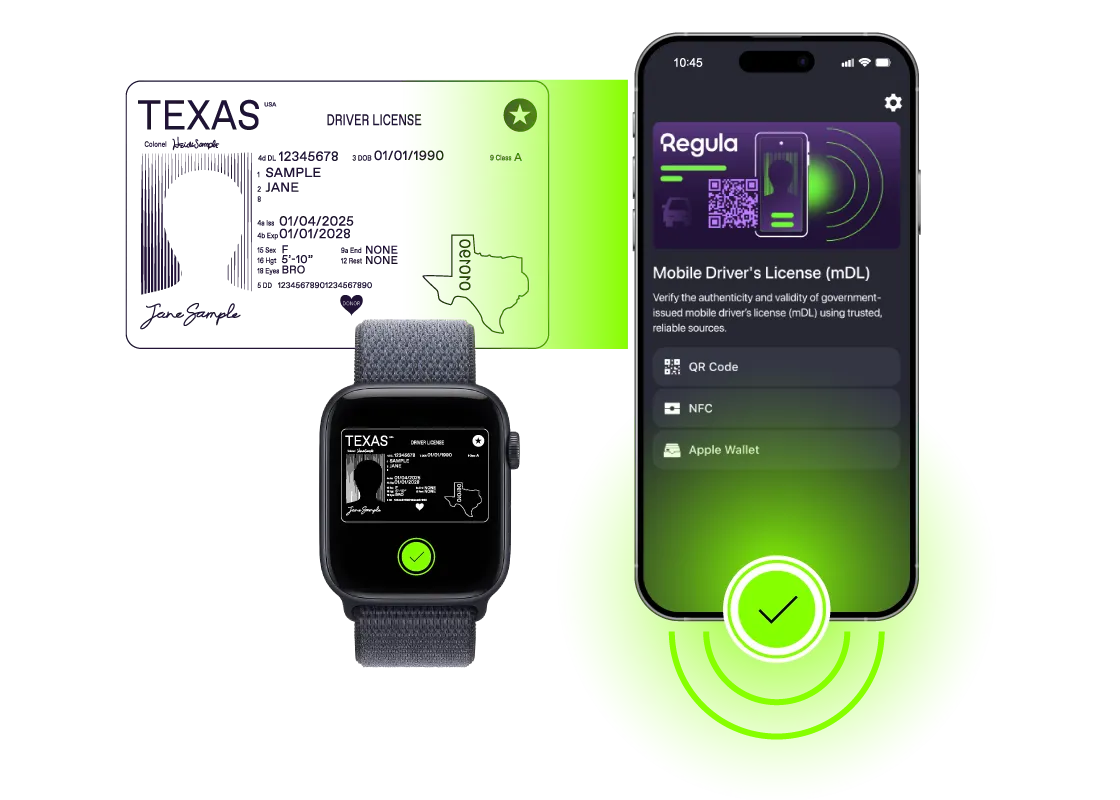
Regula's mDL verification supports engagement via QR codes and NFC, and retrieval via Bluetooth and NFC, for both on-site and remote identity checks.
Document Reader SDK Mobile also includes certificate pinning, screen capture prevention, and capture process integrity checks. These settings are optional, but they are valuable in banking, telecom, travel, workforce screening, and other flows that handle sensitive personal data.
Regula Document Reader SDK: Mobile vs Web
The mobile-web difference is more visible for Document Reader SDK than for Face SDK, although it should not be framed as a simple competition between two channels. Web can be embedded into an onboarding page, and it works well on desktop browsers and smartphone browsers. Mobile, in turn, is the right path when the business already has an app or wants a custom native verification flow.
Where mobile has an advantage in identity verification
Mobile becomes the better choice when the flow needs access to device capabilities that browsers cannot fully provide. RFID chip reading through NFC is the clearest example; if the policy requires chip data, a native iOS or Android app is usually the practical route.
Mobile is also preferable when the product needs stronger control over capture conditions and stronger protection against injection attacks. A native app gives the team more control over the capture flow, device permissions, and app-level security settings, which can be valuable in higher-risk flows where document images, camera input, or session data may be targeted by fraud attempts.
Mobile is especially relevant when the flow requires:
-
RFID chip reading through NFC
-
Repeated document verification inside an installed app
-
Tighter control over the capture setting
-
Stronger protection against injection attacks
-
App-level security settings
-
A custom user flow tied to an existing mobile product
Where web is the better fit
Web is usually the better fit when the user needs to complete a one-time or low-friction verification step. The document capture flow can be embedded directly into a web onboarding page, which avoids app installation and keeps the process easier for first-time users.
This works well for customer onboarding, trial flows, guest check-in, account recovery, or any process where asking the user to install an app would create unnecessary friction. Web can also work well on smartphones, so the question is not “desktop web versus mobile phone”; the question is whether the business needs an installed app or a browser-based step.
A browser path works best when the project needs:
-
Fast access through an onboarding page
-
No app installation
-
Document capture on desktop or smartphone browsers
-
Backend processing after capture
-
A one-time verification step with limited user commitment
Web is limited less by general document capture and more by specific checks: normal browser flows do not read RFID chips, document liveness has more constraints, and injection resistance is harder in an open browser setting than in a protected native app.
A risk-based design can begin in web because it is convenient and requires no installation, then move higher-risk users or chip-required documents into mobile. That keeps lower-risk onboarding simple while giving higher-risk cases a stronger verification path.
Regula Face SDK on Mobile
After the document is checked, the next question is whether the person holding it is the rightful owner. Face SDK captures a selfie, checks that the person is live, evaluates face image quality, and can compare the selfie with a portrait from the document or RFID chip.
Most regulated flows use Face SDK with Face SDK Web Service, so liveness, matching, audit logging, and policy decisions stay under backend control. When the app needs local 1:1 comparison, native iOS and Android builds can add the Match framework and compare two face images on the device.
|
Feature |
What it does in a mobile flow |
|---|---|
|
Face capture |
Opens the camera UI and captures a face image suitable for the next verification step. |
|
Face image quality assessment |
Checks whether the captured face image is suitable for matching, enrollment, or further review. |
|
Liveness detection |
Runs active or passive liveness checks. Active liveness asks the user to turn the head and align face position; passive mode is closer to taking a selfie. |
|
Face attribute evaluation |
Evaluates traits such as age, emotion, glasses, medical mask, and head covering. |
|
1:1 face comparison |
Compares two face images, such as a selfie and a document portrait. |
|
1:N face identification |
Checks one face against a database. |
The above Face SDK features are available for all platforms, so a React Native face recognition integration, and an Android face recognition app will function very similarly. More detail is available in the Face SDK Mobile documentation.
Detection, quality, and age estimation
Before matching, face input quality must be controlled. Face detection can process one face or several faces, and identification settings can define how many faces are processed. This helps onboarding teams avoid privacy and decision issues caused by background faces.
Face attributes evaluation can return traits such as age, emotion, glasses, medical mask, and head covering. In age-gated flows, estimated age works best as an early screening factor rather than a replacement for document-based age verification.
Face image quality assessment checks whether a photo satisfies quality conditions aligned with identity photo standards. It uses configurable parameters covering head size and position, pose, expression, face occlusion, and inappropriate objects.
Capture, liveness, and matching
Face Capture opens a camera UI and captures a suitable face image. Liveness detection can run in active or passive mode. Active liveness asks the user to turn the head and align face position, while passive liveness is closer to taking a selfie. Active liveness is the default, and passive mode can be switched on through configuration.
A visual example of active liveness detection and 1:1 face matching between portrait images from a document data page and a live video
The online service model fits regulated KYC programs because liveness, matching, audit logging, and policy rules can stay under backend control. When 1:1 comparison must work through poor connectivity or a short outage, the Match framework can compare faces without sending an image to the server.
Regula Face SDK: Mobile vs Web
The difference between mobile and web is much smaller for Face SDK than for Document Reader SDK. In both cases, the user can be guided through face capture and liveness with a very similar experience.
Channel choice depends on deployment model: installed app or browser link, online-only flow or local 1:1 comparison, standard risk or stronger protection against injection attacks and deepfakes.
When mobile is the better fit
Mobile Face SDK is usually the better choice when face verification belongs inside an app-based identity flow. This is common in banking, fintech, telecom, workforce management, gig platforms, and other products where users already have an installed app and may need to verify themselves more than once.
It is also a better fit when local 1:1 matching is required. With the Match framework, native iOS and Android integrations can compare faces on the device, which can be useful for field work, kiosk-like setups, or cases where a short network outage should not stop the verification session.
Fraud exposure can also push the project toward mobile, especially when the app is used for repeated authentication or high-risk account actions and needs stronger protection against injection attacks or deepfake attempts. In these cases, native mobile code gives teams more control over the capture flow and the security checks around it.
When web is the better fit
Web Face SDK is a better choice when the user needs to complete a one-time action with as little friction as possible. A browser-based flow works well for invite links, occasional onboarding, account recovery, one-off checks, or cases where asking the user to install an app would be too much for the risk level.
The user can open the link, complete face capture and liveness, and continue without adding another app to the device. This makes web especially useful when conversion and quick access have higher priority than offline matching or app-level controls.
The user experience is mostly similar on both channels, so the decision should be based on deployment constraints.
Mobile is usually preferred when the flow needs:
-
An installed app setting
-
Repeated identity checks
-
Offline 1:1 matching
-
Tighter control over injection and deepfake risks
-
Close pairing with NFC-based document verification
Web is usually preferred when the flow needs:
-
One-time verification
-
Minimal user friction
-
No app installation
-
Quick access through a browser link.
Putting both SDKs into one verification flow
Fraud usually targets the weakest point in a process: a forged document can pass basic OCR, a stolen genuine document can pass text extraction, and a recorded video attack can pass selfie capture that lacks liveness. Mobile works best when document and biometric checks validate each other.
A common mobile pipeline looks like this:
-
Document Reader SDK scans the document, extracts data, checks image quality, and runs authenticity checks supported by the selected scenario and database.
-
If the document has an RFID chip and the risk policy requires it, the app starts chip reading, validates chip data, runs authentication checks, and extracts the chip portrait.
-
Face SDK captures the selfie, runs liveness, and compares the selfie with a document portrait.
-
The app or backend stores the needed outcomes for audit, support, and compliance review.
The value lies in deciding where stronger proof is needed, rather than adding checks for their own sake: visual document checks for lower-risk users, RFID chip reading for higher-risk flows, passive liveness when having no friction is the priority, active liveness when spoofing risk is higher, and backend reprocessing when auditability is part of the policy.
Making your ID verification robust with mobile SDKs
If users already operate inside an app, mobile provides tools that web cannot fully match: NFC chip reading, offline document processing, tighter capture control, app-level security settings, and, in native iOS and Android integrations, client-side 1:1 face comparison. Web still has a place when instant reach is the priority, but mobile is the stronger fit when verification is repeated, regulated, or tied to electronic document chips and biometric evidence.
When Document Reader SDK and Face SDK are used together, they provide a reliable defense against identity fraud and help verify that customers are who they claim to be.
Document Reader SDK processes document images, verifies document presence, identifies the document type, extracts the required data, cross-validates it, and checks whether the document is genuine through a wide set of authenticity checks. It also performs document liveness checks covering major dynamic security features, including holograms, optically variable inks (OVIs), multiple laser images (MLIs), and Dynaprint®.
At the same time, Face SDK conducts facial recognition in passive and active flows and helps prevent fraudulent presentation attacks such as static face images, printed photos, recorded video attempts, video injections, or masks. The solution can perform both 1:1 face matching, comparing the user’s live facial image to the ID, and 1:N face recognition, comparing the user’s facial data against a database.
Curious to see the SDKs in action? Let’s talk.